The Park Graph app for ChatGPT finds parking near where you're going, prices a stay for your hours and gets the lot's pay link, in the chat. It runs on its own MCP server, with no sign-in and no API key.
Last updated November 3, 2026
Every payment completes on parkgraph.com with the driver present; no tool charges money on its own.
The Park Graph app for ChatGPT
The app uses its own server, https://parkgraph.com/api/mcp/chatgpt, with 4 tools (search_lots, get_lot, quote, reserve) and no sign-in.
The app is in review in the ChatGPT directory. Until it's approved, you can add it now:
ChatGPT
1Open chatgpt.com/plugins, select the plus button, then Add custom MCP server.
2Name it Park Graph and enter the server URL: https://parkgraph.com/api/mcp/chatgpt
3Leave authentication off, tick “I understand and want to continue”, then create the plugin.
4In a chat, type @ and pick Park Graph.
On Business, Enterprise and Edu workspaces, an admin or owner adds it first.
Walkthrough video
60 seconds, recorded in MCP Inspector against the full Park Graph server with no key. The ChatGPT app has the same search, quote and reserve tools.
Test prompts
Prompts that should call Park Graph, and prompts that should not, from the store kit.
Should call Park Graph (5)
1.“Find parking near downtown Redmond, Washington.”
2.“How much would it cost to park at 16300 Redmond Way in Redmond, Washington for 3 hours?”
3.“Hold a parking space for me at 16300 Redmond Way in Redmond, Washington.”
4.“Check on my parking session. The phone code on my receipt is Q7M4RX and my plate ends in 4FD.”(full server)
5.“Add an hour to my parking. My receipt's phone code is Q7M4RX and my plate ends in 4FD.”(full server)
Should not call Park Graph (3)
1.“Find a gas station near downtown Redmond, Washington.”
2.“Charge my card on file for 2 hours of parking at 16300 Redmond Way in Redmond, Washington.”
3.“What will traffic be like on I-405 near Redmond, Washington tomorrow morning?”
Prompts 4 and 5 use get_session and extend_session, which are on the full server, https://parkgraph.com/api/mcp, not on this one.
The result to expect from each prompt, and the tools it calls, are in the store kit's test prompts.
Build your own GPT with the REST API (API key)
For developers building a Custom GPT with OpenAI Actions. The API key on this part of the page is for the REST API only: the Park Graph app and the hosted MCP server don't need one.
Park Graph integrates with ChatGPT via OpenAI Actions and Custom GPTs. ChatGPT reads our OpenAPI 3.1 specification and auto-generates function calls for parking operations.
OpenAPI spec v1.5.0
How It Works
ChatGPT Actions use an OpenAPI specification to understand available API endpoints. When a user asks about parking, ChatGPT calls Park Graph's API endpoints directly. The spec defines four operations: searchParking, createSession, getSession, and endSession.
Set authentication to API Key (Bearer) in your GPT configuration. Get your API key from the dashboard.
Authorization: Bearer pk_live_...
Available Actions
GET/lots/search?lat=&lng=&radius_km=
Find lots by coordinates
POST/sessions
Book a parking space (body: lot_id, plate)
GET/sessions/{sessionId}
Get session by UUID
POST/sessions/end
End session (body: session_id, session_code)
This REST call settles the charge with the operator's API key.
Example Conversation
ChatGPT with Park Graph Actions
User:I need parking near Denver airport for 4 hours
ChatGPT:I found 3 lots near Denver International Airport. The best option is DIA Economy Lot at $6/hr with 150 available spaces. Want me to book it?
Try It
Test the searchParking action directly:
Try itSimulates the searchParking ChatGPT Action
Tracking
Sessions appear with source: "agent", agent_name: "chatgpt", agent_platform: "openai_actions".
Limitations
Requires ChatGPT Plus or Team plan for custom GPTs with Actions
OpenAI may cache API responses for a short period
Rate limits: 60 requests/minute per API key
Security model
The Park Graph ChatGPT integration sits behind the same security perimeter as the dashboard and the public website. The notes below summarise the controls that apply to every ChatGPT integration request; a deeper write-up lives in the developer changelog.
No tool on the hosted MCP server needs an API key. The key notes below are for the REST API.
Authentication
Every authenticated request carries an API key in the Authorization header (`Bearer pk_live_…`). Keys are issued per project from /dashboard/api-keys. Rotation is an HTTP DELETE + re-create in the dashboard; old keys are revoked immediately. Live and sandbox keys use the `pk_live_` and `pk_test_` prefixes so they cannot be confused in code review.
Transport security
TLS 1.3 with HSTS preloaded on every host (parkgraph.com, *.parkgraph.com). Plaintext requests are rejected at the edge with HTTP 426. Certificates are issued through the public Let's Encrypt CA and pinned in the CT logs.
Payment handling
Card data is tokenised inside Stripe Elements on the driver's device — Park Graph never observes raw PANs and is therefore SAQ-A scope. Sessions reference Stripe PaymentIntents by id only; webhooks are signed by Stripe using HMAC-SHA256 and verified server-side before any state change.
Data retention
Driver email addresses and license plates are retained for the lifetime of the operator's relationship with Park Graph (or 30 days after a verified delete request, whichever comes first). Search-only requests with no booking outcome are anonymised after 24 hours. Aggregated occupancy data has no personal identifiers and is retained indefinitely.
Audit trail
Every write — session create, end, extend, refund, rate change, agent registration — appends an immutable row to the audit_log table with actor type, actor id, and the diff. The log is exposed to operators through the dashboard activity feed and via a per-lot CSV export. Deletes are tombstoned, not hard-removed.
Rate limits
A request that sends an API key is counted by its key; a request without one, by its IP. Limits count fixed one-minute windows, and the daily quota counts the UTC day. Every response carries X-RateLimit-Limit, X-RateLimit-Remaining, and X-RateLimit-Reset headers; 429 responses additionally carry Retry-After. Retry-After is never more than 60 seconds, and the error message says how long to wait. Bursts above the per-minute budget should be backed off with jitter — the official SDK does this automatically.
The hosted MCP server, which needs no key, allows 60 tool calls a minute per caller: each MCP session (Mcp-Session-Id), signed-in driver, ChatGPT conversation or API key. One address can send up to 600 a minute in all, so assistants that share addresses don't slow each other's users down. The table below is for the REST API.
Scope
Budget
Window
Lot search without a key (`/lots/search`)
60 requests
per IP per minute
Other public reads without a key (lot detail, availability, GeoJSON, QR)
100 requests
per IP per minute, each endpoint
Other public reads sent with an API key
100 requests
per API key per minute, each endpoint
Requests with an API key (Starter and Pro)
60 requests
per API key per minute
Requests with an API key (Enterprise)
120 requests
per API key per minute
Daily quota for every API key
10,000 requests
per API key per UTC day
Sandbox endpoints (`pk_test_…` keys)
30 requests
per key per minute
Need a higher ceiling? Email developers@parkgraph.com with your projected throughput and we will lift the burst budget on a per-key basis.
Error codes
Every error response uses the same envelope: { "error": { "code": "…", "message": "…", "request_id": "req_…" } }. The HTTP status indicates the broad class; the code field disambiguates within a class. Surface the request_id to your support team — we can look up the full server-side trace by id alone.
Code
HTTP status
Meaning
BAD_REQUEST
400
Required parameter missing or out of range. Response body lists the offending field.
UNAUTHORIZED
401
Missing or malformed Authorization header. Send `Authorization: Bearer pk_live_…`.
FORBIDDEN
403
API key is valid but the plan does not include this scope (e.g. agent or intelligence endpoints on Starter).
NOT_FOUND
404
Lot, session, or webhook id does not exist or has been deleted.
CONFLICT
409
Idempotent retry of a non-terminal session, or attempt to end an already-completed session.
RATE_LIMITED
429
A rate limit was reached (per API key, or per IP without one). Inspect `Retry-After` and back off.
PAYLOAD_TOO_LARGE
413
Webhook delivery body or batch upload exceeds 1 MB.
INTERNAL
500
Unexpected server error. Park Graph automatically opens an incident and retries idempotent writes.
BAD_GATEWAY
502
Upstream payment processor returned an error. Safe to retry with the same idempotency key.
AI-agent use cases
Park Graph is built for agentic distribution: every commercial endpoint (search, availability, rates, sessions, refunds) is callable by an LLM through MCP, OpenAI Actions, Gemini function declarations, xAI function calling, Perplexity Agent API, or Microsoft Copilot plugins. The grid below maps the most common agent-driven workflows on top of the ChatGPT integration.
On the hosted MCP server, which needs no key, an assistant can search lots, read rates, quote a stay and hold a space, and the driver pays on parkgraph.com. Starting sessions and refunds through the REST API take an operator's API key.
Conversational booking
An end user asks ChatGPT, Claude, Gemini, Grok, or Perplexity to find parking near a destination. The model calls /lots/search, summarises 3-5 lots with prices and walking distance, then on confirmation calls /sessions to start a session and returns the QR-coded receipt URL.
Travel-app companion
A flight-booking or hotel-booking assistant pre-fetches arrival-airport parking for the trip dates and displays inline lot suggestions inside its itinerary view. The same surface backs in-app booking and a fallback web checkout.
Voice-first ordering
Realtime voice assistants (e.g. gpt-realtime, Gemini Live, Grok Voice) confirm a lot, plate, and duration verbally, then call /sessions and read back the session code. Drivers never touch a screen until they walk away from the car.
Fleet dispatcher
An autonomous-vehicle fleet (rideshare, delivery, robotaxi) holds AV-fleet allocations with /av-fleet/dispatch, then commits the spot at handoff. See /developers/av-fleet for the AV-specific contract.
Procurement / expense agent
An accounts-payable agent reconciles staff parking against company-card statements by querying /sessions/search by plate, then files reimbursements through the agent's own ledger.
City planning analytics
A research agent queries /api/v2/intelligence/market-rate and /api/v2/intelligence/agent-demand for an address corridor, then drafts a report on rate elasticity and AI-agent traffic.
Architecture
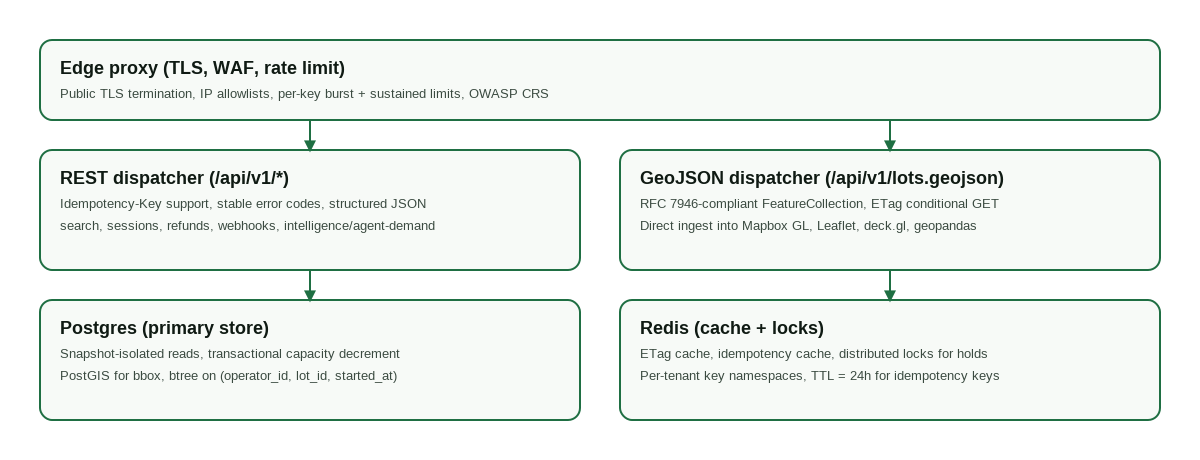
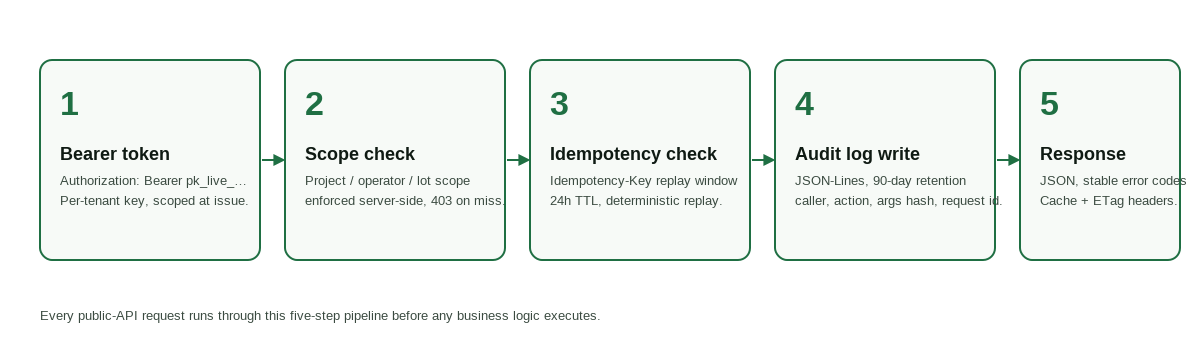
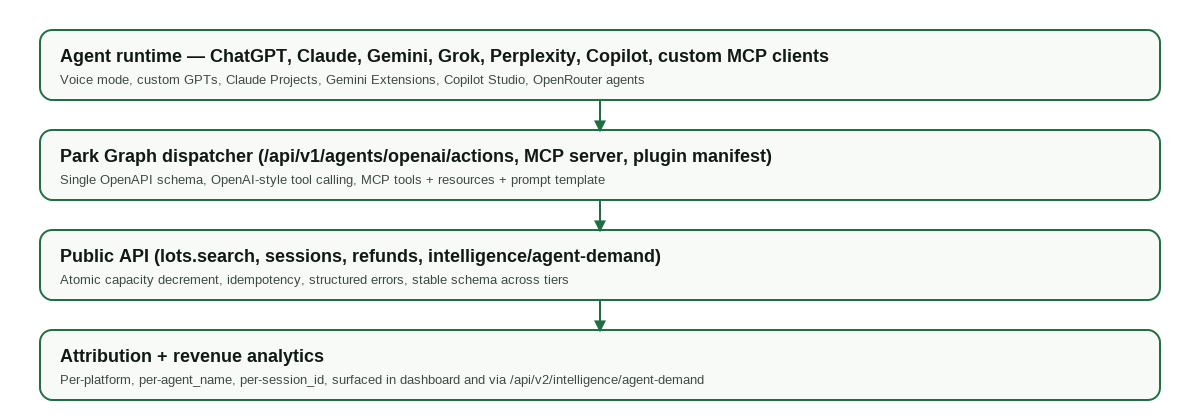
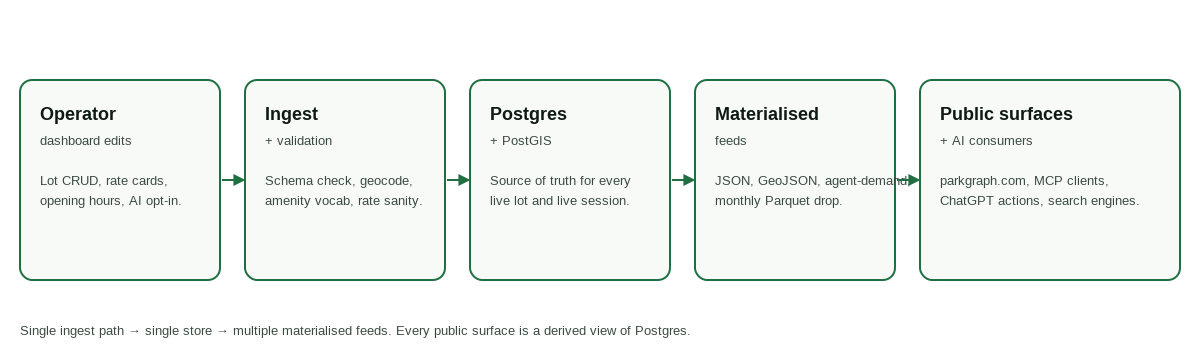
Every Park Graph request — whether it arrives from the ChatGPT integration, the dashboard, the QR-driven mobile checkout, or an agent — runs through the same Next.js Edge front door, hits the same Postgres-backed core, and shares the same audit log and webhook fan-out. There is no divergent code path between "agent traffic" and "human traffic": anything an agent can do, a human can do, and vice versa.
ChatGPT integration request architecture — edge proxy, REST + GeoJSON dispatchers, Postgres primary store, Redis cache and distributed locks. Identical perimeter for human, agent, and webhook traffic.Five-step ChatGPT integration request pipeline that runs before any business logic — bearer auth, scope check, idempotency replay window, audit log write, structured response.The AI integration stack that sits on top of the public API — agent runtimes (ChatGPT, Claude, Gemini, Grok, Perplexity, Copilot, custom MCP), dispatcher, public API, and attribution analytics.The data pipeline behind every Park Graph public surface — single ingest path, single source of truth in Postgres, multiple materialised feeds for AI consumers, search engines, and the public site.
Sandbox & getting help
Every operator gets a sandbox key prefixed with pk_test_. Sandbox traffic uses Stripe test mode, synthetic lots, and never charges a real card. Spin one up at /developers/sandbox, then point your client at https://parkgraph.com/api/v1 exactly as you would in production.
For integration help, reach the developer team at developers@parkgraph.com or open an issue on the public GitHub org. Status and incident history live at /developers/changelog; subscribe to the JSON feed for machine-readable updates.