MCP server

Store kit

What ChatGPT, Claude, Google and Cursor ask for when they review the Park Graph MCP server. Testing it needs no account, sign-in or API key: connect to https://parkgraph.com/api/mcp and ask.

Server v2.2.0

Reviewer steps

  1. Connect. Add https://parkgraph.com/api/mcp as a remote MCP server (Streamable HTTP). ChatGPT uses its own server, https://parkgraph.com/api/mcp/chatgpt, with 4 tools (search_lots, get_lot, quote, reserve).

  2. No account needed. No sign-in, OAuth, API key or test account for six of the eight tools: they work as soon as the server is connected. Sign-in is optional. my_sessions and my_vehicles are for a driver signed in to Park Graph (OAuth 2.1 with PKCE). Called without sign-in they answer 401, and your client offers the sign-in. Any email works: Park Graph emails a sign-in code, and a new driver account starts with no sessions or saved vehicles.

  3. Where to test. Park Graph lots are in a small number of places. Search near downtown Redmond, Washington (47.674, -122.122); 16300 Redmond Way is there. A search near Old Faithful in Yellowstone National Park finds no lots, and the server says so.

  4. Payment. Payment always completes on parkgraph.com with the driver present; no tool charges money on its own. At a lot that takes payment at its QR page, such as 16300 Redmond Way, quote and reserve return the lot's pay page link and reserve places no hold. You don't need to open the link or pay: it is a real customer's lot, and the page takes real cards, so a payment there is a real charge.

  5. Parked cars. get_session and extend_session need the 6-character phone code from a real receipt and the last 3 characters of the plate. The sample values Q7M4RX and 4FD match no session and return SESSION_NOT_FOUND, the same answer as a wrong code or a wrong plate, so a guess reveals nothing.

  6. Tool hints. Read-only: search_lots, get_lot, quote, get_session, my_sessions. Destructive: reserve, extend_session, because they create or extend paid holds. Neither: my_vehicles, which only changes the signed-in driver's own saved plates, and repeating it changes nothing. Every tool sets readOnlyHint, destructiveHint and openWorldHint, and has a title.

  7. Limits. 60 tool calls a minute per MCP session or signed-in driver (per IP for clients that send neither). AI platforms that route many users through shared addresses (Claude, ChatGPT) get a higher shared limit.

  8. Help. Email support@parkgraph.com. Privacy: https://parkgraph.com/legal/privacy. Terms: https://parkgraph.com/legal/terms.

Test prompts

5 that should call Park Graph and 3 that should not call it, each with the result to expect. A script checks all 8 against the live server before each release.

Should call Park Graph (5)

1. Find lots near a place

Should call

“Find parking near downtown Redmond, Washington.”

Expected: Works out the coordinates of downtown Redmond, calls search_lots and lists the Park Graph lots it returns, nearest first, with each lot's name and distance (on October 15, 2026: 16300 Redmond Way). Mentions spaces left and the rate when the result has them.

Tools: search_lots
2. Price a stay of a few hours at a lot

Should call

“How much would it cost to park at 16300 Redmond Way in Redmond, Washington for 3 hours?”

Expected: Finds the lot with search_lots, calls quote with duration_hours 3 and gives the total from the quote, at the lot's hourly rate with the daily maximum applied. Says how to book from booking.mode: a hold, or the lot's pay page.

Tools: search_lots, quote

3. Hold a space, or get the pay link at a lot that takes payment at its QR page

Should call

“Hold a parking space for me at 16300 Redmond Way in Redmond, Washington.”

Expected: Asks the driver to confirm, then calls reserve. At a lot that takes payment at its QR page (16300 Redmond Way does), gives the driver the pay_url and says no hold was placed. At a lot that takes holds, says the space is held and when the hold ends.

Tools: search_lots, quote, reserve

4. Check a parked car's session with the receipt's phone code and the plate

Should call

“Check on my parking session. The phone code on my receipt is Q7M4RX and my plate ends in 4FD.”

Expected: Calls get_session with phone_code and plate_last3. For a real session, reports the lot, the end time and the amount so far, and links the session page. For these sample values, which match no session, says no session matches and asks the driver to check the code and the plate.

Tools: get_session

5. Add an hour, which returns a pay link

Should call

“Add an hour to my parking. My receipt's phone code is Q7M4RX and my plate ends in 4FD.”

Expected: Calls extend_session with phone_code, plate_last3 and extend_hours 1. For a real active session, gives the price, the new end time once paid and the pay_url, and says nothing is charged until the driver pays there. Never says the time was added. For these sample values, says no session matches.

Tools: extend_session

Should not call Park Graph (3)

1. A gas station, which Park Graph doesn't cover

Should not call

“Find a gas station near downtown Redmond, Washington.”

Expected: Park Graph is not called: it covers parking lots only.

Tools: None

2. Charging a card from the chat, which no tool does

Should not call

“Charge my card on file for 2 hours of parking at 16300 Redmond Way in Redmond, Washington.”

Expected: No tool charges a card; every payment completes on parkgraph.com with the driver present. The assistant says it can't do that. It may look up the lot or price the stay, but nothing is charged.

Tools: None

3. Traffic, which Park Graph has no data for

Should not call

“What will traffic be like on I-405 near Redmond, Washington tomorrow morning?”

Expected: Park Graph is not called: it has no traffic or road data.

Tools: None

Walkthrough video

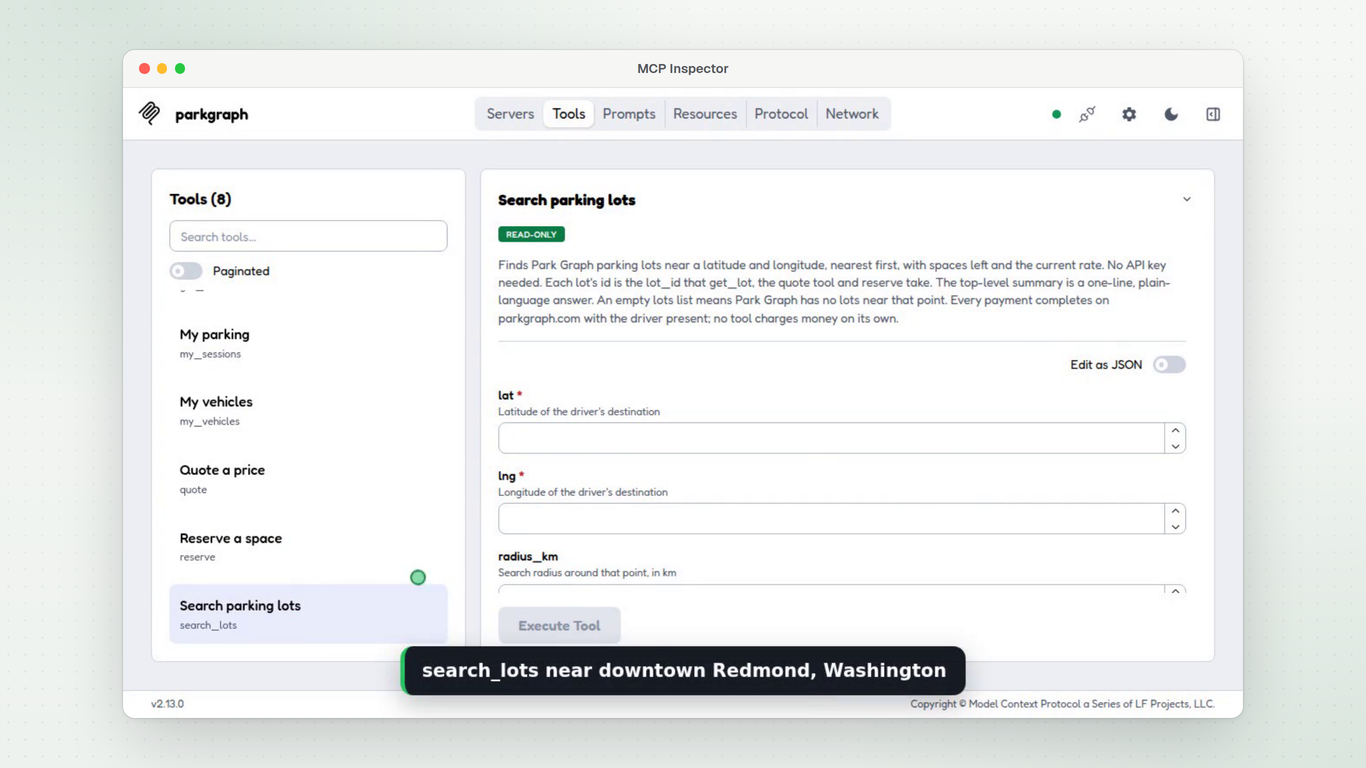
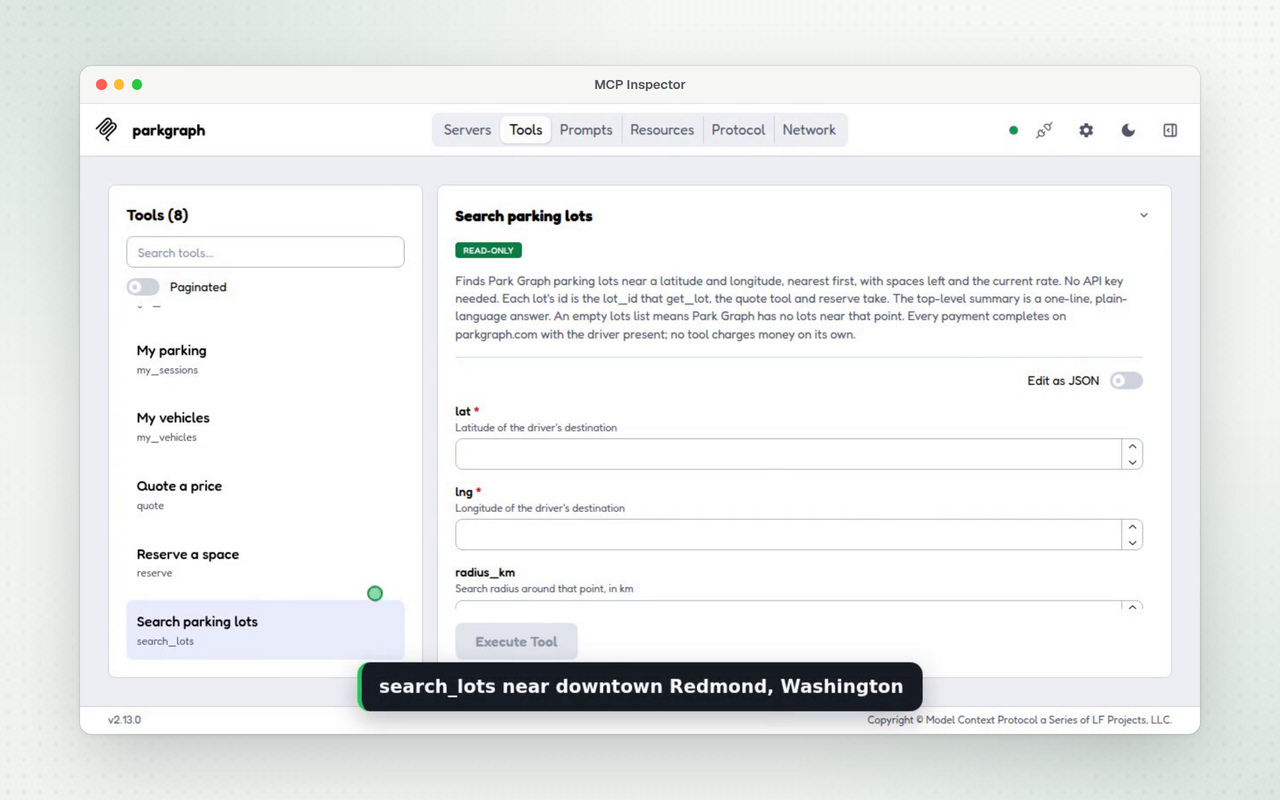
60 seconds, recorded in MCP Inspector against the live server with no key.

  • Connecting MCP Inspector to https://parkgraph.com/api/mcp with no key, and the tool list with each tool's hints
  • search_lots near downtown Redmond, Washington, then quote for 2 hours
  • reserve, which returns the lot's pay page link and places no hold; nothing is paid
  • get_session with the sample phone code: SESSION_NOT_FOUND
  • search_lots near Old Faithful in Yellowstone National Park: no lots

Download the MP4

Directory assets

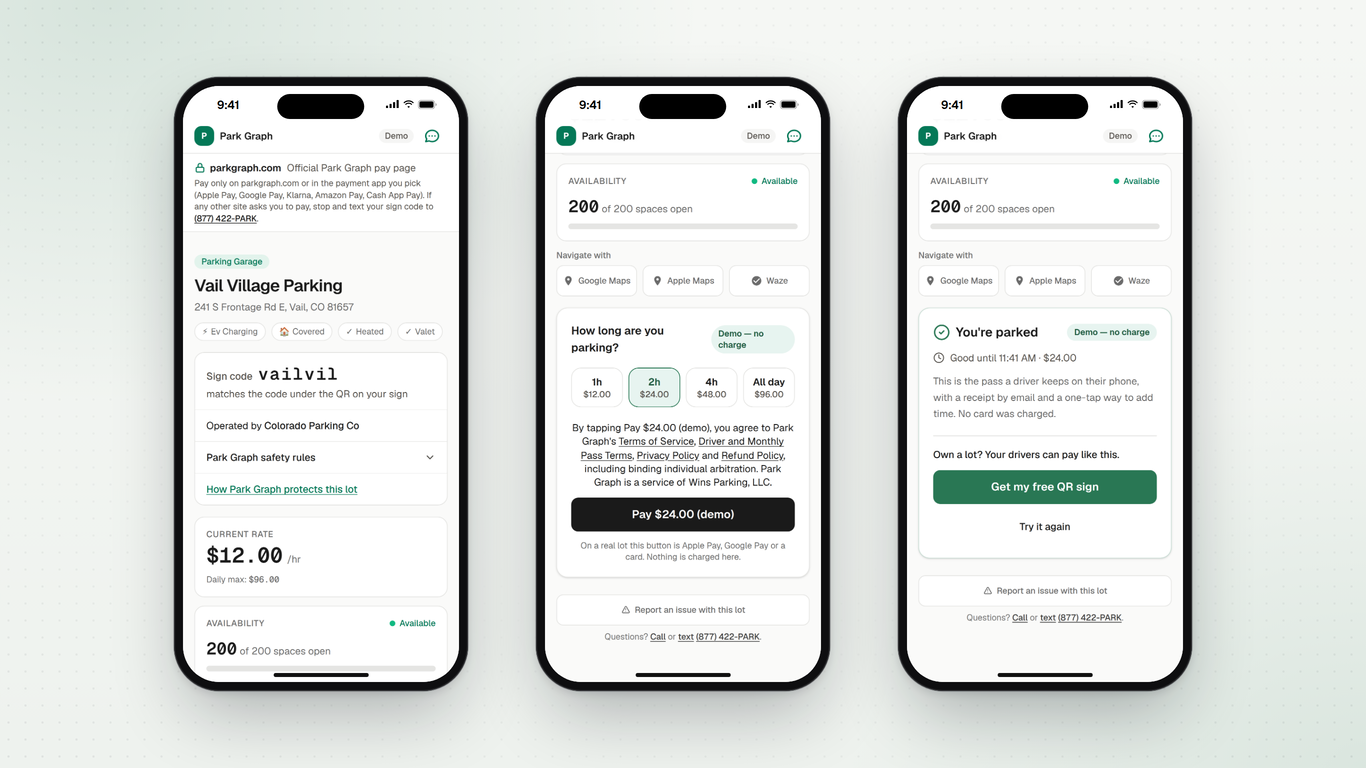
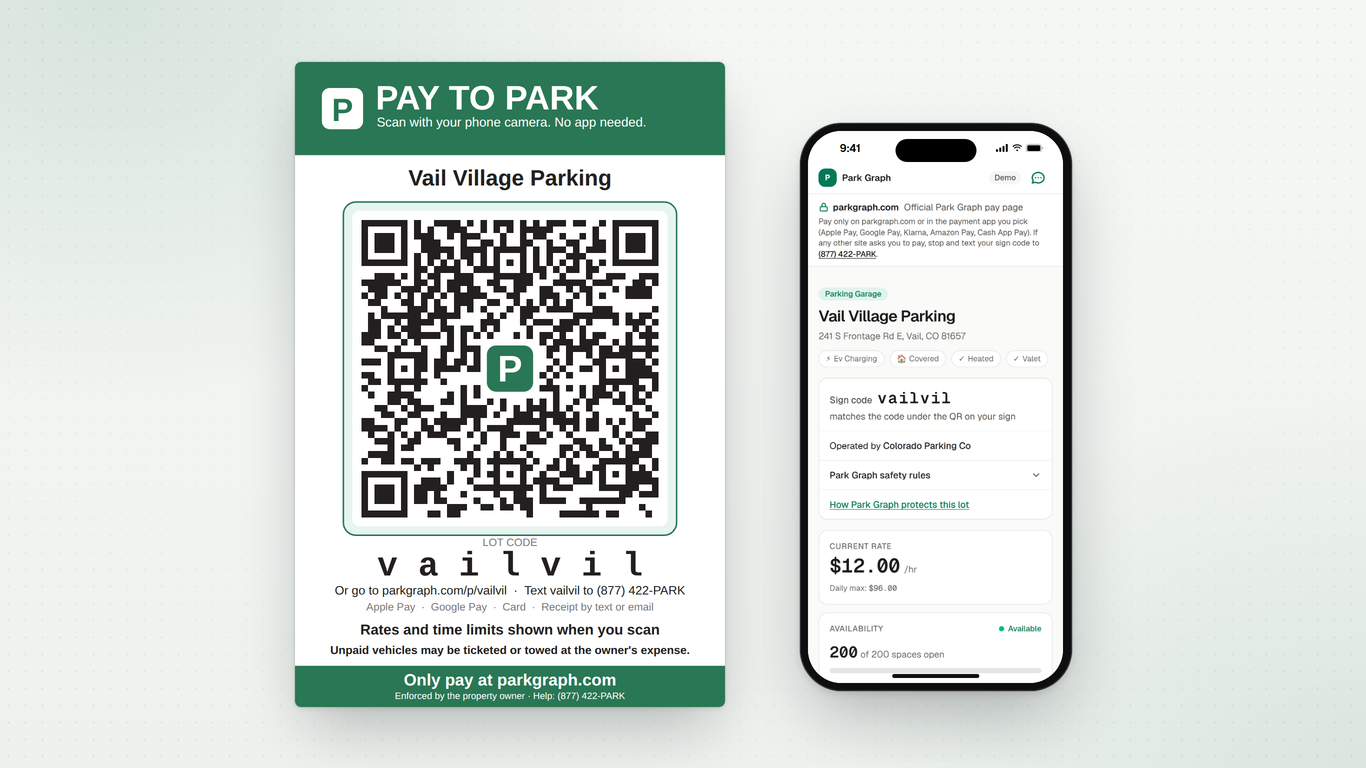
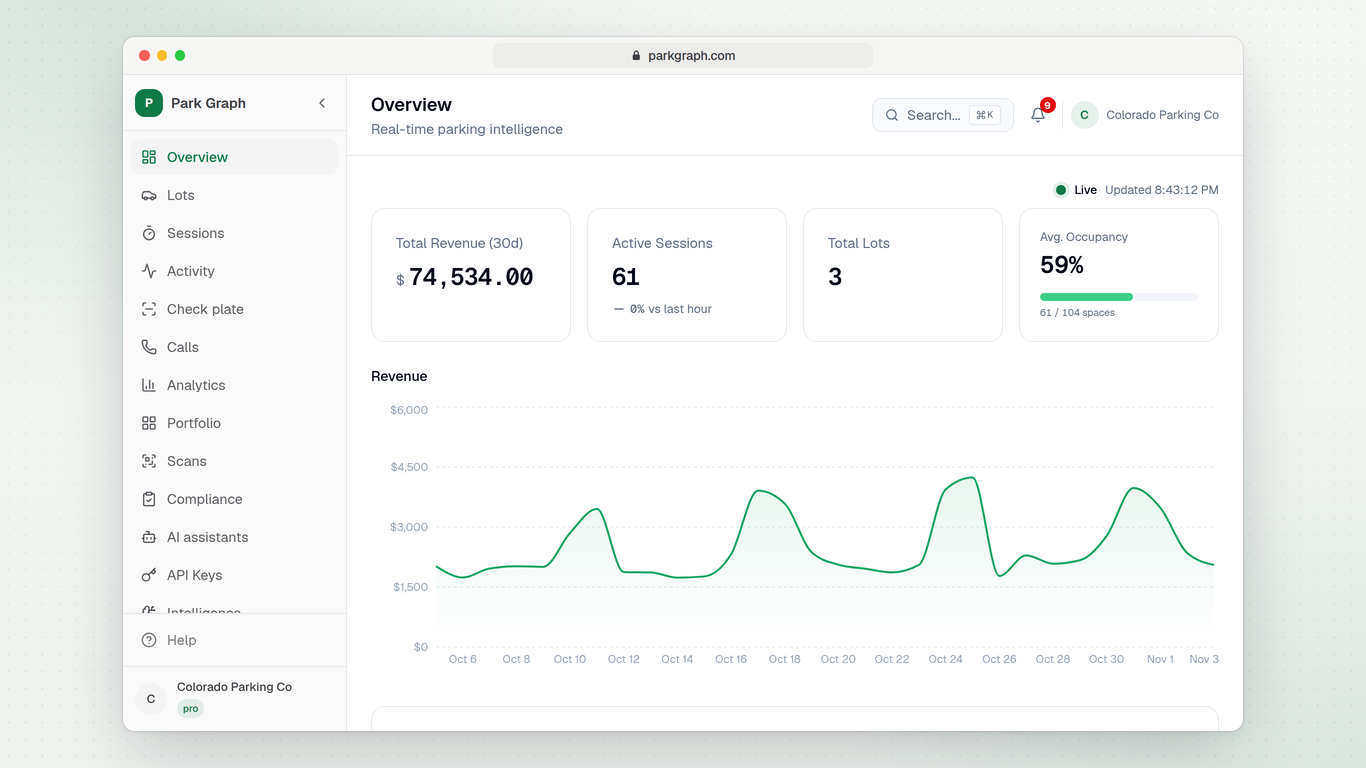
Screenshots for software directories such as G2, Capterra, GetApp, Software Advice, SourceForge and F6S, each at 1920 × 1080 and 1280 × 800, and a 512 × 512 logo. Demo data only: the sign and pay page are the demo lot, where nothing is charged, and the dashboard and rates are a sample account.

Google listing

Description · 25 words

Find Park Graph parking near where you're going, see the price for your hours, and get the lot's pay link, with no account or app.

Capabilities

  • Find Park Graph lots near a place, nearest first, with spaces left and the current rate.
  • Price a stay for the hours you need and get the lot's pay page, or a short hold at lots that take holds.
  • Check a parked car's time, or price more time, with the receipt's phone code and the plate's last 3 characters.

Example prompts

  • @Park Graph find parking near downtown Redmond, Washington
  • @Park Graph how much is 3 hours at 16300 Redmond Way in Redmond?
  • @Park Graph book 2 hours at 16300 Redmond Way and send me the pay link

Cursor plugin

A Cursor plugin folder named park-graph that adds the hosted server. Cursor takes marketplace plugins from a public Git repository; to try it first, put the folder in ~/.cursor/plugins/local/ and reload the window.

Download the plugin (.zip)
park-graph/
  .cursor-plugin/plugin.json
  mcp.json
  README.md
  LICENSE
  assets/logo.svg
.cursor-plugin/plugin.jsonjson
{
  "name": "park-graph",
  "version": "2.2.0",
  "description": "Find parking near where you're going, see the price and get the lot's pay link. Check or add time to a parked car with the receipt's phone code. No account or API key.",
  "author": {
    "name": "Park Graph",
    "email": "support@parkgraph.com"
  },
  "homepage": "https://parkgraph.com/developers/mcp",
  "license": "MIT",
  "keywords": [
    "parking",
    "mcp",
    "maps",
    "travel",
    "park-graph"
  ],
  "logo": "assets/logo.svg"
}
mcp.jsonjson
{
  "mcpServers": {
    "park-graph": {
      "url": "https://parkgraph.com/api/mcp"
    }
  }
}
README.mdmarkdown
# Park Graph for Cursor

Find parking near where you're going, see the price and get the lot's pay link, right from Cursor's agent. Check or add time to a parked car with the phone code on the receipt.

This plugin adds one remote MCP server, https://parkgraph.com/api/mcp. There is nothing to install or run, and no account or API key. Signing in to Park Graph is optional: it adds my_sessions and my_vehicles, a driver's own parking and saved plates.

## Tools

- `search_lots`: Search parking lots (read-only)
- `get_lot`: Get lot details (read-only)
- `quote`: Quote a price (read-only)
- `reserve`: Reserve a space (destructive: creates or extends a paid hold)
- `get_session`: Get a parking session (read-only)
- `extend_session`: Extend a parking session (destructive: creates or extends a paid hold)
- `my_sessions`: My parking (read-only)
- `my_vehicles`: My vehicles

Payment always completes on parkgraph.com with the driver present; no tool charges money on its own.

## Try it

- "Find parking near downtown Redmond, Washington."
- "How much is 3 hours at 16300 Redmond Way?"
- "Check on my parking session. The phone code on my receipt is Q7M4RX and my plate ends in 4FD."

The last one uses sample values that match no session, so the answer is that no session matches.

## Install locally

Copy this folder to `~/.cursor/plugins/local/park-graph`, then run **Developer: Reload Window**. The server shows as `plugin-park-graph-park-graph` in Customize.

## Links

- Docs: https://parkgraph.com/developers/mcp
- Store kit and test prompts: https://parkgraph.com/developers/mcp/store-kit
- Privacy: https://parkgraph.com/legal/privacy
- Developer and AI Agent Terms: https://parkgraph.com/legal/developers
- Support: support@parkgraph.com

## License

MIT. See LICENSE.
LICENSEtext
MIT License

Copyright (c) 2026 Park Graph

Permission is hereby granted, free of charge, to any person obtaining a copy
of this software and associated documentation files (the "Software"), to deal
in the Software without restriction, including without limitation the rights
to use, copy, modify, merge, publish, distribute, sublicense, and/or sell
copies of the Software, and to permit persons to whom the Software is
furnished to do so, subject to the following conditions:

The above copyright notice and this permission notice shall be included in all
copies or substantial portions of the Software.

THE SOFTWARE IS PROVIDED "AS IS", WITHOUT WARRANTY OF ANY KIND, EXPRESS OR
IMPLIED, INCLUDING BUT NOT LIMITED TO THE WARRANTIES OF MERCHANTABILITY,
FITNESS FOR A PARTICULAR PURPOSE AND NONINFRINGEMENT. IN NO EVENT SHALL THE
AUTHORS OR COPYRIGHT HOLDERS BE LIABLE FOR ANY CLAIM, DAMAGES OR OTHER
LIABILITY, WHETHER IN AN ACTION OF CONTRACT, TORT OR OTHERWISE, ARISING FROM,
OUT OF OR IN CONNECTION WITH THE SOFTWARE OR THE USE OR OTHER DEALINGS IN THE
SOFTWARE.

Release notes

Version 2.2.0

  • Optional driver sign-in on the same Park Graph login as parkgraph.com: OAuth 2.1 with PKCE, dynamic client registration and refresh tokens. The server card and the MCP Registry entry list https://parkgraph.com/api/mcp with OAuth as optional.
  • 8 tools: my_sessions and my_vehicles are new, for signed-in drivers only. Without sign-in they answer 401 with the sign-in details.
  • Tokens are scoped (parking.read, parking.book), last 1 hour with refresh, and can be revoked from Account, Connected apps on parkgraph.com.
  • Tool descriptions say only what each tool does, what it takes and what it returns, with no instructions to the assistant. get_session and extend_session name their inputs: phone_code (the 6-character code on the driver's receipt or pass) and plate_last3 (the last 3 characters of the plate).
  • reserve and extend_session are marked destructive, because they create or extend paid holds. search_lots, get_lot, quote, get_session, my_sessions are read-only. my_vehicles is neither, and idempotent. Every tool sets readOnlyHint, destructiveHint and openWorldHint, and has a title.
  • The server instructions say what each tool needs and returns, with no instructions to the assistant, and link to the Developer and AI Agent Terms without accepting them for anyone. They say: "Every payment completes on parkgraph.com with the driver present; no tool charges money on its own." Every tool description says: "Every payment completes on parkgraph.com with the driver present; no tool charges money on its own."
  • Assistants can find the server on their own: a server card at /.well-known/mcp/server-card.json, an API catalog at /.well-known/api-catalog, agent skills at /.well-known/agent-skills/index.json, and Markdown copies of the docs.
  • Unchanged: the other six tools, what they take and what they return, with or without sign-in. The ChatGPT server, https://parkgraph.com/api/mcp/chatgpt, has no sign-in.

Microsoft 365 Copilot

A Copilot agent for Partner Center's Apps and agents for Microsoft 365 and Copilot: one declarative agent whose action is this MCP server.

The first submission uses only the tools that need no sign-in.

  1. Download the package. Download parkgraph-m365-agent-1.0.0.zip below and check its SHA-256. It has the manifest, both icons, the agent, its MCP action and the six tools that need no sign-in. Nothing in it signs in, and it holds no secret.

  2. Try it in your tenant. In Teams, open Apps, Manage your apps, Upload an app, and upload the ZIP. In Microsoft 365 Copilot, pick Park Graph and run the conversation starters. Nothing asks you to sign in.

  3. Create the offer. In Partner Center, open Marketplace offers, New offer, Apps and agents for Microsoft 365 and Copilot, and name it Park Graph. Paste the listing text below, add the five 1366 × 768 screenshots and the links, and upload the ZIP under Packages.

  4. Notes for certification. Paste the reviewer notes below. The reviewer needs no account and no test credentials. Then submit for review; Microsoft emails the result.

Download parkgraph-m365-agent-1.0.0.zip
App ID
340ded45-0a0d-40d2-a606-72508252f68f
Version
1.0.0
SHA-256
ae4f68c280418d455b0953f6e0bf86d8f127dcb54e2439be48be0cd0c639a122
Color icon: a white P on a green square
Outline icon: a white P on transparent
Color, 192 × 192 PNGOutline, 32 × 32 PNG
Short name · 10 characters
Park Graph
Full name
Park Graph: find and book parking
Developer
Wins Parking, LLC
Search keywords
parking, park, parking lot, garage, travel
Privacy
https://parkgraph.com/legal/privacy
Terms of use
https://parkgraph.com/legal/terms
Short description · 79 of 80 characters
Find parking near where you're going, see the price and get the lot's pay link.
Long description · 869 of 4,000 characters
Park Graph finds parking near where you're going, right in Microsoft 365 Copilot. Ask for parking near a place and Park Graph lists its lots there, nearest first, with spaces left and the current rate. Ask what a few hours cost and it prices the stay at the lot's current rate, with the daily maximum applied. To book, Park Graph gives you the lot's pay page on parkgraph.com, or holds a space for a few minutes at lots that take holds. Every payment completes on parkgraph.com with you present; nothing is charged in Copilot. Already parked? Give Copilot the 6-character phone code on your receipt and the last 3 characters of your plate to check your time, or to price more time and get the link to pay for it. There is nothing to sign in to and no account to make. Park Graph lots are in a small number of places so far. Where Park Graph has no lots, it says so.

Screenshots, 1366 × 768

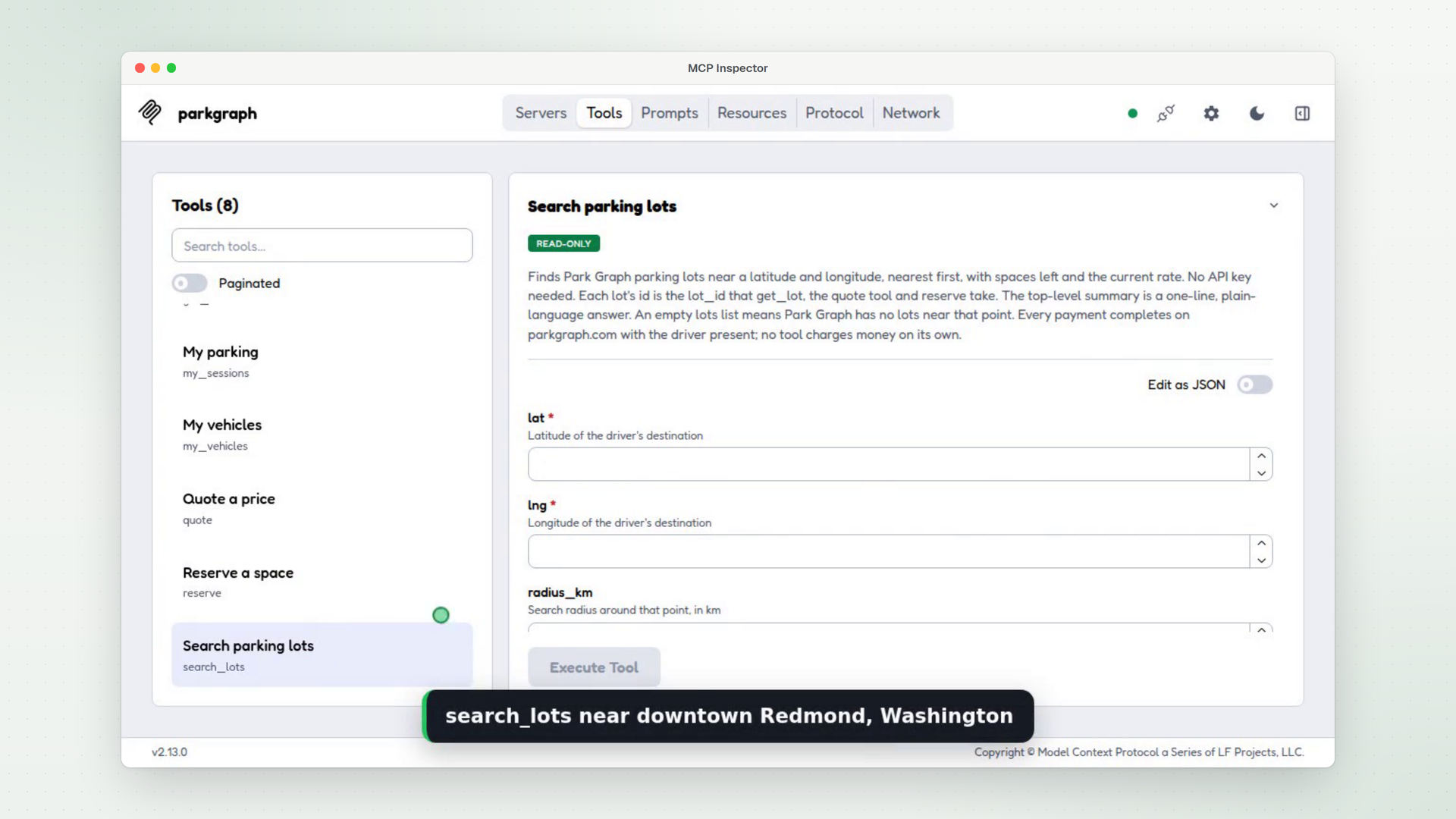
  1. Frame from the walkthrough video: search_lots running in MCP Inspector against the live Park Graph server, with no key

    1. Finding a lot over MCP

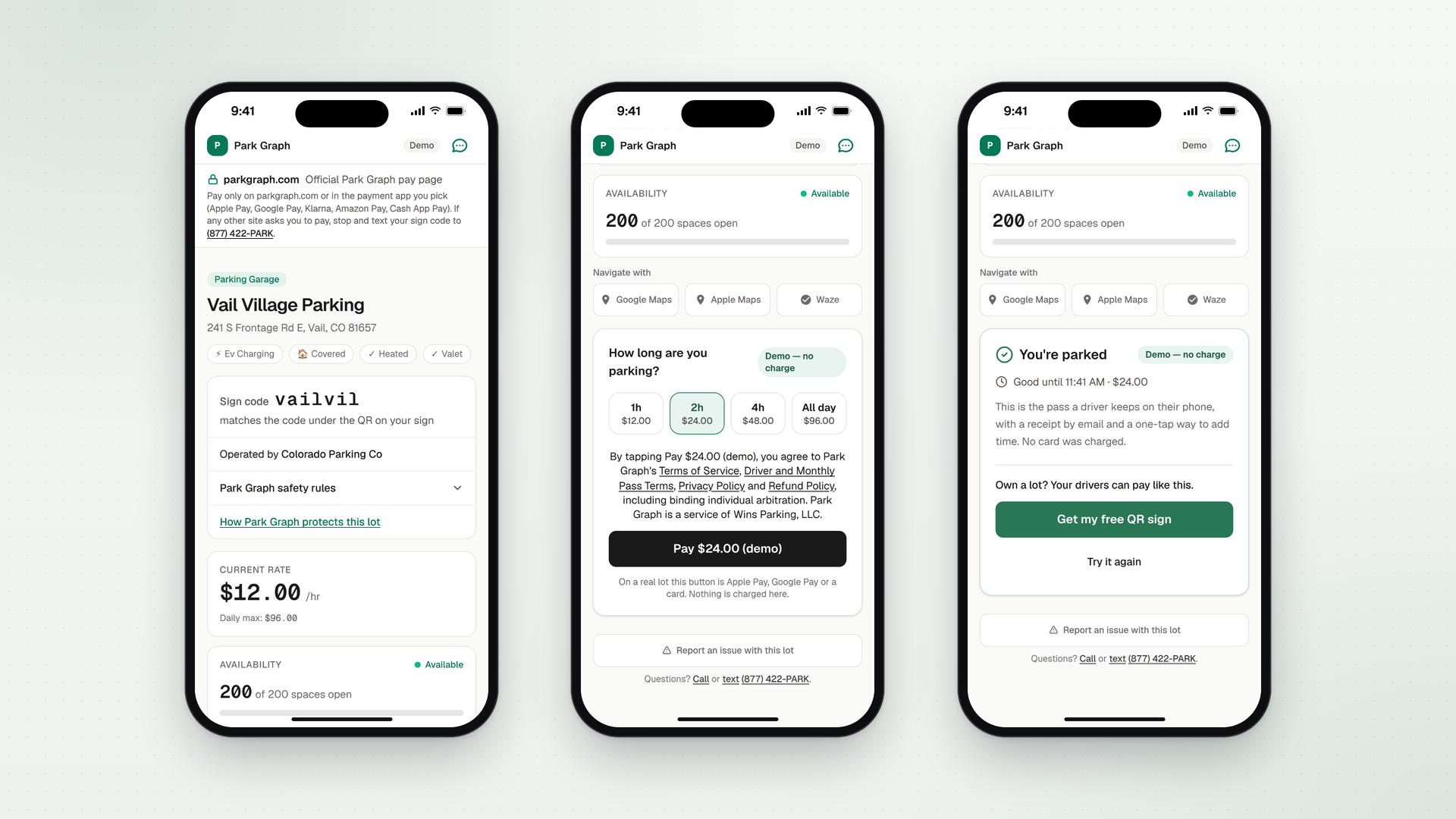
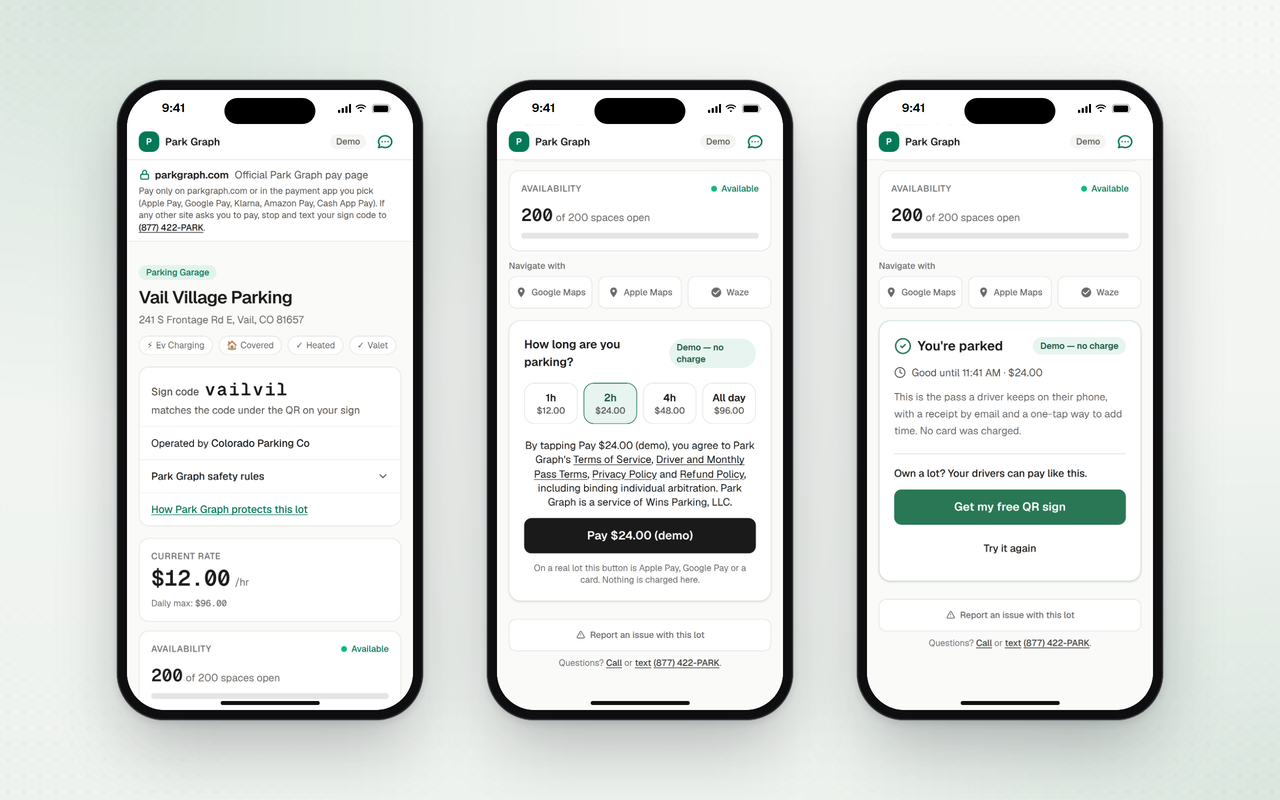
  2. The demo lot's pay page on three phones: the lot and its rate, choosing 2 hours and Pay, and the parked pass. Demo mode, no charge

    2. Driver pay page

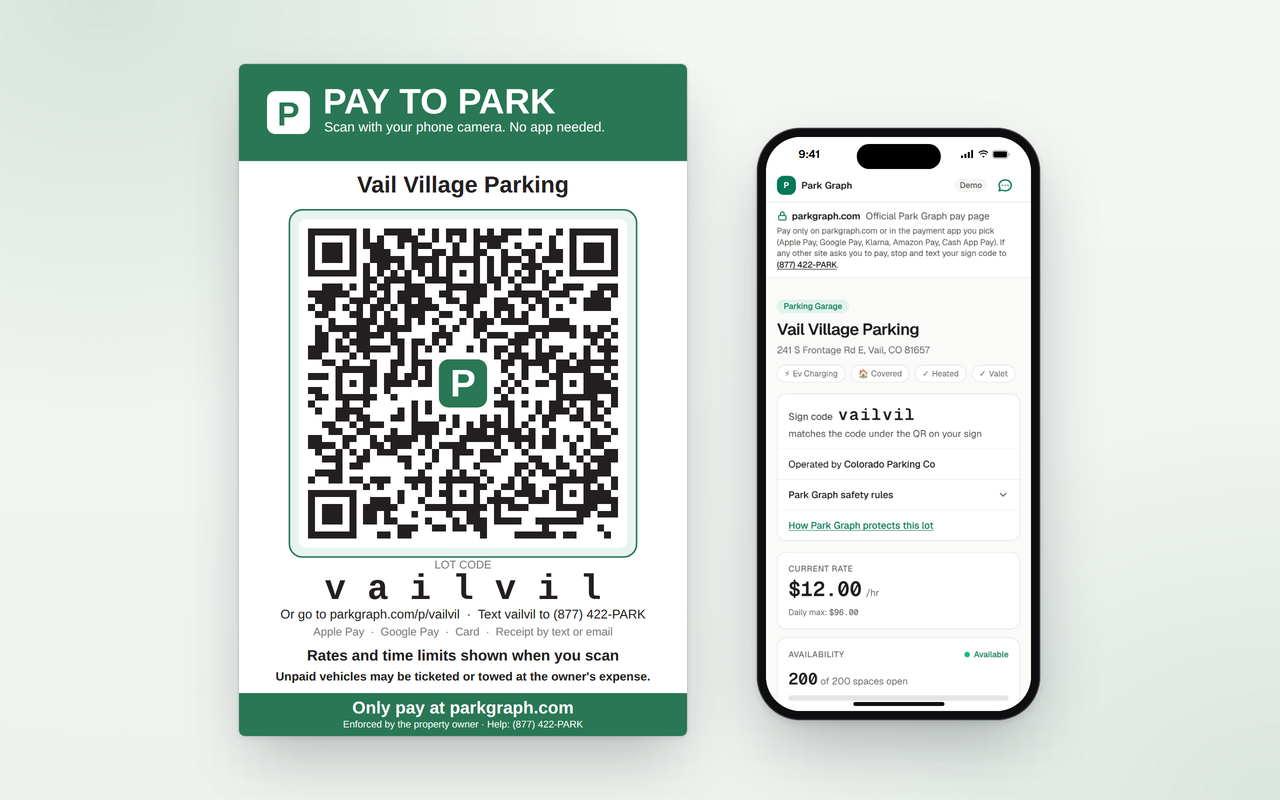
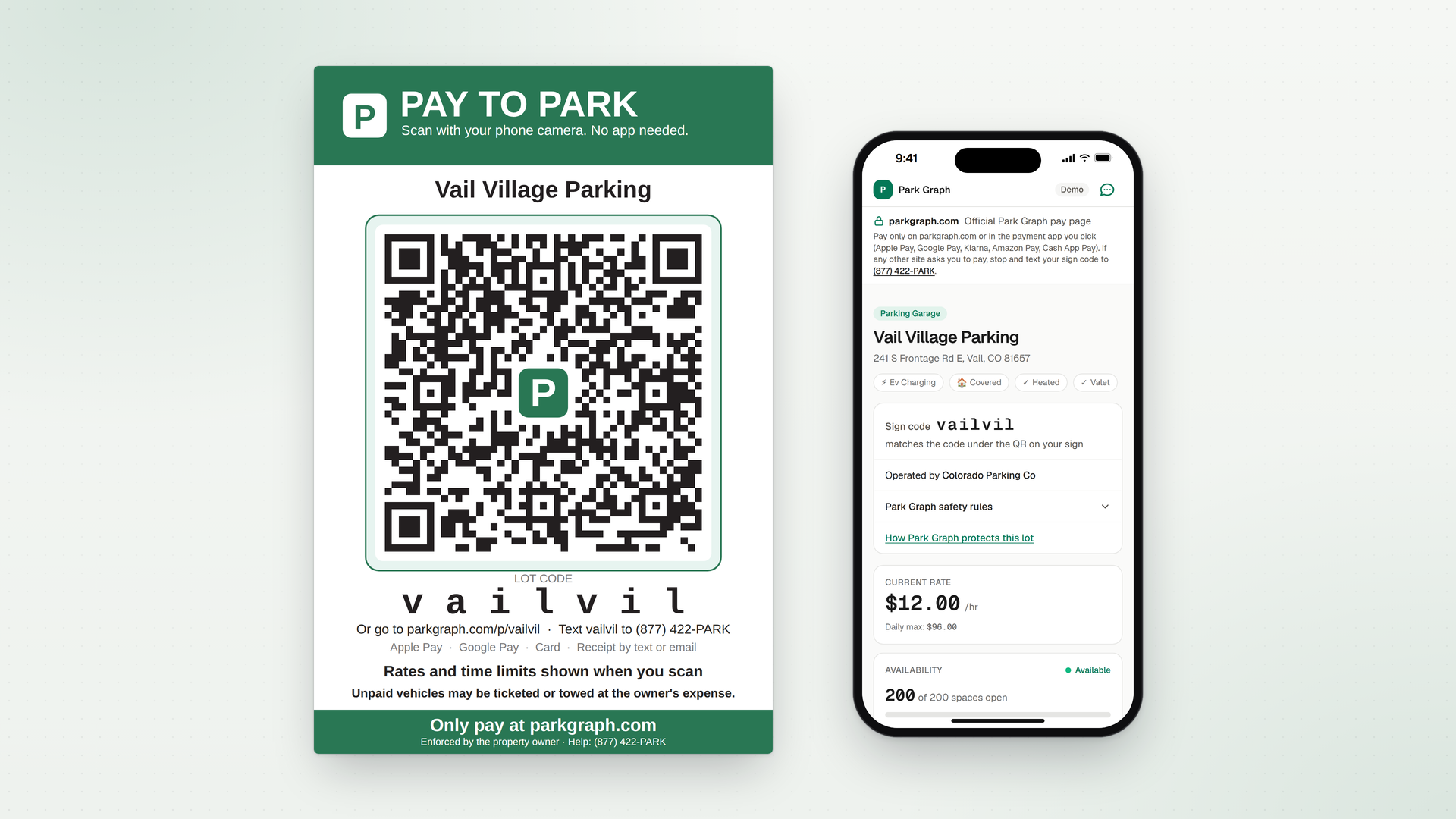
  3. Park Graph pay-to-park sign for the demo lot, Vail Village Parking, with its QR code, next to a phone showing the pay page the code opens

    3. QR sign

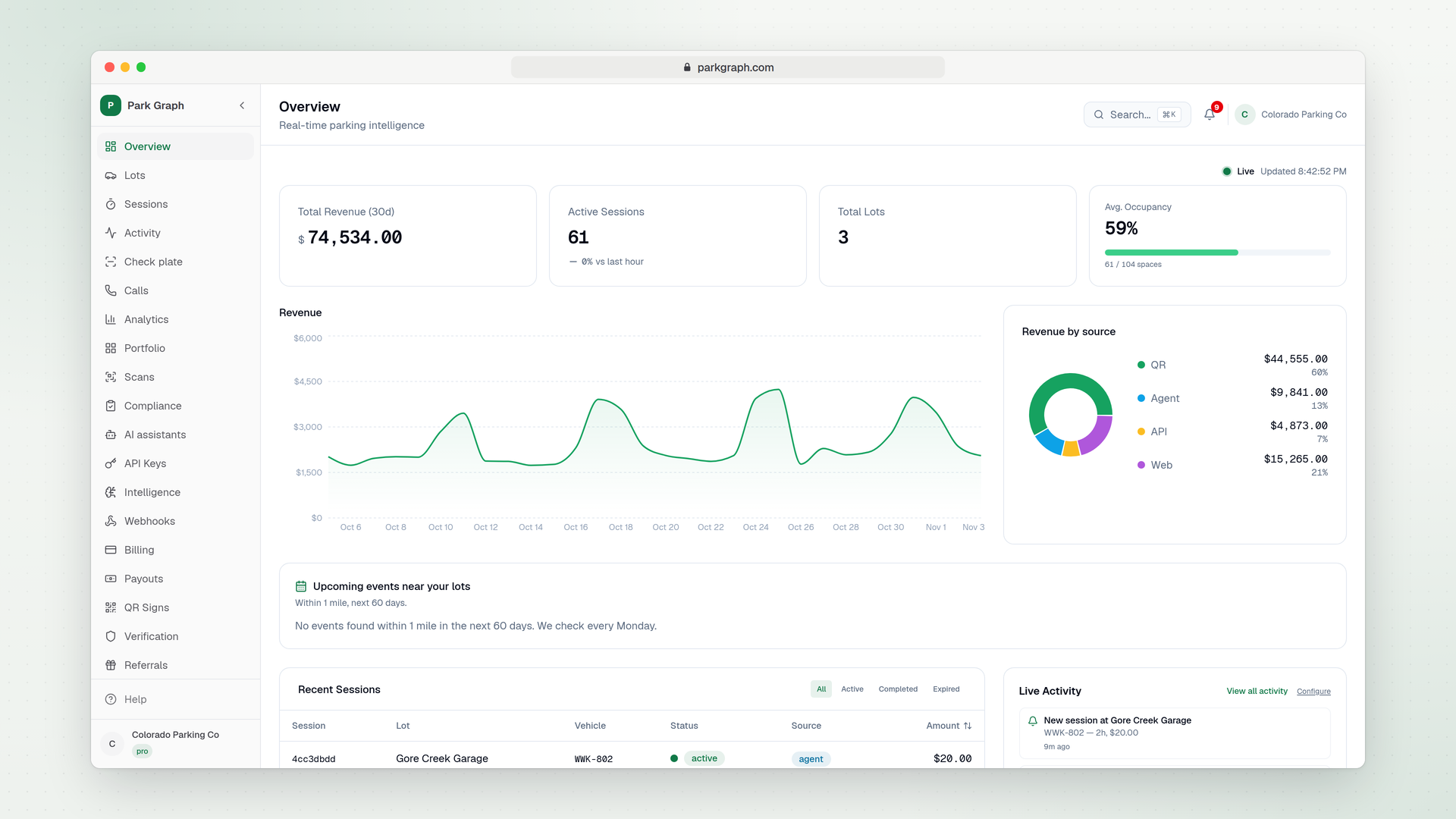
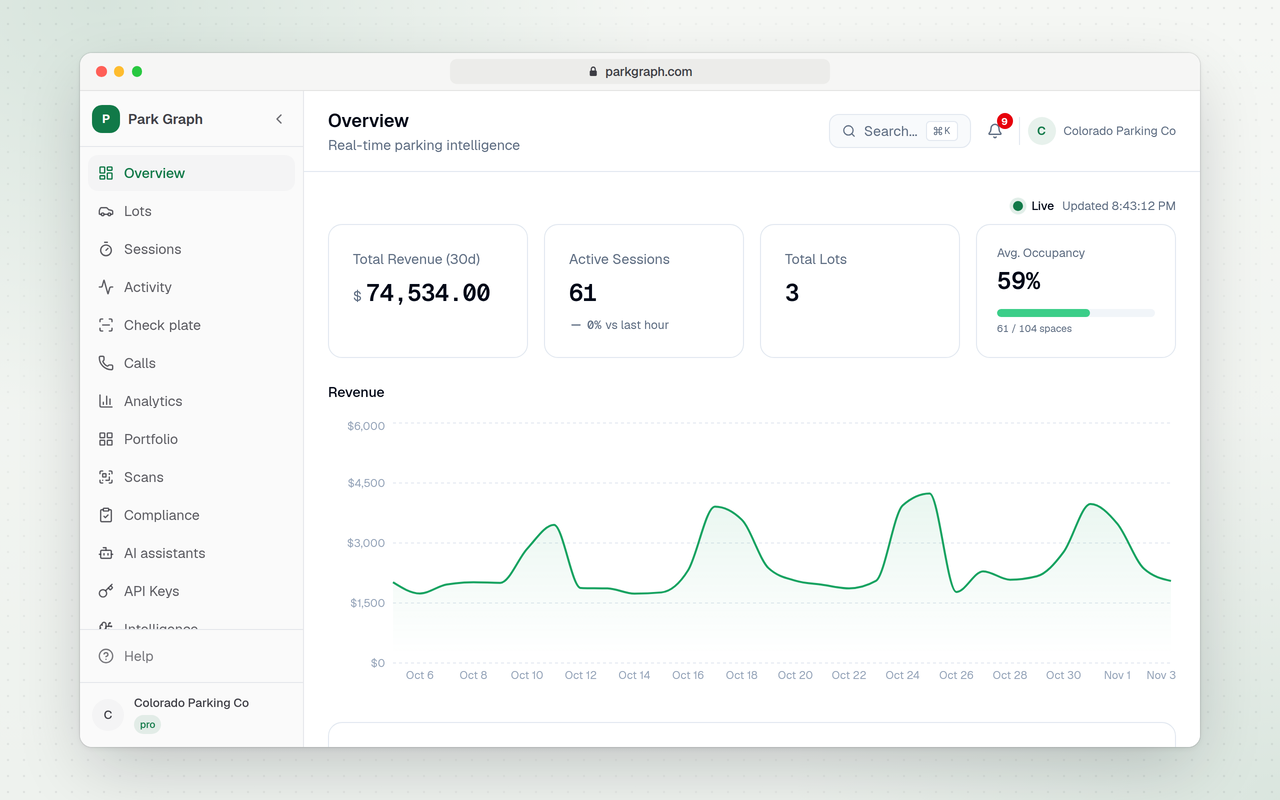
  4. Park Graph owner dashboard for a sample account with three lots: 30-day revenue, active sessions, occupancy, revenue by source and recent sessions

    4. Owner dashboard

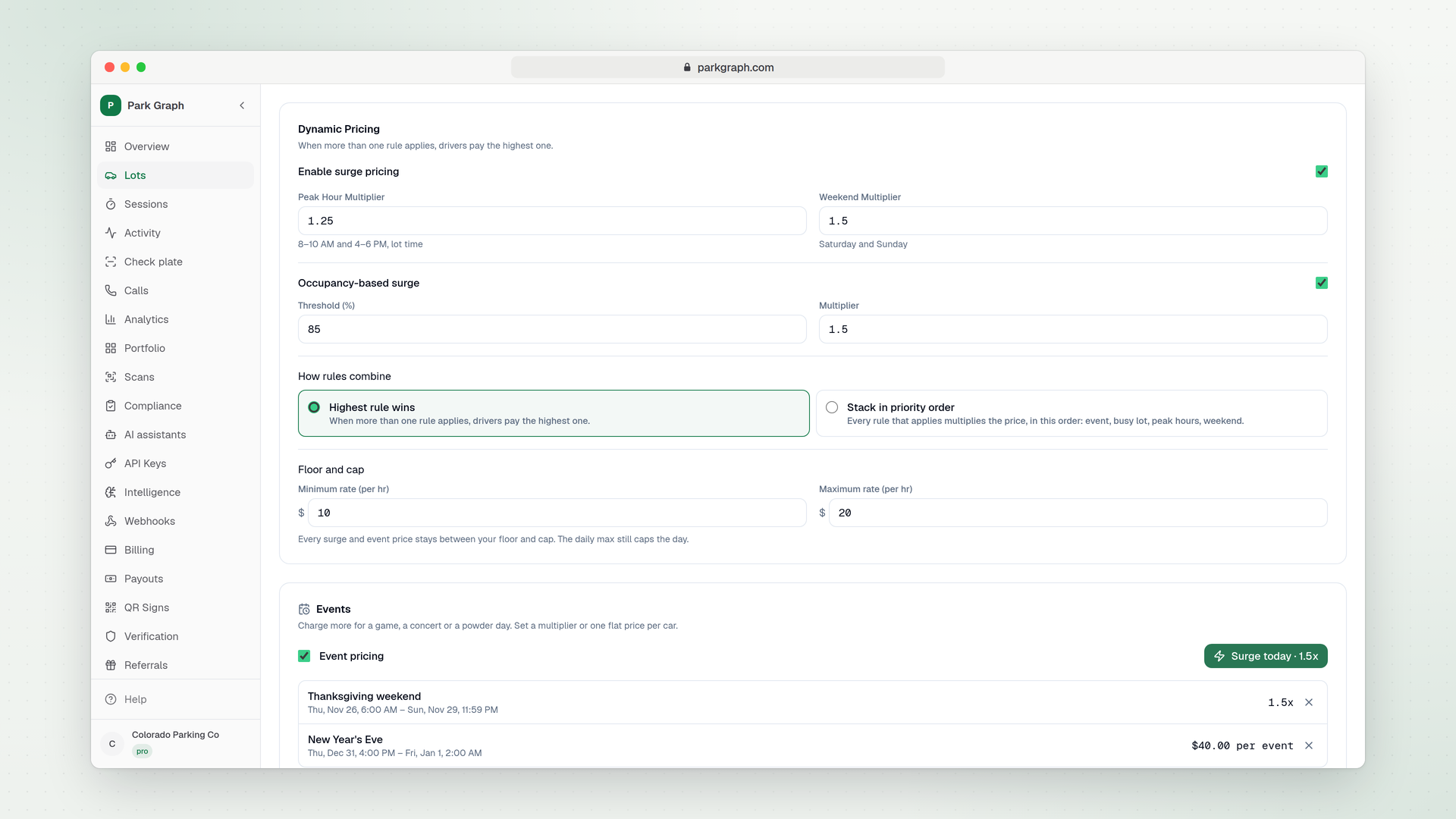
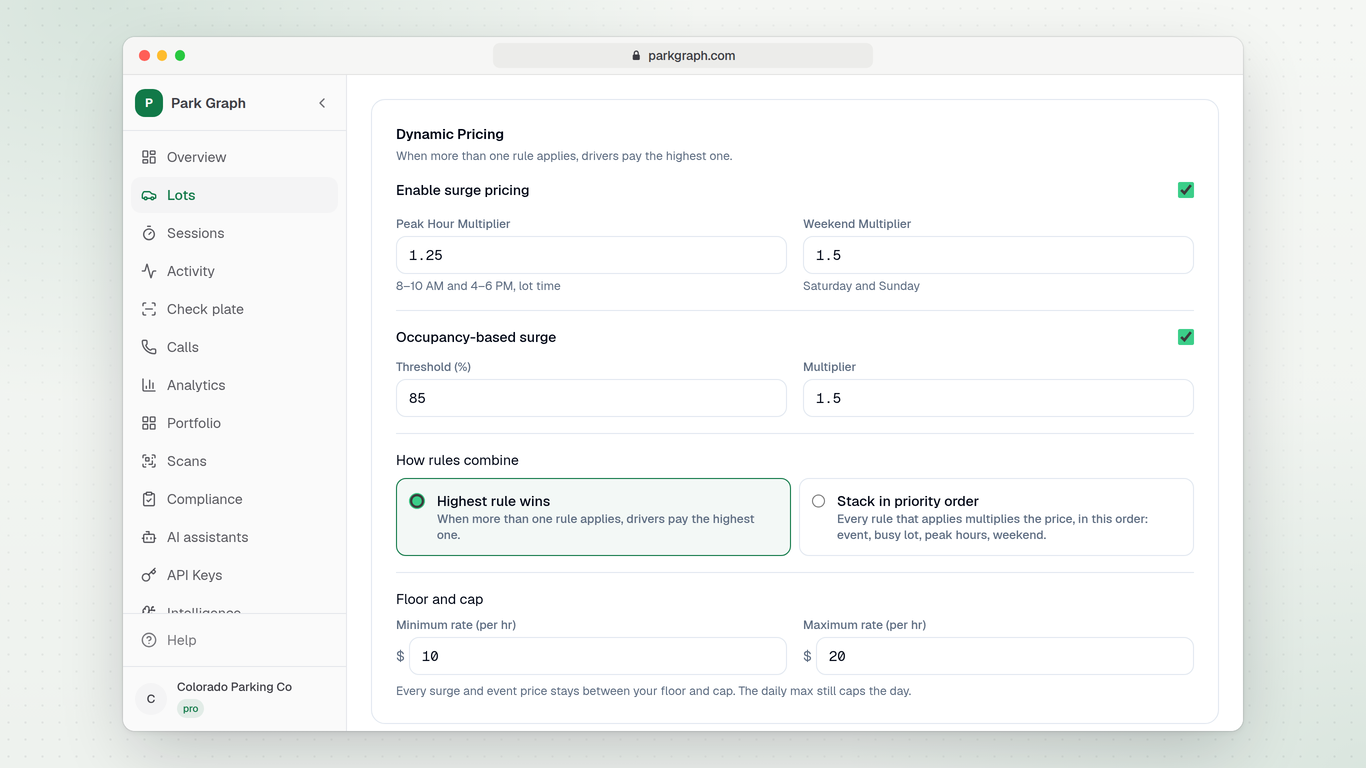
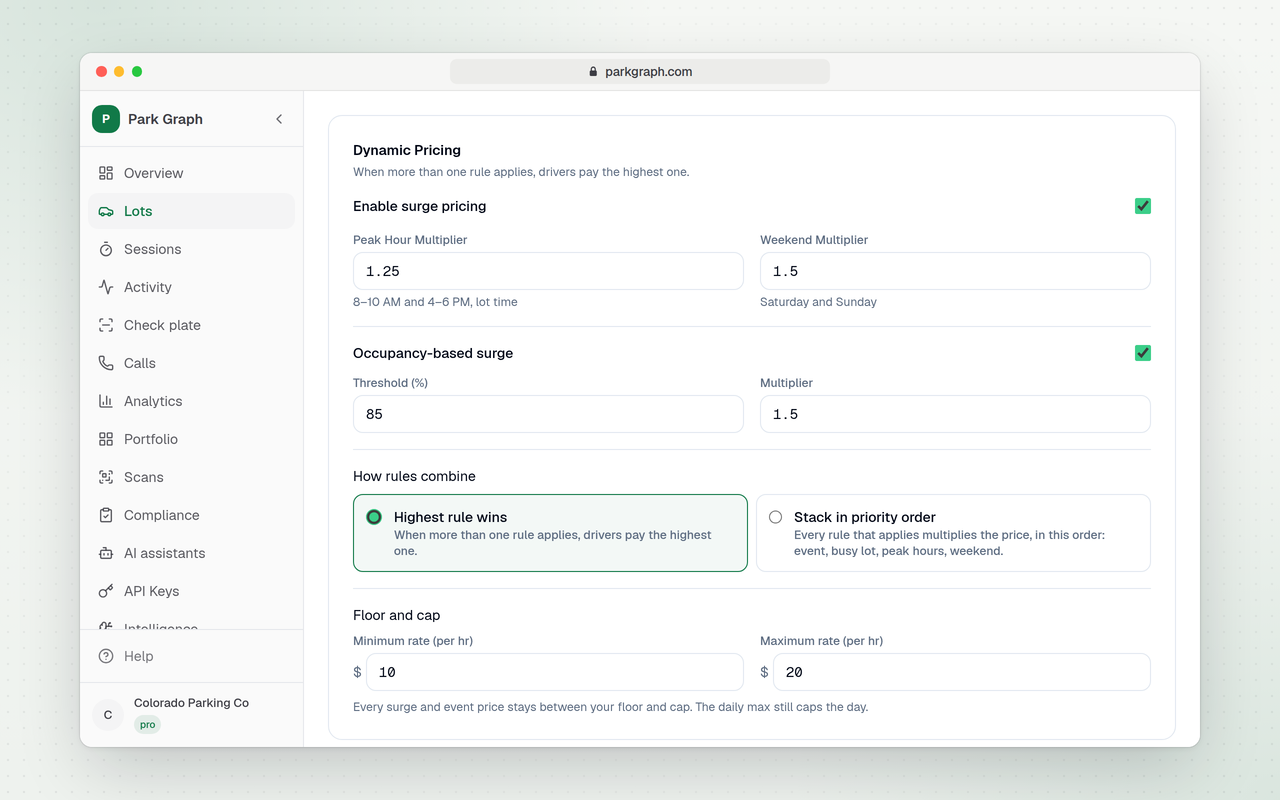
  5. Dynamic pricing settings for a sample garage: peak-hour and weekend multipliers, occupancy surge, how rules combine, floor and cap, and event days

    5. Rate settings

Notes for certificationtext
Park Graph is a declarative agent with one MCP action, https://parkgraph.com/api/mcp. It uses only public tools: nothing signs in, and no account or test credentials are needed.
Try: "Find parking near downtown Redmond, Washington." Park Graph lists 16300 Redmond Way. Then: "How much is 3 hours there?" The total comes from the quote tool.
Then: "Book 2 hours there." Copilot asks you to confirm first. 16300 Redmond Way takes payment at its pay page, so Park Graph gives that link and holds nothing.
Every payment completes on parkgraph.com with the driver present; no tool charges money on its own. 16300 Redmond Way is a real customer's lot that takes real cards, so please don't pay on its pay page.
To see a pay page from start to finish without paying, open https://parkgraph.com/demo: the demo lot, where nothing is charged.
get_session and extend_session need the phone code from a real parking receipt. With the sample code Q7M4RX and plate ending 4FD, Park Graph says no parking matches.
Support: support@parkgraph.com. Test prompts with expected results: https://parkgraph.com/developers/mcp/store-kit#test-prompts
manifest.jsonjson
{
  "$schema": "https://developer.microsoft.com/en-us/json-schemas/teams/v1.24/MicrosoftTeams.schema.json",
  "manifestVersion": "1.24",
  "version": "1.0.0",
  "id": "340ded45-0a0d-40d2-a606-72508252f68f",
  "developer": {
    "name": "Wins Parking, LLC",
    "websiteUrl": "https://parkgraph.com/support",
    "privacyUrl": "https://parkgraph.com/legal/privacy",
    "termsOfUseUrl": "https://parkgraph.com/legal/terms"
  },
  "icons": {
    "color": "color.png",
    "outline": "outline.png"
  },
  "name": {
    "short": "Park Graph",
    "full": "Park Graph: find and book parking"
  },
  "description": {
    "short": "Find parking near where you're going, see the price and get the lot's pay link.",
    "full": "Park Graph finds parking near where you're going, right in Microsoft 365 Copilot. Ask for parking near a place and Park Graph lists its lots there, nearest first, with spaces left and the current rate. Ask what a few hours cost and it prices the stay at the lot's current rate, with the daily maximum applied.\n\nTo book, Park Graph gives you the lot's pay page on parkgraph.com, or holds a space for a few minutes at lots that take holds. Every payment completes on parkgraph.com with you present; nothing is charged in Copilot.\n\nAlready parked? Give Copilot the 6-character phone code on your receipt and the last 3 characters of your plate to check your time, or to price more time and get the link to pay for it.\n\nThere is nothing to sign in to and no account to make.\n\nPark Graph lots are in a small number of places so far. Where Park Graph has no lots, it says so."
  },
  "accentColor": "#1A9D6C",
  "copilotAgents": {
    "declarativeAgents": [
      {
        "id": "parkGraphAgent",
        "file": "declarativeAgent.json"
      }
    ]
  },
  "validDomains": [
    "parkgraph.com"
  ]
}
declarativeAgent.jsonjson
{
  "$schema": "https://developer.microsoft.com/json-schemas/copilot/declarative-agent/v1.6/schema.json",
  "version": "v1.6",
  "name": "Park Graph",
  "description": "Finds Park Graph parking near a place, prices a stay at the lot's current rate, and gives the lot's pay link or holds a space. Checks a parked car's time, or prices more time, with the receipt's phone code and the plate's last 3 characters. Every payment completes on parkgraph.com with the driver present; no tool charges money on its own.",
  "instructions": "You help drivers find and book parking with Park Graph.\n- To find parking, work out the latitude and longitude of the place the driver names and call search_lots. If it returns no lots, say Park Graph has no lots there.\n- To price a stay, call quote with the lot_id and the hours. Give the total from the quote; don't work prices out yourself.\n- The quote's booking.mode says how to book: reserve (the reserve tool holds a space and returns booking_url), pay_at_qr_page (give the driver pay_url, where they pay and park) or not_bookable.\n- Before calling reserve or extend_session, tell the driver the lot, the hours and the price, and ask them to confirm.\n- Every payment completes on parkgraph.com with the driver present; no tool charges money on its own. Never say a payment was made or time was added.\n- get_session and extend_session take the 6-character phone code on the driver's receipt or pass and the last 3 characters of the plate. extend_session returns a pay_url; the end time changes only after the driver pays there.\n- Show every link as a link the driver can open.",
  "conversation_starters": [
    {
      "title": "Find parking",
      "text": "Find parking near downtown Redmond, Washington."
    },
    {
      "title": "Price a stay",
      "text": "How much is 3 hours of parking at 16300 Redmond Way in Redmond, Washington?"
    },
    {
      "title": "Book a space",
      "text": "Book 2 hours at 16300 Redmond Way in Redmond, Washington and give me the pay link."
    },
    {
      "title": "Check my time",
      "text": "How much time is left on my parking?"
    }
  ],
  "actions": [
    {
      "id": "parkGraphMcp",
      "file": "ai-plugin.json"
    }
  ]
}
ai-plugin.jsonjson
{
  "$schema": "https://developer.microsoft.com/json-schemas/copilot/plugin/v2.4/schema.json",
  "schema_version": "v2.4",
  "name_for_human": "Park Graph",
  "namespace": "parkgraph",
  "description_for_human": "Find parking near a place, see the price and get the lot's pay link.",
  "description_for_model": "Finds Park Graph parking near a place, prices a stay at the lot's current rate, and gives the lot's pay link or holds a space. Checks a parked car's time, or prices more time, with the receipt's phone code and the plate's last 3 characters. Every payment completes on parkgraph.com with the driver present; no tool charges money on its own.",
  "logo_url": "https://parkgraph.com/brand/park-graph-icon-512.png",
  "contact_email": "support@parkgraph.com",
  "legal_info_url": "https://parkgraph.com/legal/terms",
  "privacy_policy_url": "https://parkgraph.com/legal/privacy",
  "functions": [
    {
      "name": "search_lots",
      "description": "Finds Park Graph parking lots near a latitude and longitude, nearest first, with spaces left and the current rate. No API key needed. Each lot's id is the lot_id that get_lot, the quote tool and reserve take. The top-level summary is a one-line, plain-language answer. An empty lots list means Park Graph has no lots near that point. Every payment completes on parkgraph.com with the driver present; no tool charges money on its own.",
      "capabilities": {
        "security_info": {
          "data_handling": [
            "GetPublicData"
          ]
        }
      }
    },
    {
      "name": "get_lot",
      "description": "Full public details for one lot: address, coordinates, spaces, features, hours, pricing and spaces left right now. No API key needed. Every payment completes on parkgraph.com with the driver present; no tool charges money on its own.",
      "capabilities": {
        "security_info": {
          "data_handling": [
            "GetPublicData"
          ]
        }
      }
    },
    {
      "name": "quote",
      "description": "Price to park at a lot for a number of hours, at the lot's current rate (daily max applied). No API key needed. booking.mode in the result is the next step: reserve (the reserve tool holds a space) or pay_at_qr_page (booking.pay_url is the lot's pay page, where the driver pays and parks). Every payment completes on parkgraph.com with the driver present; no tool charges money on its own.",
      "capabilities": {
        "security_info": {
          "data_handling": [
            "GetPublicData"
          ]
        }
      }
    },
    {
      "name": "reserve",
      "description": "Holds space at a lot for the driver for a few minutes and returns booking_url, the lot's pay page on parkgraph.com (opened on duration_hours when it is sent). No API key needed. A hold takes a real space until it expires or the driver pays. Lots that take payment at their QR page place no hold: the result is status pay_at_qr_page with a pay_url, the lot's pay page. Every payment completes on parkgraph.com with the driver present; no tool charges money on its own.",
      "capabilities": {
        "security_info": {
          "data_handling": [
            "ResourceStateUpdate"
          ]
        },
        "confirmation": {
          "type": "AdaptiveCard",
          "title": "Hold a parking space?",
          "body": "Park Graph holds a space at this lot for a few minutes and returns its pay page. Nothing is charged until you pay on parkgraph.com."
        }
      }
    },
    {
      "name": "get_session",
      "description": "A parking session's lot, status, start and end times, rate, amount so far and extensions, with a link to the driver's session page. No API key needed. Requires phone_code (the 6-character code on the driver's receipt or pass) and plate_last3 (the last 3 characters of the plate), or session_id with session_code. Any mismatch returns the same answer, SESSION_NOT_FOUND. Every payment completes on parkgraph.com with the driver present; no tool charges money on its own.",
      "capabilities": {
        "security_info": {
          "data_handling": [
            "GetPrivateData"
          ]
        }
      }
    },
    {
      "name": "extend_session",
      "description": "Prices more time on an active hourly parking session. No API key needed. Requires phone_code (the 6-character code on the driver's receipt or pass), plate_last3 (the last 3 characters of the plate) and extend_hours (0.5 to 8, in half-hour steps); session_id with session_code works in place of the two codes. Returns the price, the new end time once paid and a pay_url to the driver's session page, where the driver pays. Nothing is charged and the end time doesn't move until the driver pays there. Any mismatch returns the same answer, SESSION_NOT_FOUND. Every payment completes on parkgraph.com with the driver present; no tool charges money on its own.",
      "capabilities": {
        "security_info": {
          "data_handling": [
            "GetPrivateData",
            "ResourceStateUpdate"
          ]
        },
        "confirmation": {
          "type": "AdaptiveCard",
          "title": "Price more parking time?",
          "body": "Park Graph prices the extra time and returns a link to pay for it. Nothing is charged and your end time doesn't change until you pay on parkgraph.com."
        }
      }
    }
  ],
  "runtimes": [
    {
      "type": "RemoteMCPServer",
      "auth": {
        "type": "None"
      },
      "spec": {
        "url": "https://parkgraph.com/api/mcp",
        "mcp_tool_description": {
          "file": "mcp-tools.json"
        }
      },
      "run_for_functions": [
        "search_lots",
        "get_lot",
        "quote",
        "reserve",
        "get_session",
        "extend_session"
      ]
    }
  ]
}
mcp-tools.jsonjson
{
  "tools": [
    {
      "name": "search_lots",
      "title": "Search parking lots",
      "description": "Finds Park Graph parking lots near a latitude and longitude, nearest first, with spaces left and the current rate. No API key needed. Each lot's id is the lot_id that get_lot, the quote tool and reserve take. The top-level summary is a one-line, plain-language answer. An empty lots list means Park Graph has no lots near that point. Every payment completes on parkgraph.com with the driver present; no tool charges money on its own.",
      "inputSchema": {
        "type": "object",
        "properties": {
          "lat": {
            "type": "number",
            "minimum": -90,
            "maximum": 90,
            "description": "Latitude of the driver's destination"
          },
          "lng": {
            "type": "number",
            "minimum": -180,
            "maximum": 180,
            "description": "Longitude of the driver's destination"
          },
          "radius_km": {
            "type": "number",
            "minimum": 0.1,
            "maximum": 100,
            "default": 5,
            "description": "Search radius around that point, in km"
          },
          "limit": {
            "type": "integer",
            "minimum": 1,
            "maximum": 50,
            "default": 10,
            "description": "Maximum number of lots returned"
          }
        },
        "required": [
          "lat",
          "lng"
        ],
        "additionalProperties": false
      },
      "annotations": {
        "title": "Search parking lots",
        "readOnlyHint": true,
        "destructiveHint": false,
        "openWorldHint": false
      }
    },
    {
      "name": "get_lot",
      "title": "Get lot details",
      "description": "Full public details for one lot: address, coordinates, spaces, features, hours, pricing and spaces left right now. No API key needed. Every payment completes on parkgraph.com with the driver present; no tool charges money on its own.",
      "inputSchema": {
        "type": "object",
        "properties": {
          "lot_id": {
            "type": "string",
            "format": "uuid",
            "description": "Lot id from search_lots"
          }
        },
        "required": [
          "lot_id"
        ],
        "additionalProperties": false
      },
      "annotations": {
        "title": "Get lot details",
        "readOnlyHint": true,
        "destructiveHint": false,
        "openWorldHint": false
      }
    },
    {
      "name": "quote",
      "title": "Quote a price",
      "description": "Price to park at a lot for a number of hours, at the lot's current rate (daily max applied). No API key needed. booking.mode in the result is the next step: reserve (the reserve tool holds a space) or pay_at_qr_page (booking.pay_url is the lot's pay page, where the driver pays and parks). Every payment completes on parkgraph.com with the driver present; no tool charges money on its own.",
      "inputSchema": {
        "type": "object",
        "properties": {
          "lot_id": {
            "type": "string",
            "format": "uuid",
            "description": "Lot id from search_lots"
          },
          "duration_hours": {
            "type": "number",
            "minimum": 0.25,
            "maximum": 24,
            "description": "How long the driver will park, in hours"
          }
        },
        "required": [
          "lot_id",
          "duration_hours"
        ],
        "additionalProperties": false
      },
      "annotations": {
        "title": "Quote a price",
        "readOnlyHint": true,
        "destructiveHint": false,
        "openWorldHint": false
      }
    },
    {
      "name": "reserve",
      "title": "Reserve a space",
      "description": "Holds space at a lot for the driver for a few minutes and returns booking_url, the lot's pay page on parkgraph.com (opened on duration_hours when it is sent). No API key needed. A hold takes a real space until it expires or the driver pays. Lots that take payment at their QR page place no hold: the result is status pay_at_qr_page with a pay_url, the lot's pay page. Every payment completes on parkgraph.com with the driver present; no tool charges money on its own.",
      "inputSchema": {
        "type": "object",
        "properties": {
          "lot_id": {
            "type": "string",
            "format": "uuid",
            "description": "Lot id from search_lots"
          },
          "intent": {
            "type": "string",
            "minLength": 4,
            "maxLength": 500,
            "description": "What the driver needs, in plain words (optional)"
          },
          "space_count": {
            "type": "integer",
            "minimum": 1,
            "maximum": 20,
            "default": 1,
            "description": "Number of spaces"
          },
          "ttl_seconds": {
            "type": "integer",
            "minimum": 30,
            "maximum": 900,
            "default": 180,
            "description": "How long the hold lasts, in seconds"
          },
          "start": {
            "type": "string",
            "format": "date-time",
            "description": "Arrival time (ISO 8601)"
          },
          "end": {
            "type": "string",
            "format": "date-time",
            "description": "Departure time (ISO 8601)"
          },
          "vehicle": {
            "type": "object",
            "description": "The driver's vehicle",
            "properties": {
              "type": {
                "type": "string",
                "enum": [
                  "standard",
                  "ev",
                  "oversized",
                  "motorcycle",
                  "rv",
                  "av"
                ]
              },
              "plate": {
                "type": "string",
                "minLength": 1,
                "maxLength": 20
              },
              "needs_charger": {
                "type": "boolean"
              },
              "length_meters": {
                "type": "number",
                "exclusiveMinimum": 0,
                "maximum": 20
              }
            }
          },
          "duration_hours": {
            "type": "integer",
            "enum": [
              1,
              2,
              4,
              8
            ],
            "description": "Hours to book. The result's booking_url opens the lot's pay page on this length"
          },
          "plate": {
            "type": "string",
            "minLength": 1,
            "maxLength": 20,
            "description": "Plate to pre-fill on the pay page"
          },
          "agent_platform": {
            "type": "string",
            "enum": [
              "chatgpt",
              "claude",
              "gemini",
              "grok",
              "perplexity",
              "copilot",
              "custom"
            ],
            "description": "The calling assistant's platform (recorded on the booking)"
          },
          "idempotency_key": {
            "type": "string",
            "minLength": 8,
            "maxLength": 200,
            "description": "A repeated key retries safely. Generated when omitted and returned in the result."
          }
        },
        "required": [
          "lot_id"
        ],
        "additionalProperties": false
      },
      "annotations": {
        "title": "Reserve a space",
        "readOnlyHint": false,
        "destructiveHint": true,
        "idempotentHint": true,
        "openWorldHint": true
      }
    },
    {
      "name": "get_session",
      "title": "Get a parking session",
      "description": "A parking session's lot, status, start and end times, rate, amount so far and extensions, with a link to the driver's session page. No API key needed. Requires phone_code (the 6-character code on the driver's receipt or pass) and plate_last3 (the last 3 characters of the plate), or session_id with session_code. Any mismatch returns the same answer, SESSION_NOT_FOUND. Every payment completes on parkgraph.com with the driver present; no tool charges money on its own.",
      "inputSchema": {
        "type": "object",
        "properties": {
          "phone_code": {
            "type": "string",
            "description": "The 6-character phone code printed on the driver's receipt or pass"
          },
          "plate_last3": {
            "type": "string",
            "description": "The last 3 letters or numbers of the license plate parked on the session"
          },
          "session_id": {
            "type": "string",
            "format": "uuid",
            "description": "Session id, from the driver's session page link. Sent with session_code."
          },
          "session_code": {
            "type": "string",
            "description": "The session's code (sess_…), sent with session_id"
          }
        },
        "additionalProperties": false
      },
      "annotations": {
        "title": "Get a parking session",
        "readOnlyHint": true,
        "destructiveHint": false,
        "openWorldHint": false
      }
    },
    {
      "name": "extend_session",
      "title": "Extend a parking session",
      "description": "Prices more time on an active hourly parking session. No API key needed. Requires phone_code (the 6-character code on the driver's receipt or pass), plate_last3 (the last 3 characters of the plate) and extend_hours (0.5 to 8, in half-hour steps); session_id with session_code works in place of the two codes. Returns the price, the new end time once paid and a pay_url to the driver's session page, where the driver pays. Nothing is charged and the end time doesn't move until the driver pays there. Any mismatch returns the same answer, SESSION_NOT_FOUND. Every payment completes on parkgraph.com with the driver present; no tool charges money on its own.",
      "inputSchema": {
        "type": "object",
        "properties": {
          "phone_code": {
            "type": "string",
            "description": "The 6-character phone code printed on the driver's receipt or pass"
          },
          "plate_last3": {
            "type": "string",
            "description": "The last 3 letters or numbers of the license plate parked on the session"
          },
          "session_id": {
            "type": "string",
            "description": "Session id, from the driver's session page link. Sent with session_code in place of the phone code."
          },
          "session_code": {
            "type": "string",
            "description": "The session's code (sess_…), for verification"
          },
          "extend_hours": {
            "type": "number",
            "minimum": 0.5,
            "maximum": 24,
            "default": 1,
            "description": "Hours to add: 0.5 to 8, in half-hour steps"
          }
        },
        "additionalProperties": false
      },
      "annotations": {
        "title": "Extend a parking session",
        "readOnlyHint": false,
        "destructiveHint": true,
        "idempotentHint": false,
        "openWorldHint": false
      }
    }
  ]
}
Later: driver sign-in

Not part of the first submission. A later update (version 1.1.0) can add the two signed-in tools, my_sessions and my_vehicles, through this OAuth client registration. It needs the client secret typed into Teams Developer Portal, so it is not submitted yet.

Registration name
Park Graph
Base URL
https://parkgraph.com/api/mcp
Restrict usage by org
Any Microsoft 365 organization
Restrict usage by app
Any Teams app
Authorization endpoint
https://parkgraph.com/oauth/authorize
Token endpoint
https://parkgraph.com/api/oauth/token
Refresh endpoint
https://parkgraph.com/api/oauth/token
Scope
parking.read parking.book
PKCE
On
Redirect URI (set by Microsoft)
https://teams.microsoft.com/api/platform/v1.0/oAuthRedirect
Client ID and client secret
In the email to reserve@winsparking.com

AWS Marketplace

For AI Agents and Tools. Agent gateways can import the OpenAPI 3.1 document of the endpoints behind the MCP tools.

Product title
Park Graph Parking MCP Server
Short description
Find Park Graph parking near any point, price a stay and get the lot's pay link, or hold a space, from any AI agent. Remote MCP server and REST API, no account or API key.
Long description
Park Graph is parking software for lot owners, and its MCP server, https://parkgraph.com/api/mcp, lets AI agents find and book that parking for drivers. search_lots finds Park Graph lots near a latitude and longitude, nearest first, with spaces left and the current rate. get_lot reads one lot. quote prices a stay at the lot's current rate, with the daily maximum applied. reserve holds a space at lots that take holds and returns the lot's pay page on parkgraph.com; lots that take payment at their QR page return that page instead. get_session and extend_session check a parked car's time, or price more time, with the 6-character phone code on the driver's receipt and the last 3 characters of the plate. my_sessions and my_vehicles are for a driver signed in to Park Graph with OAuth 2.1, which is optional. Payment always completes on parkgraph.com with the driver present; no tool charges money on its own.

Highlights

  • No account, API key or setup: connect an MCP client or import the OpenAPI document and ask for parking.
  • Live spaces left and current rates at Park Graph lots, priced by the same engine as the lot's own pay page.
  • Drivers always pay on parkgraph.com themselves; no tool charges money.
Category
AI Agents & Tools
Search keywords
parking, MCP, travel
Pricing
Free. Every pricing dimension is $0; drivers pay the lot's own rate on parkgraph.com.
OpenAPI document
https://parkgraph.com/developers/mcp/openapi.json
Remote MCP server (Streamable HTTP)
https://parkgraph.com/api/mcp
Support
support@parkgraph.com
End user terms
https://parkgraph.com/legal/developers
Privacy
https://parkgraph.com/legal/privacy

Logo, 512 × 512 PNG

Usage instructions

  1. MCP clients. Add https://parkgraph.com/api/mcp as a remote MCP server (Streamable HTTP). There is no key to enter; 6 of the 8 tools work at once.

  2. Amazon Bedrock AgentCore Gateway. Add an OpenAPI target from https://parkgraph.com/developers/mcp/openapi.json. It has 3 operations, named after the MCP tools they serve: search_lots, get_lot, reserve. The endpoints take no credential. If the gateway asks for one, send a Park Graph API key as Authorization: Bearer pk_live_…; any other Authorization value is refused.

  3. Try it. Ask: "Find parking near downtown Redmond, Washington." search_lots returns 16300 Redmond Way. Then ask what 3 hours there costs.

  4. Payment. Payment always completes on parkgraph.com with the driver present; no tool charges money on its own. reserve returns the lot's pay page link for the driver to open.

  5. Limits and help. 60 tool calls a minute per MCP session or signed-in driver. Docs: https://parkgraph.com/developers/mcp. Support: support@parkgraph.com.

Docker and Cline

Docker MCP Catalog

A pull request to docker/mcp-registry adding Park Graph as a remote server: these three files, then this title and description.

servers/park-graph/server.yamltext
name: park-graph
type: remote
meta:
  category: search
  tags:
    - parking
    - maps
    - travel
    - remote
about:
  title: Park Graph
  description: Park Graph finds parking near any point, prices a stay at the lot's current rate and returns the lot's pay link, or holds a space. Drivers pay on parkgraph.com; no tool charges money.
  icon: https://parkgraph.com/brand/park-graph-icon-512.png
remote:
  transport_type: streamable-http
  url: https://parkgraph.com/api/mcp
servers/park-graph/tools.jsonjson
[]
servers/park-graph/readme.mdmarkdown
Docs: https://parkgraph.com/developers/mcp
Pull request: Add Park Graph remote MCP servermarkdown
## MCP Server Information

**Server Name:** park-graph
**Repository URL:** https://github.com/winsparking/park-graph-cursor-plugin
**Brief Description:** Remote (hosted) MCP server that finds Park Graph parking near any point, prices a stay and returns the lot's pay link, or holds a space. Streamable HTTP at https://parkgraph.com/api/mcp. No API key or OAuth needed for 6 of the 8 tools; sign-in (OAuth 2.1) is optional and only adds my_sessions and my_vehicles.

This PR adds `servers/park-graph/` as a **remote** server (`type: remote`, `transport_type: streamable-http`), so there is no Dockerfile. `tools.json` is an empty array for dynamic tool discovery, as the remote-server guide describes. There is no `oauth` block because the public tools need no sign-in.

## Basic Requirements

- [x] **Open Source**: Uses acceptable license (MIT, see the repository)
- [x] **MCP Compliant**: Implements MCP API specification (Streamable HTTP, tools/list and tools/call)
- [x] **Active Development**: Recent commits and maintained
- [ ] **Docker Artifact**: Dockerfile (not applicable: remote server)
- [x] **Documentation**: Basic README and setup instructions
- [x] **Security Contact**: support@parkgraph.com

## Submitter Checklist

- [x] This server meets the basic requirements listed above
- [x] I understand this will undergo automated and manual review.

Docs: https://parkgraph.com/developers/mcp
Privacy: https://parkgraph.com/legal/privacy
Publisher: Wins Parking, LLC

Cline MCP Marketplace

An issue at cline/mcp-marketplace for the plugin repository, which gets this llms-install.md. Tick the last box only after Cline sets the server up from it.

Logo, 400 × 400 PNG

llms-install.mdmarkdown
# Installing Park Graph in Cline

Park Graph is a remote MCP server at https://parkgraph.com/api/mcp. There is nothing to clone, build or run, and no API key.

## Set up

Add this entry to Cline's MCP settings file (`cline_mcp_settings.json`), inside `mcpServers`, keeping any servers already there:

```json
{
  "mcpServers": {
    "park-graph": {
      "type": "streamableHttp",
      "url": "https://parkgraph.com/api/mcp",
      "disabled": false,
      "autoApprove": []
    }
  }
}
```

Save the file. The server lists 8 tools: search_lots, get_lot, quote, reserve, get_session, extend_session, my_sessions, my_vehicles.

## Check it works

Call `search_lots` with lat 47.674 and lng -122.122 (downtown Redmond, Washington). It returns at least one lot, 16300 Redmond Way.

## Notes

- my_sessions and my_vehicles are for a driver signed in to Park Graph. Without sign-in they answer 401 with the sign-in details; the other tools need no sign-in.
- Payment always completes on parkgraph.com with the driver present; no tool charges money on its own.
- reserve and extend_session are marked destructive: they hold a space or price more time. Don't add them to `autoApprove`.
- Docs: https://parkgraph.com/developers/mcp. Support: support@parkgraph.com.
Issue: Add Park Graph (remote parking MCP server)markdown
**GitHub Repo URL:** https://github.com/winsparking/park-graph-cursor-plugin

**Logo (400×400 PNG):** https://parkgraph.com/brand/park-graph-icon-400.png

**Reason for addition:** Park Graph finds parking near any point, prices a stay at the lot's current rate and returns the lot's pay link, or holds a space, with live spaces left. It is a hosted server (Streamable HTTP, https://parkgraph.com/api/mcp) with no API key and nothing to install, so Cline sets it up from llms-install.md in one step. Payment always completes on parkgraph.com with the driver present; no tool charges money on its own. Published by Wins Parking, LLC; it is also in the official MCP Registry as com.parkgraph/mcp.

- [ ] I have tested giving Cline the README.md and llms-install.md, and it set up the server.

Store kit with test prompts: https://parkgraph.com/developers/mcp/store-kit
MCP Store Kit — Test Prompts & Reviewer Notes | Park Graph