Hospital and clinic parking
Patients and staff pay on their own phones — no shared kiosk in a healthcare setting.
Healthcare
Money page · Contactless parking payment
The driver never touches a meter, a kiosk, a card reader, or a gate touchpad. They scan a QR code on a sign, pay on their own phone with Face ID, and drive in. Free forever on Starter.
Contactless payment has been a buzzword since 2020. Most parking platforms bolted a contactless option onto existing touch-based hardware — driver app on top of a kiosk, tap-to-pay reader on top of a meter — without changing the underlying infrastructure. Park Graph took the opposite approach: we removed the touch infrastructure entirely and built a payment system around the device every driver already carries.
The benefit isn't just hygiene. Eliminating shared touch surfaces also eliminates a long tail of failure modes: kiosks that break in cold weather, touchscreens that fail in direct sunlight, card readers that attract skimmer attacks, payment surfaces inaccessible to drivers with mobility or vision constraints. A truly contactless parking payment system is faster, more reliable, more secure, and more accessible than the touch-based alternative.
| Pain today | What it costs you | How Park Graph fixes it |
|---|---|---|
| Coin and kiosk surfaces are vectors for transmissible illness | Driver complaints, reluctance to use the lot | Drivers pay on their own phone — no shared surface ever touched. |
| Touchscreens fail in cold, rain, and direct sunlight | Lot offline during the worst weather | QR signs are passive paper. Driver phones work in any weather. |
| Card readers attract skimmer attacks | Fraud chargebacks, regulatory exposure | No physical card reader on-site; Apple/Google Pay tokenises before the card leaves the phone. |
| Drivers with mobility or vision constraints can't use kiosks | Lost customers, ADA exposure | WCAG 2.2 AA compliant browser flow works with VoiceOver, TalkBack, large text. |
| Touchscreen kiosks are expensive to maintain | $3k-$25k upfront + $500-$2,000/yr maintenance | $0 hardware. A printed sign is the only physical artifact. |
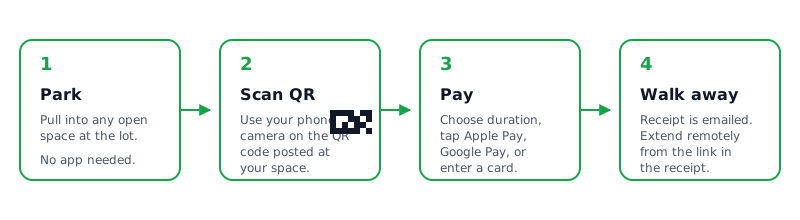
A driver pulls into a Park Graph lot. The only physical thing they see is a yard sign with a large QR code and the lot name, hourly rate, and daily maximum printed clearly beneath the code. They open their phone camera, point it at the QR, and tap the link banner that appears.
The Park Graph payment page loads in their mobile browser in under two seconds. The most prominent buttons are Apple Pay and Google Pay. They tap the wallet button, the phone authenticates with Face ID or fingerprint, and the session is active. The confirmation page becomes a digital pass with a countdown and an extend button.
At no point in this flow does the driver touch lot infrastructure. They never touch a meter, a kiosk, a card reader, or a gate touchpad. They never share a surface with another driver. They never enter a PIN on a shared keypad. The only touch event is on their own phone, which is the same touch surface they use for every other transaction in their life.
For lots with gates, Park Graph integrates with the major gate vendors so the gate opens automatically when the driver pays. Even the gate becomes contactless from the driver's side — they roll up, the camera reads the license plate or the QR redeems the session, and the gate opens.
The phone mockup shows the contactless Park Graph payment page. Apple Pay sits above the fold; Google Pay is rendered the same way on Android. The payment completes in seconds with biometric authentication.
The page is responsive across the entire iPhone and Android device range and is tested weekly against the most popular browsers. WCAG 2.2 AA accessibility is verified on every release.
Drivers who prefer not to use a digital wallet can enter a card number on their own phone — still contactless from the operator's side because the card data never touches lot infrastructure.
Park Graph
Scan QR Code
Point camera at parking sign
Free Starter plan.
Address, capacity, base rate.
Download the print-ready PDF.
Mount at the lot entrance and any pay-station-style location.
Scan with your own phone, pay with Apple Pay.
For drivers without smartphones.
Generate a QR code for your lot. No account required.
QR preview
| Capability | Park Graph | Legacy parking platform | DIY / hardware-based |
|---|---|---|---|
| Touch-free for the driver | Yes (QR + own phone) | Sometimes (driver app) | No (kiosk / meter) |
| Apple Pay + Google Pay | Yes | Sometimes | No |
| WCAG 2.2 AA accessibility | Yes | Vendor-dependent | Often non-compliant |
| Hardware skimmer risk | None (no reader) | Driver-side none | High |
| Setup cost (1 lot) | $0 + sign | $200-$800/mo | $3k-$25k |
| Phone-call fallback | Yes | Sometimes | No |
| Driver app install required | No | Yes | N/A |
| Take rate | 3.3-10% | 5-15% + monthly | Stripe only |
Patients and staff pay on their own phones — no shared kiosk in a healthcare setting.
Healthcare
Phone-call fallback ensures every driver can pay regardless of smartphone access.
Accessibility
Touchscreens fail in winter; QR signs and phones don't.
Climate
High-volume Sunday or event-day parking without queues at a single kiosk.
Civic
Self-park guests pay contactless on arrival; valet folio integrates via the API.
Hospitality
Customers don't share a kiosk surface; revenue settles per anchor tenant.
Retail
Contactless without compromise
Per kiosk replaced
Driver pays on own phone
Tested with assistive tech
0
Driver-side touch surfaces
$0
Hardware required
0%
WCAG 2.2 AA tested
0
AI agent platforms supported
Projected targets reflect 2026+ planning and internal pilot modeling — not live customer outcomes.
Apple Pay + Google Pay tokenization
Card data never leaves the phone.
PCI DSS Level 1 (via Stripe)
Park Graph operates under Stripe's service-provider scope.
WCAG 2.2 AA accessibility
VoiceOver, TalkBack, large text, high contrast tested.
Phone-call fallback
Drivers without smartphones can still pay contact-free.
The calculator below estimates monthly take-home revenue across Starter, Pro, and Enterprise plans for any lot size, hourly rate, occupancy, and operating-hour configuration you choose. Numbers update live as you adjust the inputs.
See how much you could earn with Park Graph.
Projected monthly revenue
$86,400
Starter
Platform cost
$8,640/mo
Your net revenue
$77,760/mo
Pro
Best valuePlatform cost
$4,819/mo
Your net revenue
$81,581/mo
Enterprise
Platform cost
$5,350/mo
Your net revenue
$81,050/mo
Free forever on Starter. Print a sign, post it, accept Apple Pay tomorrow.