Dashboard
Every metric for every lot in real-time
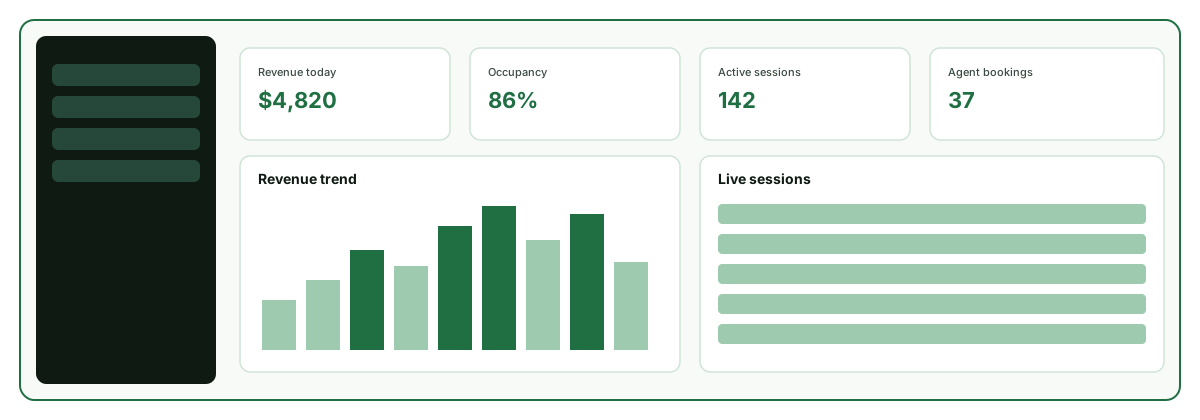
Stop guessing. Start knowing. Park Graph gives you a real-time intelligence dashboard that shows exactly what is happening across every parking space you manage — revenue, occupancy, sessions, and AI agent performance, updated every second. The dashboard is designed for operators who need answers fast, with a keyboard-first interface and instant search across all your data.
Total Revenue
$12,847
Sessions
342
Occupancy
73%
Avg Rate
$8.40
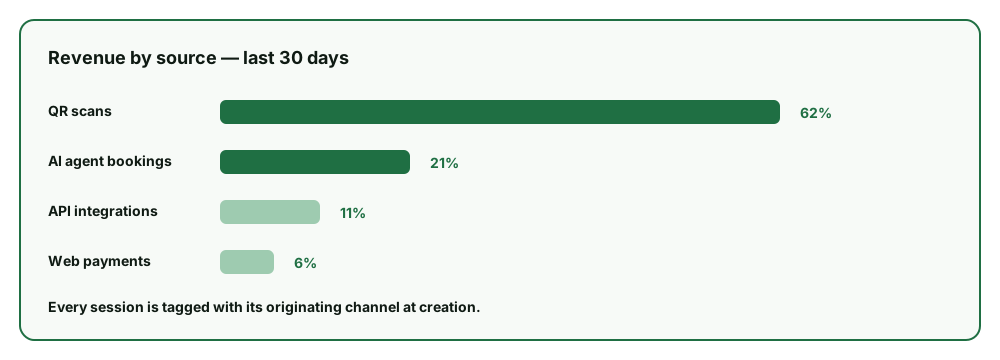
Revenue by source
Revenue intelligence
See exactly where your revenue comes from. Park Graph breaks down every dollar by source: QR code scans, AI agent bookings, API integrations, and web payments. This attribution data helps you understand which channels drive the most value and where to invest. Source attribution is automatic — every session is tagged at creation with the originating channel and platform.
Revenue charts show daily, weekly, and monthly trends with year-over-year comparisons. Identify seasonal patterns, spot underperforming lots, and track the impact of pricing changes in real-time. Every data point uses Geist Mono for precise readability. The area chart component supports stacked views to compare revenue sources side-by-side across any time range.
The dashboard calculates your platform fees, Stripe processing costs, and net owner payout for every transaction. No surprises on your statement. Financial reporting that would take hours with spreadsheets is available instantly with a single click. Export revenue data in CSV or JSON format for import into your accounting software or tax preparation tools.
For multi-lot operators, the portfolio view shows aggregate metrics across all locations with the ability to drill down into any individual lot. Compare occupancy rates, revenue per space, and average session durations across your entire network. Identify which lots consistently outperform and analyze what makes them different — pricing strategy, location characteristics, or traffic patterns.
Revenue data connects directly to your QR payment flow. Every scan, session, and extension is tracked automatically.
How QR payments workOccupancy tracking and forecasting
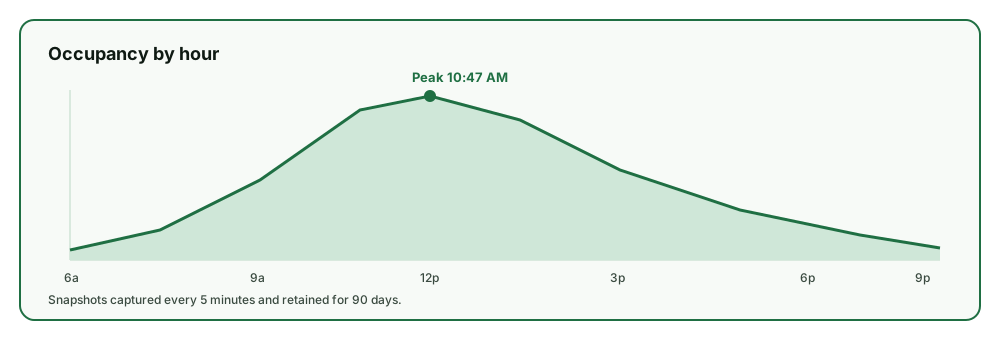
Park Graph tracks occupancy in real-time based on active sessions. Every time a driver starts or ends a session, the occupancy count updates instantly. Historical snapshots are recorded every 5 minutes, giving you granular data for trend analysis. The occupancy bar on each lot card fills from green to amber to red as the lot approaches capacity.
The occupancy timeline shows hour-by-hour patterns over the past 7, 30, and 90 days. Identify your peak hours down to the minute. Know that Tuesday parking peaks at 10:47 AM and drops off sharply at 2:15 PM. Use this data to optimize staffing, pricing, and marketing. Heat map views color-code each hour of each day so patterns are visible at a glance.
When occupancy crosses configurable thresholds (default 85%), Park Graph can automatically trigger surge pricing, send capacity alerts, or update AI agent responses to redirect drivers to nearby lots with availability. This optimization happens without any manual intervention. The threshold is configurable per lot, so a valet-operated hotel garage might use 70% while an open surface lot uses 90%.
Peak occupancy metrics are tracked per lot per day, feeding into your daily statistics and weekly reports. Enterprise operators use this data for capacity planning, expansion decisions, and investor reporting. Historical peak data helps predict demand for upcoming events, holidays, and seasonal changes months in advance.
Everything you need to run a modern parking operation
From QR-based payments to AI agent integrations — Park Graph is the complete infrastructure layer.
QR-based payments
Drivers scan, pay, and park in under 30 seconds. No app download, no account required.
Real-time analytics
Revenue tracking, occupancy heatmaps, source breakdown, and weekly performance reports.
AI agent protocol
Connect to ChatGPT, Claude, Gemini, and every AI assistant through a single API.
Dynamic pricing
Automatic surge pricing based on events, occupancy, time of day, and demand signals.
Enterprise security
Aligned with SOC 2 controls — row-level security, scoped API keys, and comprehensive audit logs.
Universal SDK
REST API, MCP, OpenAI Actions, Gemini Functions — every platform, one integration.
Automated reporting
Park Graph aggregates your data into automated daily and weekly reports delivered to your inbox. Each report includes total revenue, session counts, average duration, occupancy trends, source breakdown, and comparison to previous periods. Daily reports land at 7 AM in your timezone, giving you a snapshot before your workday begins.
Weekly reports highlight actionable insights: which lot had the highest growth, which day of the week underperformed, whether dynamic pricing adjustments had the expected impact, and recommendations for rate optimization. Each recommendation includes the projected revenue impact if implemented, so you can prioritize changes by expected ROI.
For Enterprise operators, Park Graph generates monthly executive summaries with portfolio-wide metrics, competitive intelligence from web crawling, and upcoming event data that may affect parking demand. These reports are formatted for board presentations and investor updates. The executive summary includes year-over-year growth rates, market share estimates, and key performance indicators benchmarked against industry averages.
All report data is accessible through the API, allowing you to integrate Park Graph metrics into your existing business intelligence tools, accounting software, or custom dashboards. Export raw data in CSV or JSON format at any time. Webhook subscriptions can push daily statistics to your data warehouse as they are generated, enabling real-time BI dashboards alongside your other business metrics.
AI agents drive bookings directly into your dashboard. Track which platforms generate the most revenue.
Explore AI agent bookingsCommand palette and keyboard-first interface
The Park Graph dashboard is built for power users. Press Cmd/Ctrl+K anywhere to open the command palette, which gives you instant access to every feature without clicking through menus. Search for lots by name, jump to a specific session by code, open analytics for any date range, or switch between lots — all without reaching for your mouse.
Every data table supports keyboard navigation, column sorting, and inline filtering. The sessions table updates in real-time via WebSocket connections, so you see new sessions appear and active sessions tick down without refreshing the page. Pagination, search, and status filters are all accessible from the keyboard.
The dark-themed dashboard (background #0A0E17) is designed for extended use in both office and on-site environments. High contrast text, generous spacing, and the park-green accent color (#10B981) ensure readability in all lighting conditions. The sidebar collapses on smaller screens and can be toggled with a single click, giving you more space for data when you need it.
Session management and driver activity
The Sessions page gives you a live view of every active, completed, and extended parking session across all your lots. Active sessions show a countdown timer, the driver's payment method type, the authorized amount, and the session code. Completed sessions show the final captured amount, duration, and source attribution.
Filter sessions by lot, status, date range, payment amount, or source. Search by session code to quickly look up a specific driver's session. Each session row expands to show the full timeline: when the QR code was scanned, when payment was authorized, any extension events, and the final capture. This audit trail is essential for resolving disputes and understanding driver behavior patterns.
Session analytics aggregate duration, revenue, and extension frequency into daily and weekly trends. Understand how long drivers typically park at each lot, what percentage extend their sessions, and how much additional revenue extensions generate. This data directly informs your pricing strategy and helps you set optimal default durations for each lot.
The funnel analytics track each step of the driver journey: QR scan, page view, duration selection, payment confirmation, and session completion. See exactly where drivers drop off and identify conversion bottlenecks. For most lots, optimizing the duration selection step alone increases conversion by 10-15% through better default options and clearer pricing presentation.
Alerts, notifications, and team access
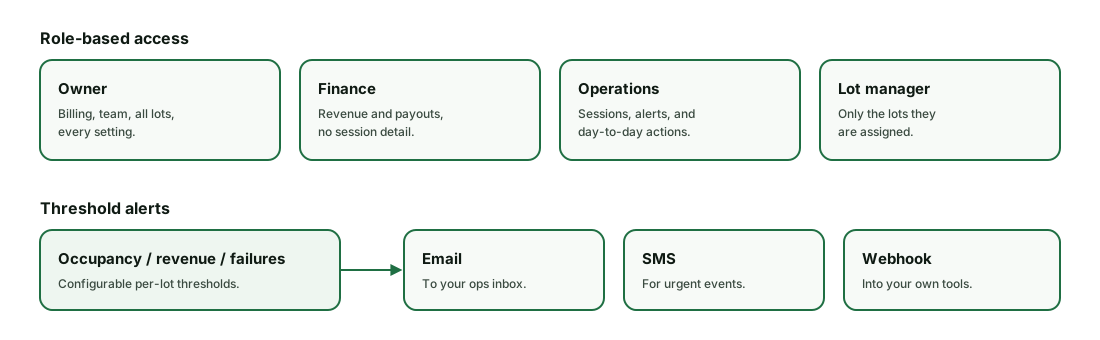
Configure real-time alerts for critical events across your parking portfolio. Set thresholds for occupancy spikes, revenue drops, payment failures, or extended downtime periods. Alerts are delivered via email, SMS, or webhook to your operations team so issues are caught before they impact revenue.
Team members can be assigned role-based access to the dashboard. Lot managers see only their assigned lots. Finance teams get revenue and payout data without session-level detail. Operations staff have full access to session management and alerts. Owner accounts control all settings, billing, and team membership. Each role is configurable to match your organizational structure.
The activity feed on the dashboard home page shows a chronological stream of all events across your lots: new sessions, payments processed, sessions extended, alerts triggered, and team actions. This feed provides at-a-glance situational awareness without needing to drill into individual lot pages. Filter the feed by lot, event type, or time range to focus on what matters most.
See your parking data in real-time
The dashboard is available on all plans. Upgrade to Pro for advanced analytics and automated reports.