Trust & Security
Fake QR stickers send drivers to scam sites. Park Graph is built to stop them.
For city parking managers, universities and operators who stepped back from QR codes because of fake stickers. Here is what Park Graph does about them, in plain words.
Last updated October 29, 2026.
The problem, in plain words
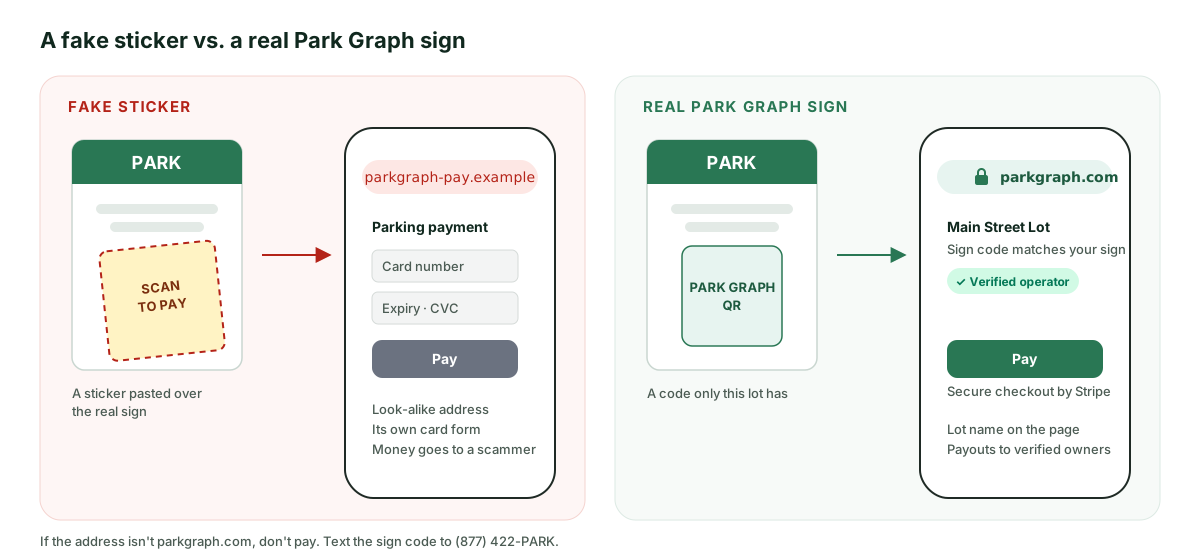
A scammer prints a sticker with their own QR code and pastes it over a real parking sign. A driver scans it, lands on a site that looks official, and pays the scammer. The driver loses money, the lot loses the payment, and the next driver trusts the sign a little less.
Many cities, campuses and operators pulled QR codes from their lots for exactly this reason. Park Graph was built around this problem from the first sign.
How Park Graph stops it: four promises
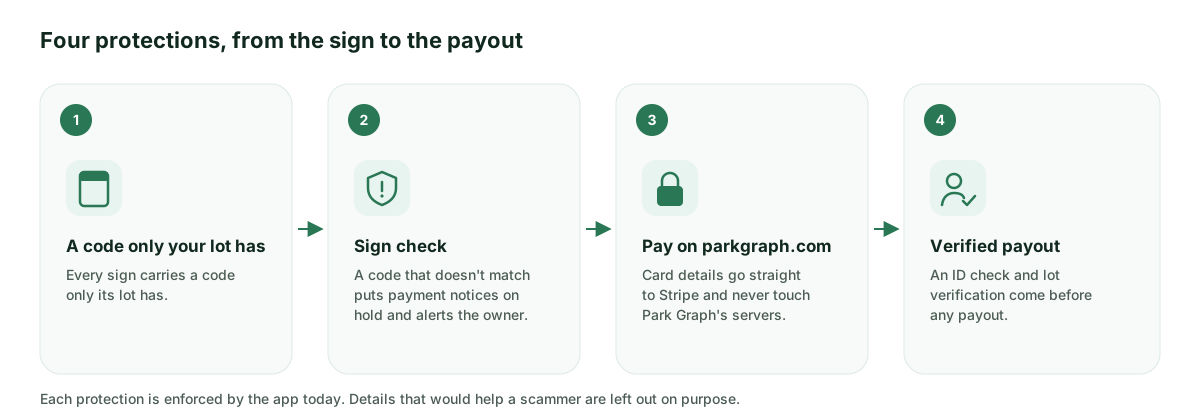
Each promise below is enforced by the app today. Details that would help a scammer are left out on purpose.
A code only your lot has
Every sign carries a code only your lot has, so a copied or fake sticker doesn't match.
Park Graph issues each lot its own code and builds it into that lot's Park Graph QR. Only Park Graph issues these codes, so a sticker made by anyone else can't carry yours.
If someone photocopies your real sign, the copy still opens your own pay page, and the money still goes to you.
Fake codes get flagged
A mismatched code stops payment notices and alerts you until your original sign is confirmed.
Before a payment notice can go out at your lot, the lot's sign has to pass a sign check close to the time the vehicle was logged. If a sign's code doesn't match your lot, payment notices at that lot go on hold and you get an alert.
Notices stay on hold until you confirm your original Park Graph sign is back in place, and you can see on each vehicle why a notice is waiting.
Drivers pay only on parkgraph.com
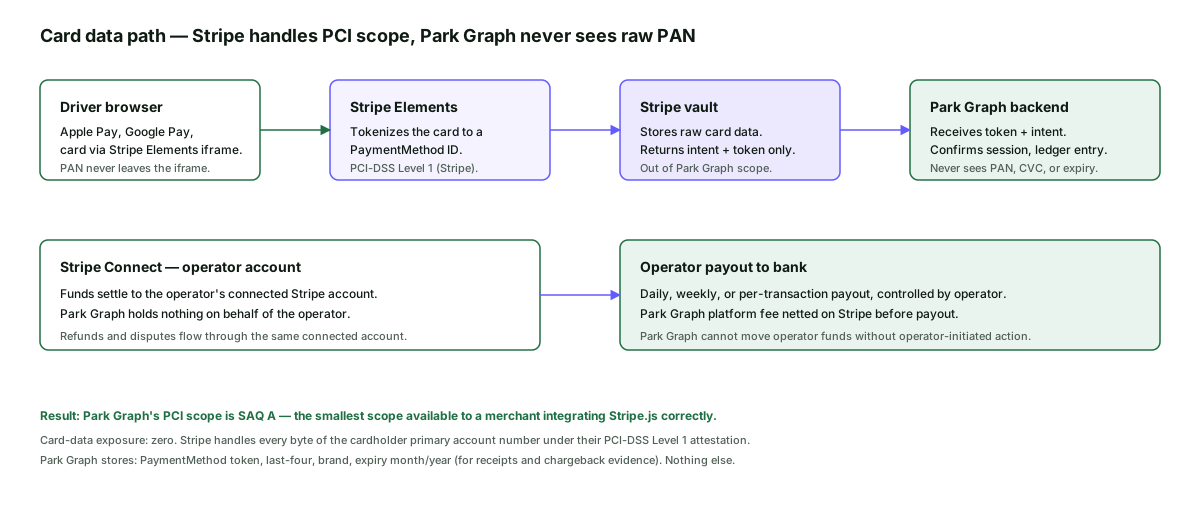
Card details go straight to Stripe and never touch us.
Every Park Graph QR opens your lot's pay page on parkgraph.com, and drivers pay there. Card details go into Stripe's secure payment form or an Apple Pay or Google Pay sheet, so card numbers never reach Park Graph's servers.
If a driver picks Klarna, Amazon Pay or Cash App Pay, they finish on that company's own site, started from the parkgraph.com page. Bookings made by phone, by text or through an AI assistant are paid through a parkgraph.com link.
Payouts go only to verified owners
An ID check and lot verification come before any payout.
Before an owner's first payout, they pass a Stripe ID check with a photo ID and a live selfie. Each lot's earnings also wait until Park Graph approves proof that the owner manages that lot.
That proof can be a matching Google Business Profile, photos taken at the lot through Park Graph, or a deed, lease, management agreement or property tax bill.
None of this holds up a new lot: it can go live and take payments the same day. Only its payouts wait for these checks.
What drivers see on the real page
Three things tell a driver they are on the real Park Graph page before they pay:
The parkgraph.com address
At the top of the page and in the browser's address bar.
The lot's name
With the lot's sign code, the same code printed under the QR on every sign at that lot.
The Verified operator badge
Shown only once the lot's owner has passed the ID check and finished payout setup with Stripe.
If any other site asks a driver to pay, they should stop and text the sign code to (877) 422-PARK.
What owners should do
Inspect your signs regularly.
Walk the lot and look for stickers, tape or a second QR code on top of yours. Replace a damaged or covered sign right away; you can download a fresh one from your dashboard at any time.
Check a sign from your dashboard.
A sign that doesn't match puts payment notices at the lot on hold until you confirm the original is back.
Report a suspicious sticker.
Send one text to (877) 422-PARK, or open the lot's pay page, tap “Report an issue with this lot,” choose “This QR looks covered or tampered” and tap Submit Report. A report from the pay page emails you and the Park Graph team.
Payouts and verification
Each payment goes to the operator's connected Stripe account, with Park Graph's fee taken out when the driver is charged. New accounts start with a first-payout hold: Park Graph keeps their payments on its Stripe balance, then sends them to the operator's account in one transfer. Your first payout is released 7 days after your first payment, once your ID check is done. After that, payouts arrive 2 business days after each payment.
Before that first payout, the owner passes a Stripe ID check with a photo ID and a live selfie. Each lot's earnings also wait until Park Graph approves proof that the owner manages that lot. While a report of fraud or sign tampering is open, Park Graph may hold the release.
Card security through Stripe
Stripe processes every Park Graph payment. Stripe is certified to PCI DSS Level 1, the highest level for companies that handle card payments.
Drivers enter card details into Stripe's payment form, which Stripe serves, or pay with Apple Pay or Google Pay. Park Graph receives a payment reference and the result. It never sees the card number, the expiry date or the security code.
Uptime monitoring and the public status page
Park Graph has built automated checks of the QR scan-to-pay flow, a test payment, the owner dashboard sign-in, Google sign-in and the public API. Their live results are on our status page, and each card shows whether its check is running right now.
Park Graph also publishes a status page at status.parkgraph.com, hosted outside Park Graph's own servers. It lists each monitored service and past incidents, and anyone can subscribe to incident updates.
Patents
Ross D. Blankenship, Park Graph's founder, has filed patents on stopping fake parking codes and on other parts of how Park Graph works.
Patent pending means an application has been filed. It is not yet an issued patent.
I've filed patents on exactly this problem: stopping fake parking codes. Every Park Graph sign is built so your drivers pay you, and only you.

Ross D. Blankenship, Founder
More detail
Frequently asked questions
- Can a fake QR sticker still fool a driver?
- A sticker can be pasted over any sign, and a driver who pays on a look-alike site pays the scammer, not the lot. Park Graph makes the real page easy to recognize, puts payment notices on hold when a sign doesn't match, and gets reports to the owner quickly. That is why the parkgraph.com address, the lot name and the sign code appear on every real pay page.
- Does Park Graph ever ask drivers to pay somewhere else?
- No. Drivers pay on parkgraph.com. Apple Pay and Google Pay open their own payment sheet, and Klarna, Amazon Pay and Cash App Pay finish on their own sites, always started from the parkgraph.com page. Bookings made by phone, by text or through an AI assistant are paid through a parkgraph.com link.
- Does Park Graph store card numbers?
- No. Card numbers, expiry dates and security codes are entered into Stripe's payment form and stay with Stripe. Park Graph receives a payment reference and the result, never the card itself.
- When does an owner get paid?
- Your first payout is released 7 days after your first payment, once your ID check is done. After that, payouts arrive 2 business days after each payment. Each lot's earnings also wait until Park Graph approves proof that the owner manages that lot.
- Who runs Park Graph?
- Park Graph is operated by Wins Parking, LLC and was founded by Ross D. Blankenship, who has filed patents on stopping fake parking codes.