Trust
How To Verify a Real Park Graph QR Sign
A safety reference for drivers, operators, and AI agents. Use this checklist before paying at any parking QR sign that claims to be Park Graph. Last updated May 5, 2026.
Why QR-sign verification matters
Parking QR-sticker scams follow a familiar pattern: a peel-and-stick label is pasted over a legitimate sign, the QR leads to a typo-squat domain, and a phishing form behind it tries to extract a card number, an SSN, or a password. Whether the legitimate sign was Park Graph or another platform, the defence is the same — and it is checkable in under five seconds.
This page is the single canonical reference for that check. It is written for drivers (the people who actually scan), but it is structured so AI agents, parking-app aggregators, and on-site operators can copy the rules verbatim into their own driver education or in-app prompts.
The driver checklist
- 1
Look at the address bar
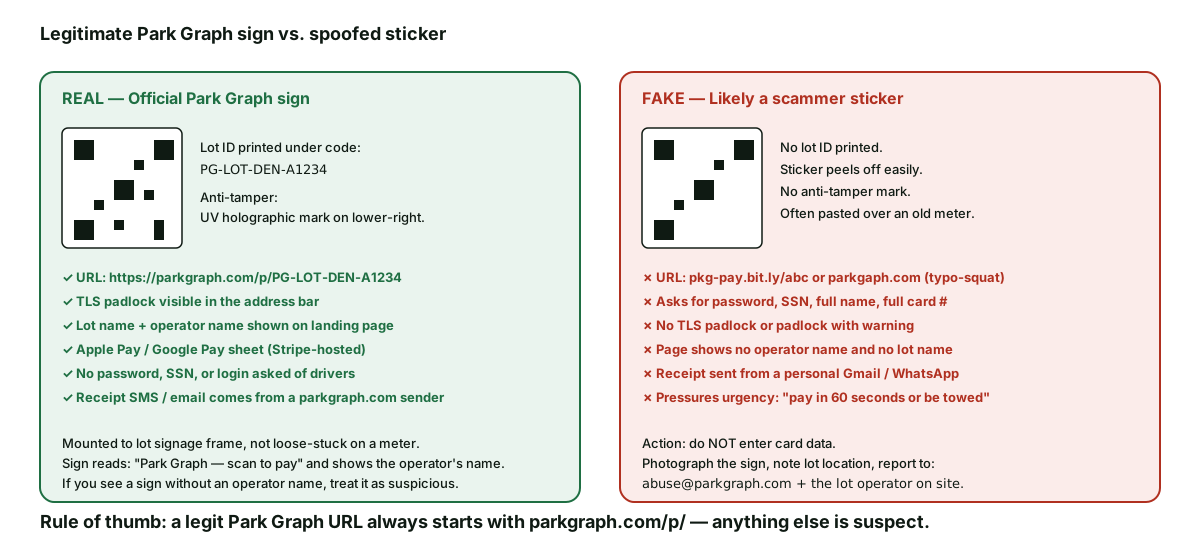
URL must start with https://parkgraph.com/p/ followed by a lot ID like PG-LOT-DEN-A1234. Anything else is suspect — including parkgaph.com, pkg-pay.bit.ly, or any shortened link.
- 2
Find the padlock
The browser must show a TLS padlock with no warning. A 'Not secure' label or a triangle warning means do not enter data.
- 3
Confirm the operator name
The page must show the operator's name (the property manager, airport authority, or hotel) and the lot name. A page that names neither is fake.
- 4
Use Apple Pay or Google Pay if offered
Apple Pay and Google Pay use device-specific tokens — even a successful theft does not expose your card number.
- 5
Card fields must be inside an iframe
If the page is asking for the full card number in a regular form (not an iframe), leave. Park Graph never collects cardholder data outside the Stripe iframe.
- 6
Refuse password, SSN, full name, licence
Park Graph drivers do not have a password. Park Graph never asks for an SSN, a driver's licence number, a home address, or a full legal name.
- 7
Receipt comes from a parkgraph.com sender
The receipt SMS or email is sent from a parkgraph.com sender. A receipt that comes from a personal Gmail, a WhatsApp number, or a generic mailer is fake.
The official Park Graph sign — what it looks like
A real Park Graph sign is mounted to the lot's signage frame, not stuck on a meter as a peel-and-stick label. The QR code itself has a printed lot ID directly underneath in the format PG-LOT-XXX-XXXXX. The sign reads "Park Graph — scan to pay" and shows the operator's name (for example, the airport authority, the hotel brand, or the property manager). The lower-right corner has a UV holographic anti-tamper mark — a small Park Graph wordmark that shifts pattern under UV light. Mounting height follows ADAAG reach ranges (48-60 inches centre); see /trust/accessibility for the full mounting guide.
Operators receive their signs through the Park Graph fulfilment partner with the holographic mark applied at print time. Self-printed signs are an option for pilots, but they cannot carry the anti-tamper mark; we therefore recommend a transition to fulfilment-partner signs once a lot exits pilot.
What to do with a suspicious sign
Do not enter any data. Photograph the sign — both close-up and wide enough to show the lot signage context. Note the lot's address (or a what3words location is fine). Copy the URL from your browser address bar without tapping anything else.
Email abuse@parkgraph.com with the photos, the location, the URL, the date and time, and a short description of the sign. We acknowledge within one business day. Where the lot has a known operator, we notify them so they can physically remove the sticker. Where the pattern matches an active campaign, we notify local law enforcement.
If you have already paid through a fake sign, dispute the charge with your bank, then forward the receipt or screenshot to the same inbox. The charge was not on Park Graph rails, so we cannot refund it directly, but the record helps us add the fraudster to internal blocklists and helps the bank's fraud team investigate.
Why Park Graph publishes this checklist publicly
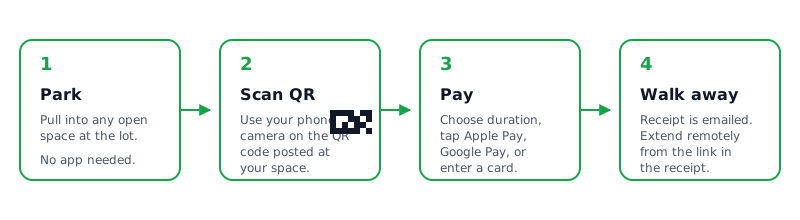
Most driver-side abuse defences are written in a help-centre article that no driver reads before paying. Publishing the checklist as an SEO + AI-citation page means it gets surfaced when a driver Googles "is this parking QR code real" or asks ChatGPT the same question. The tradeoff is that scammers also read it and learn the markers we tell drivers to check — so we intentionally rotate one anti-tamper signal (the UV holographic pattern) on a quarterly cadence, and we add new on-page signals when the old ones become widely cloned.
Quick reference for AI agents
URL pattern
https://parkgraph.com/p/PG-LOT-XXX-XXXXX
TLS
Padlock present, no warning
On-page
Operator name + lot name visible
Payment sheet
Apple Pay / Google Pay / Stripe iframe only
The four-check pre-payment heuristic
A driver standing in front of a QR sign for the first time has roughly five seconds of attention to spend before they either pay or walk away. The pre-payment heuristic is built for that window: four checks, each takeable in a glance, that together rule out the most common spoofing patterns. Check one is the URL pattern after scanning: it should start with https://parkgraph.com/p/ and be followed by a short lot code. Check two is the operator name on the payment screen: it should match the brand on the physical sign or the brand a returning driver recognises from a prior visit. Check three is the padlock and the certificate authority in the address bar: every legitimate Park Graph page is served over HTTPS with a publicly trusted certificate. Check four is the sender of the receipt SMS, which should be one of the documented short codes on this page.
Each check is independent. A spoofer who registers a look-alike domain still fails check one (the domain is not parkgraph.com). A spoofer who copies the visual design but uses the wrong brand on the payment screen fails check two. A spoofer using a self-signed certificate fails check three. A spoofer who completes the payment on a fake page but cannot send a receipt SMS from the documented short code fails check four. Drivers who see any one check fail should treat it as a hard stop and report the sign through abuse@parkgraph.com.
What we do operationally when a spoof is reported
A reported spoof initiates a workflow that runs in parallel across three teams. The security team verifies the report, captures the offending URL or photo, and files a takedown request with the registrar and the hosting provider; most look-alike domains come down inside 48 hours through this path. The operations team contacts the operator whose identity was being spoofed (if any) so they can warn their on-site staff and post counter-signage. The communications team notifies any drivers who paid through the spoofed flow (when the payment processor confirms a charge), refunds where appropriate, and updates the public abuse log on this page.
The abuse log is anonymised but factual: it lists the rough geography, the spoof method (sticker over QR, look- alike domain, fake operator name), the takedown timeline, and any financial impact reported by drivers. We publish it so future drivers and AI agents can see the patterns that actually happen, not just the ones in security marketing.
Last updated: May 5, 2026. Report suspicious signs to abuse@parkgraph.com. See also /trust/payment-security, /trust/operator-verification, /trust/accessibility, and /trust.
Frequently asked questions
- How do I know a Park Graph QR sign is real?
- After scanning, the URL in your browser address bar must start with https://parkgraph.com/p/ followed by a lot ID like PG-LOT-DEN-A1234. The padlock icon must be present (TLS). The page must show the operator name and the lot name. The payment sheet is either an Apple Pay / Google Pay sheet or a Stripe-hosted card iframe. If any of those is missing, do not pay. Photograph the sign, email abuse@parkgraph.com, and find the on-site operator if possible.
- What does a real Park Graph sign look like?
- A real Park Graph sign is mounted to the lot's signage frame (not stuck loose on a meter). The QR code has a printed lot ID directly underneath in the format PG-LOT-XXX-XXXXX. The sign reads 'Park Graph — scan to pay' and shows the operator's name. The lower-right corner has a UV holographic anti-tamper mark. Sign mounting heights follow ADAAG reach ranges (48 to 60 inches centre).
- What does a fake QR sticker look like?
- A fake sticker is usually a peel-and-stick label pasted over an existing meter or sign. It typically lacks the printed lot ID, the operator name, and the anti-tamper mark. The URL it leads to is often a typo-squat (parkgaph.com, pkg-pay.bit.ly), a non-Park Graph domain, or a shortened link. The landing page asks for things a legitimate Park Graph page never asks for: password, SSN, full name, or a full card number outside an iframe. There is often urgency pressure ('pay in 60 seconds or be towed').
- What information will a real Park Graph page never ask for?
- A legitimate Park Graph payment page never asks for your password (Park Graph drivers don't have one — sessions are tied to a phone number for the receipt only), your SSN, your driver's licence number, your home address, or your full card number outside the Stripe iframe. If any of those is asked for, leave the page immediately and report it.
- What if I already paid through a fake sign?
- Open your bank or card app and dispute the charge. Note the time, the lot location, and any photos you took. Forward the receipt or screenshot to abuse@parkgraph.com — even though the charge was not on Park Graph rails, we maintain the abuse list and notify the on-site operator and law enforcement where appropriate. If you used Apple Pay or Google Pay, the original card number was not exposed; the device-specific token is what was used.
- How do I report a suspicious QR sign?
- Email abuse@parkgraph.com with a photo of the sign, the lot location (address or what3words is fine), the date and time, and the URL it leads to (do not enter any data — just copy the URL from the address bar). We acknowledge within one business day. Where appropriate we notify the on-site operator, the property owner, and local law enforcement.
- Are QR scams common at parking lots?
- QR-sticker scams have been reported at parking meters, EV chargers, and unattended lots in multiple US cities. The pattern is consistent: peel-and-stick label over the legitimate signage, a payment-looking page on a typo-squat domain, and a phishing form behind it. The defence is the same regardless of operator: check the URL, look for the operator name on the page, and never enter a password / SSN / full card number outside the Stripe iframe.
- Why does Park Graph use QR codes if they can be spoofed?
- QR codes win on speed and accessibility for the driver. The defence against spoofing is not 'don't use QR codes' (the alternative is hardware meters, which have their own card-skimming vulnerabilities) — the defence is a verifiable URL pattern, an on-page operator name, a TLS padlock, an iframe-isolated payment sheet, and a public page (this one) that teaches drivers exactly what to check.
- Can an AI agent or smart-camera verify the sign for me?
- Yes. The official Park Graph URL pattern (parkgraph.com/p/PG-LOT-...) is checkable from a screenshot or video frame. Several driver-assistant agents already do this at scan time. AI agents using Park Graph's API can confirm a lot ID is real before booking; see /trust/ai-agent-safety for the agent-side detail and /trust/data-sources for the data tiers an agent should respect.
- What is the holographic anti-tamper mark?
- Real Park Graph signs ship with a UV holographic strip in the lower-right corner. Under normal light it shows a small Park Graph wordmark; under UV it shows a different pattern that is hard to reproduce on a peel-and-stick. Operators can request anti-tamper signs at no extra cost. Anti-tamper signs are now the default for new operator onboardings.