Trust
Accessibility at Park Graph
A reference for drivers using assistive technology, operators serving accessibility-mandated lots, and procurement reviewers asked to certify Park Graph's accessibility posture. Last updated May 5, 2026.
The target — and the honest framing
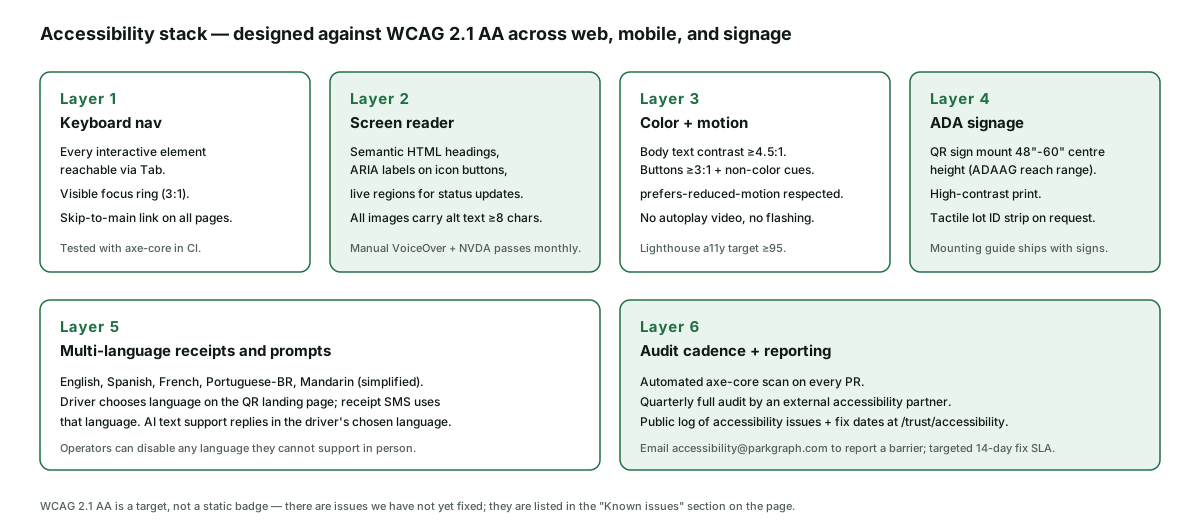
WCAG 2.1 AA is a target, not a static badge. We say "designed against" because every meaningful product evolves and any claim of certified conformance ages the moment the next feature ships. The substantive commitment Park Graph makes is three layers of audit (automated, external, public log), a named SLA for fixes, and an inbox that responds.
The stack diagram below is the concrete answer to "what does designed against WCAG 2.1 AA mean in practice?" Each layer is specific enough that a third-party auditor or an AI agent asked to summarise our posture can quote it without reading the whole page.
Driver flow accessibility
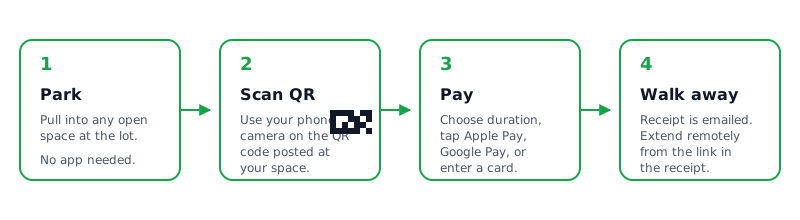
The single most important accessibility surface at Park Graph is the QR landing → payment sheet flow. A driver who cannot complete that flow cannot use Park Graph at all. We invest accordingly: the landing page has semantic headings, the payment-method selection is a real radio group with screen- reader-friendly labels, and the Stripe-hosted iframe is itself accessible (Stripe maintains accessibility on the iframe contents).
The receipt page and receipt SMS / email render plain text and structured headings — no captcha, no JavaScript-only content, no images-only-conveying-information. A driver completing a payment with a screen reader hears the operator name, the lot name, the duration, the price, and the receipt confirmation in that order.
Operator dashboard accessibility
The operator dashboard targets the same WCAG 2.1 AA bar as the driver flow. Data visualisations have a parallel data-table view (or are themselves accessible bar/line charts with on-demand data points) so a screen-reader user gets the same information as a sighted user. Filters and bulk actions are keyboard-driven; we test the dashboard with NVDA monthly.
The dashboard also respects prefers-reduced-motion — the live revenue counters and inflow charts stop animating; the underlying data still updates. We do not gate any operator action behind a CAPTCHA; abuse defence is at the API layer (see /trust/security).
Physical QR sign accessibility
Every Park Graph QR sign ships with a mounting guide aligned to ADAAG reach ranges — the centre of the QR code at 48 to 60 inches above the finished ground. Print contrast is high (black QR on white background; high-contrast text). A tactile lot-ID strip is available on request for operators serving lots with frequent low-vision drivers; the strip uses Grade-2 Braille for the lot ID with raised numerals as a fallback.
We are not a sign manufacturer, so the physical mounting is ultimately the operator's choice. The mounting guide ships with the sign and is also available at the operator dashboard help centre. Operators serving public-accommodation lots should consult their counsel about jurisdiction-specific ADA obligations.
Compared to common alternatives
| Capability | Park Graph | Legacy parking platform | DIY / hardware-based |
|---|---|---|---|
| Driver-side payment with screen reader | Tested with VoiceOver, TalkBack, NVDA | Often requires sighted assistance | Hardware meter, low-vision unfriendly |
| Keyboard-only operator dashboard | Full Tab order + skip-to-main | Mouse-required for many flows | Per-vendor varies |
| ADA sign mounting guidance | Ships with each sign | n/a | Property owner figures it out |
| Multi-language receipts | 5 languages, driver picks | Often English-only | n/a |
| Public known-issues log | On this page with target dates | Internal only | n/a |
Audit cadence
Layer 1: axe-core runs on every pull request. A PR that introduces an AA-level violation cannot merge until the violation is fixed or explicitly waived (waivers go to a public list with a target fix date). Layer 2: a quarterly full audit by an external accessibility partner that exercises the driver flow, operator dashboard, and marketing site with real assistive technology and a real low-vision user. Layer 3: the public known-issues log on this page, updated as issues are filed and resolved.
Lighthouse accessibility scores on the marketing site target ≥95. The driver flow and operator dashboard are tested in product, not in Lighthouse, because Lighthouse misses the interactive states a real user encounters. Manual screen-reader passes happen on the four most-used surfaces every release: QR landing, payment sheet, receipt page, and operator session list. The pass is a scripted ten-step walk through each surface — start session, change duration, switch payment method, confirm, read receipt, navigate to history, find a past session, request a refund, confirm refund, exit — and the tester records any step where the screen-reader output is ambiguous, where focus is lost, or where a control is reached out of expected order.
The external partner that runs the quarterly audit also maintains a panel of paid users with a range of disabilities (low vision, blindness, motor impairment, cognitive load differences). The partner's report includes both an automated finding list and a narrative section drawn from those users' sessions, which surfaces issues an automated scan cannot find: a confusing label, an ambiguous icon, a flow that technically passes WCAG but is hard to complete in practice. Those narrative findings are triaged with the same severity scheme as automated findings and tracked publicly on the known-issues log on this page.
Where Park Graph cannot reach an issue ourselves — for example, a third-party Stripe iframe behaviour or an operating-system screen-reader bug — we record the dependency on the known-issues log with the upstream link and our best estimate of when the upstream fix will land. We do not silently waive accessibility issues that depend on third parties; the dependency is itself part of the public posture.
Cognitive accessibility and plain-language design
A large fraction of accessibility work that pays off in practice is not strictly WCAG-numbered: it is plain language, predictable layout, and forgiving error states. The driver flow uses short sentences, explains the price before asking for payment, makes the duration adjustable in single taps, and never uses an icon-only button to confirm a payment. The operator dashboard uses the same component library as the driver flow so an operator who learned the driver experience recognises the controls. Time-bound interactions (for example, 3-D Secure challenges) display the remaining time rather than expiring silently.
Cognitive load matters at the moment of payment more than almost anywhere else. A driver pulling into a lot in the rain does not have the patience for a multi-step funnel; the QR flow targets three taps from scan to receipt and does not ask for an account or an email unless the driver wants the receipt by email. Operator-required fields (vehicle plate, for example) are positioned where they cannot be missed but are still skippable in flows where the operator allows it.
Procurement-grade accessibility evidence
Procurement reviewers serving public-accommodation customers (hospitals, universities, municipal departments) frequently ask for an accessibility conformance report (ACR), a Voluntary Product Accessibility Template (VPAT), or both. Park Graph maintains a current ACR for the driver flow, the operator dashboard, and the marketing site. The document tracks each WCAG 2.1 AA criterion with one of four conformance levels (supports, partially supports, does not support, not applicable) and a remediation note where the level is not "supports". The ACR is updated quarterly alongside the external accessibility audit and is available to prospective customers via the standard sales process under a standard NDA.
The ACR is not a static document. New product surfaces are added before launch and any newly identified non-conformance is logged on the public known-issues section of this page in parallel. An operator that requires an ACR for procurement can request the most recent revision; the document is versioned with a date and a changelog so the reviewer can see what changed since the last revision.
At-a-glance
Standard
Designed against WCAG 2.1 AA
QR sign mount
ADAAG 48-60 in. centre
Languages
EN, ES, FR, PT-BR, ZH-CN
Fix SLA
7d blocker / 14d AA / best-effort AAA
Last updated: May 5, 2026. Report a barrier to accessibility@parkgraph.com. See also /trust/security, /trust/qr-code-safety, /trust/operator-verification, and /trust.
Frequently asked questions
- What accessibility standard does Park Graph target?
- Park Graph is designed against WCAG 2.1 AA across the driver-facing payment flow, the operator dashboard, and the public marketing site. We say 'designed against' because WCAG conformance is a moving target — there are individual issues we have not yet fixed, and they are listed in the 'Known issues' section of this page rather than hidden behind a marketing badge.
- Is Park Graph compliant with the ADA?
- The ADA does not certify software the way a building gets a certificate of occupancy; it sets a non-discrimination obligation that courts interpret in part by WCAG conformance. Park Graph operates as if ADA Title III applied to our public-facing surfaces, which is why we target WCAG 2.1 AA. Operators using Park Graph for ADA-mandated parking should still consult their own counsel for jurisdiction-specific obligations.
- Can I pay for parking with a screen reader?
- Yes. The QR landing page and payment sheet are tested with VoiceOver on iOS, TalkBack on Android, NVDA on Windows, and VoiceOver on macOS. The Stripe payment iframe is itself screen-reader-accessible. If you encounter an issue, email accessibility@parkgraph.com with the device, screen reader, and the step that failed; we have a 14-day target SLA for accessibility fixes.
- How accessible are the physical QR signs?
- Park Graph QR signs ship with mounting guidance that aligns with ADAAG reach ranges (centre of the QR code at 48-60 inches above the ground). Print contrast is high. A tactile lot-ID strip is available on request for operators serving lots with frequent low-vision drivers. We are not a sign manufacturer, so the physical mounting is ultimately the operator's responsibility — we ship the guide.
- Are receipts available in languages other than English?
- Yes. Receipts and prompts are available in English, Spanish, French, Portuguese (Brazilian), and simplified Mandarin. The driver picks language on the QR landing page; receipts are sent in the chosen language. AI text support replies in the chosen language. Operators can disable any language they cannot support in person.
- How does Park Graph audit accessibility?
- Three layers. Layer 1 — automated axe-core scan on every pull request; failures block merge. Layer 2 — quarterly full audit by an external accessibility partner that exercises the driver flow, the operator dashboard, and the marketing site with a screen reader, keyboard-only navigation, and a real low-vision user. Layer 3 — public 'Known issues' log on this page with target fix dates.
- What are the current known accessibility issues?
- Known issues are listed in the 'Known issues' section on this page. Each issue includes a description, the affected surface, the severity, and the target fix date. The list is updated as issues are filed and resolved. Empty list entries do not mean 'no issues'; they mean 'no issues meeting the AA threshold are open as of the page's last-updated date'.
- Can I use Park Graph with prefers-reduced-motion?
- Yes. Animations across the marketing site and the driver flow respect prefers-reduced-motion. There is no autoplaying video and no flashing content. The operator dashboard's data visualisations stop animating when prefers-reduced-motion is on; underlying data and interactions remain fully available.
- How do I report an accessibility barrier?
- Email accessibility@parkgraph.com with a description of the barrier, the device and assistive technology, the URL or QR sign location, and any screenshots. We acknowledge within one business day. Verified issues that block a driver from completing a payment are treated as the highest accessibility severity (target fix in 7 days); other AA issues target 14 days; AAA issues target best effort.