Trust
Park Graph Status & Incident Communication
A reference for operators, drivers, AI agents, and procurement reviewers asking how Park Graph communicates degradations. Last updated May 5, 2026.
Why this page is honest about being in progress
A status page that publishes a "99.x% uptime" number on day one without a measured history is the most common credibility violation in trust documentation. Park Graph chose the harder path: publish what we can verify, label what is in progress, and add the measured uptime number when it actually means something.
That means today the status page surfaces classification plus a manual incident log; the rolling-window uptime number lights up once the public history backfill is complete. The plumbing (synthetic checks, real-user telemetry, Stripe webhook health, notification fan-out) is already in place; what is being built is the public-facing presentation of the historical record.
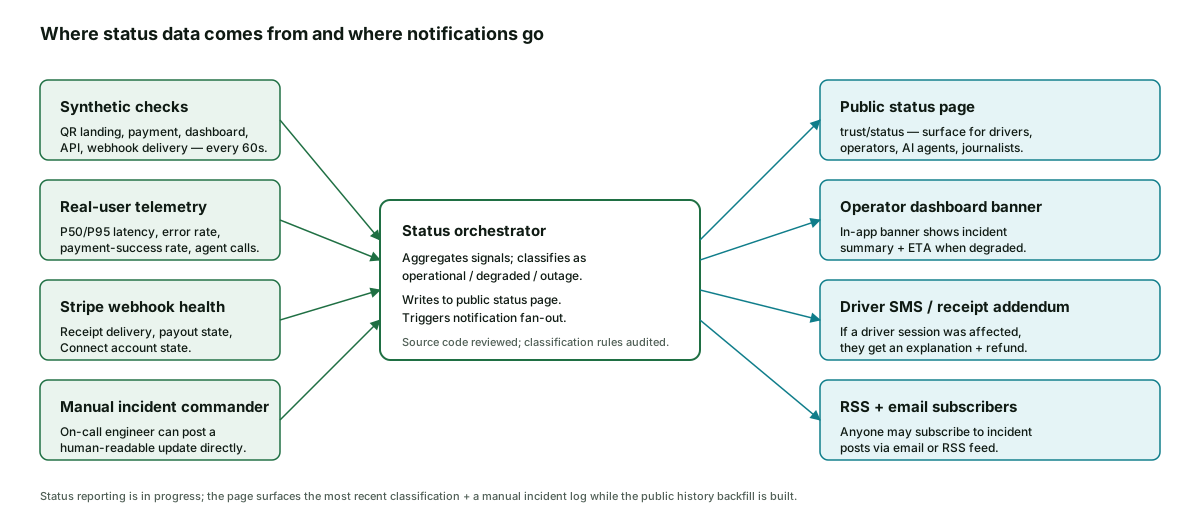
The four signal sources
Synthetic checks run from multiple regions every 60 seconds against the QR landing flow, payment flow, dashboard, public API, and webhook delivery. Each check measures availability and latency; sustained failure on any check raises an alert and updates the per-surface classification.
Real-user telemetry covers what synthetic checks cannot — the actual P50/P95 latency, error rate, and payment-success rate a user experiences from their device. The orchestrator weights real-user signals heavier than synthetic when the two disagree, because what a user actually sees is the ground truth.
Stripe webhook health is its own signal because payment receipt delivery depends on Stripe webhooks reaching us quickly. A Stripe webhook backlog manifests as delayed receipts, which is a real driver-facing degradation even when the rest of the system is operational.
The on-call engineer can post a manual update at any time. A known maintenance window, a confirmed regional issue, or a third-party outage that does not yet show in the synthetic signal can all be communicated proactively.
How an incident progresses
- 1
Detection
Synthetic check fails or real-user error rate crosses threshold. The on-call engineer is paged.
- 2
Status flip — within 15 minutes
Public status page updates to 'investigating' with the affected surface(s).
- 3
Operator notification
Operator dashboard banners appear on every page; subscribed operators get SMS for outages.
- 4
Driver-side communication
Drivers whose sessions were affected get a receipt addendum at session-end time, or sooner if the session is mid-flight.
- 5
First customer summary — within 60 minutes
A short, non-technical post on the status page describes what users are experiencing and what we are doing.
- 6
Resolution + cleanup
Status returns to 'operational' with a brief resolution note. Banner clears. Receipt addenda update.
- 7
Public post-mortem — within 5 business days
For any incident that affected payments or driver-facing flows, root cause + blast radius + corrective actions are published.
Notification channels
Operators get the in-app dashboard banner automatically. They can also opt into SMS for outage-class incidents by adding a phone number in their notification settings. The dashboard banner clears the moment the orchestrator classifies the surface as operational again.
Drivers do not subscribe to anything; if their session was affected, the receipt thread carries the explanation and any refund. AI agents using the API can subscribe to a status webhook so a degraded payment surface can route to a fallback (for example, surfacing an in-person operator phone number) rather than failing silently.
Anyone can subscribe to email updates from the status page or to the RSS feed at status.parkgraph.com/feed.xml. The feed is public and unauthenticated.
Post-mortems and what they include
A Park Graph post-mortem is structured the same way every time: a one-paragraph customer-impact summary at the top (what users saw, when, on which surface), a timeline (detection, escalation, mitigation, resolution), a root-cause section (what failed and why), a blast-radius section (which users, which sessions, which payments), and the corrective actions with target dates.
Post-mortems are blameless in tone but specific in mechanics — we do not redact the technical detail just because it shows the failure was a foot-gun in our own architecture. The point of the post-mortem is to make the next incident of the same shape impossible, which requires being honest about the shape of this one.
Status posture summary
Synthetic checks
Every 60 s, multiple regions
First update
Within 15 min of detection
Public post-mortem
Within 5 business days
Channels
Dashboard banner, SMS, email, RSS, webhook
What the status page reports today, and why it stops short of an uptime number
The current status page reports three things in real time. It reports the live classification of each platform surface (driver web flow, operator dashboard, public API, marketing site) as operational, degraded, or outage. It reports the active incidents, with a description, a start time, and a most-recent update. And it reports the resolved incidents from the last 30 days, each linked to its post- mortem entry. What it does not yet report is a fixed numerical uptime over a defined window. That number is in progress and will be added once the public history backfill completes; in the meantime we would rather show no number than a fabricated one.
The reason the page is built that way is that uptime numbers are easy to manipulate and hard to audit from the outside. A vendor can quietly redefine the surfaces that are measured, exclude classes of incident from the calculation, or pick a measurement window that flatters the number. None of those tactics are available to a status page that reports raw incidents and lets the reader calculate uptime themselves. Once the public backfill is complete, the rolling 30-day, 90-day, and 365-day uptime will be reported alongside the raw incident log so any reader who wants to check the math can do so.
Subscriber experience and incident communication
Subscribers to the status page receive notifications via three channels: an email per incident, an RSS feed for machine consumption, and a webhook for operators that want to ingest incident events into their own monitoring stack. A new incident triggers an initial notification within 15 minutes of internal detection; subsequent updates follow on a cadence that depends on severity (critical: every 30 minutes, high: every 2 hours, medium: every 4 hours). A resolved-incident notification includes the time-to-detect, time-to-mitigate, and a link to the post-mortem when available.
Post-mortems are published within 10 business days of incident resolution and follow a fixed format: incident summary, customer impact, timeline, root cause, contributing factors, action items, and what we got right. The format is stable on purpose — readers (especially procurement reviewers) want to compare across incidents without relearning a layout each time.
Last updated: May 5, 2026. Subscribe to the status page for live updates. For incident communication questions, email security@parkgraph.com. See also /trust/security, /trust/payment-security, /trust/operator-verification, and /trust.
Frequently asked questions
- What is the current Park Graph status?
- Status reporting is in progress — the public status page is being backfilled with measured uptime windows. In the meantime, the orchestrator publishes the live classification (operational, degraded, or outage) plus a manual incident log. For real-time updates, subscribe to the email or RSS feed described later on this page; for historical incidents, the post-mortem index is the source of record.
- Why does Park Graph not publish a 99.x percent uptime number?
- Because we do not yet have a public history long enough to back a number like that honestly. Publishing a fabricated uptime is the kind of credibility violation the rest of these trust pages are meant to prevent. Once the public status history backfill is complete, the status page will surface a real measured uptime over rolling 30-, 90-, and 365-day windows.
- What signals feed the status page?
- Four sources. Synthetic checks hit the QR landing flow, payment flow, dashboard, public API, and webhook delivery every 60 seconds from multiple regions. Real-user telemetry tracks P50/P95 latency, error rate, and payment-success rate from actual sessions. Stripe webhook health is monitored separately because payment receipt delivery depends on it. And the on-call engineer can post a manual update at any time when human judgment is needed.
- How quickly will I hear about an incident?
- Within 15 minutes of detection, the public status page is updated to 'investigating'. Within 60 minutes (or sooner) we publish an initial customer-facing summary. After resolution, we publish a public post-mortem within 5 business days for any incident that affected payments or driver-facing flows. Operators with incident notifications enabled get an in-app banner immediately on classification change.
- How do drivers find out an incident affected their session?
- If a driver session was affected by a confirmed incident, they receive an SMS or email addendum on their receipt explaining what happened, how it affected them, and any refund. The receipt link itself shows the addendum. Drivers do not have to subscribe to anything; the notification follows the receipt thread.
- Where is the operator-side incident notification?
- The operator dashboard shows a banner at the top of every page when the platform is degraded or in outage, with the incident summary, the affected surface, and the ETA to resolution if known. The banner clears when the orchestrator returns to operational. Operators can opt into an SMS notification for outage-class incidents by adding a phone number to the dashboard's notification settings.
- Are post-mortems public?
- Yes for any incident that affected payments or driver-facing flows. The post-mortem includes root cause, blast radius, the customer-impact summary, and the corrective actions with target dates. We publish them within 5 business days of resolution. Internal-only incidents (a build failure, a temporary CI degradation) do not get a public post-mortem.
- How can I subscribe to status updates?
- Three options. Email — subscribe at the status page; you'll get an email per status change for the surfaces you select. RSS — the status feed is at status.parkgraph.com/feed.xml. Webhook — verified API consumers can subscribe to status events programmatically; see /developers. Operators get the in-app banner regardless.
- What does each status classification actually mean?
- Operational — all monitored surfaces (QR landing, payment, dashboard, API, webhook delivery) are returning expected results within the latency budget. Degraded — at least one surface is returning expected results outside the latency budget, or a non-critical surface is failing. Outage — at least one critical surface is failing for a meaningful share of users. The classification per-surface is shown next to the overall status.
- What happens during a Stripe outage?
- Stripe is the payment processor; if Stripe is degraded, payment success rate drops and we will reflect that on the status page with a link to Stripe's own status page. Driver receipts may be delayed; operator payouts may be delayed by Stripe's standard schedule. Park Graph cannot complete a payment if Stripe cannot; what we can do is communicate clearly and credit any platform-fee losses on our side.
- Does Park Graph honour an SLA?
- Enterprise plan operators can negotiate a written SLA with named availability targets and remedy credits as part of their contract. The default plans do not include a contractual SLA — partly because we are still building the public history that an honest SLA depends on. Once the status history is fully backfilled, default-plan SLAs will be added with the same credit-on-failure mechanism.
- How is the status orchestrator itself protected from a single point of failure?
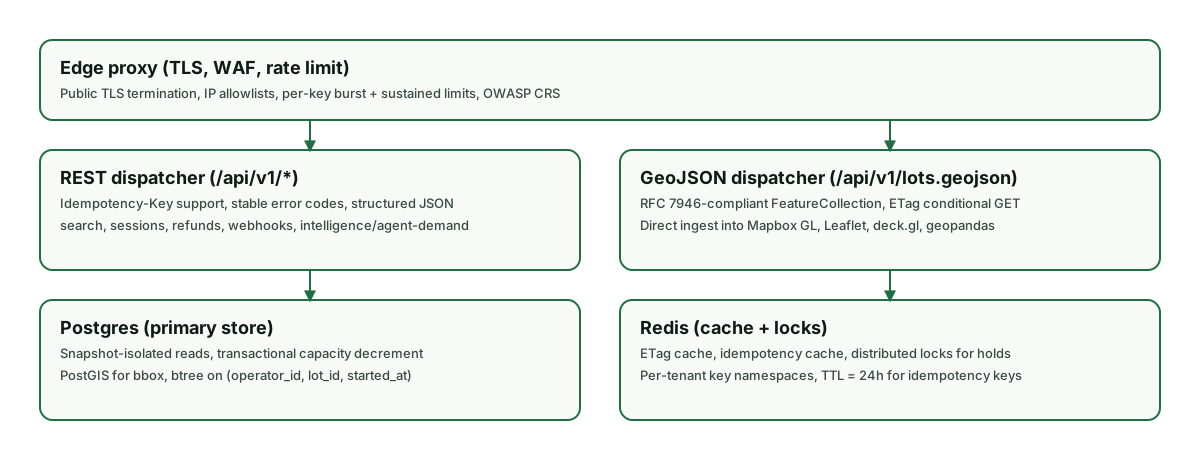
- The orchestrator is hosted on infrastructure independent of the main application; an outage in the application stack does not silence the status page. Synthetic checks run from regions outside the application's primary region. The on-call engineer can post a manual update from a phone if the dashboard itself is unreachable. The architecture diagram on this page shows the data flow.