Trust
Payment Security at Park Graph
A reference for procurement teams, accountants, and AI agents asked to explain Park Graph's payment posture. Last updated May 5, 2026.
Where card data goes (and where it doesn't)
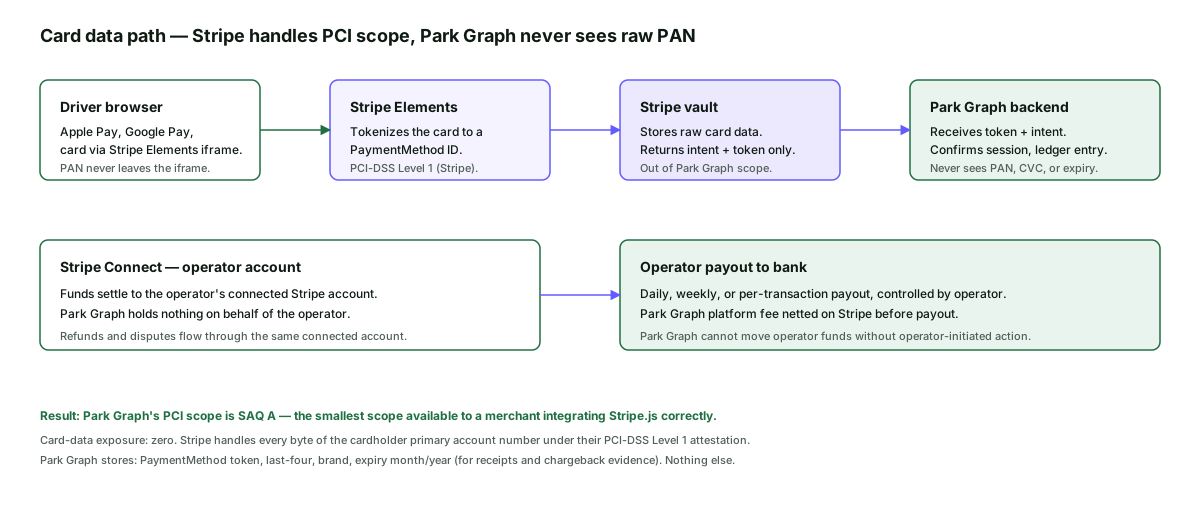
The single most important fact on this page: Park Graph does not touch the cardholder primary account number. Card data leaves the driver's browser inside an iframe served by Stripe, gets tokenized at Stripe, and only the resulting token reaches Park Graph. The diagram below shows every actor in that flow and who sees what.
Doing it this way is not a marketing posture; it is a deliberate architecture choice that shrinks our PCI scope to SAQ A — the smallest scope a merchant can occupy. SAQ A is what allows us to publish this page without an attestation report attached; Stripe, who sits in the cardholder-data path, holds PCI-DSS Level 1 for that scope on our behalf.
What Park Graph stores about a payment
The complete list of payment-adjacent fields Park Graph stores per session is short on purpose: PaymentMethod token, card brand, last four digits, expiry month and year, amount, currency, operator account ID, lot ID, session start and end, and the audit-log entries that ledger the booking and the settlement. There is no field anywhere that holds the full PAN or the CVC; there is no intermediate log line that captures either; the database column does not exist.
That short list is enough to render a receipt, support a chargeback defence, and reconcile a payout. It is not enough for any kind of card cloning or account takeover; even a successful exfiltration of the entire payments table would not give an attacker a usable card number.
Operator funds — Stripe Connect
Park Graph uses Stripe Connect's standard accounts. When an operator onboards (see operator verification), they create a Stripe-hosted Connect account and complete Stripe's identity, business, and bank-account verification. Funds from each driver session settle directly to that connected account; Park Graph nets the platform fee on Stripe.
The architectural consequence is that Park Graph cannot move operator funds. We cannot pull funds back to a Park Graph balance, we cannot redirect a payout, and we cannot change the payout bank account. Operators retain control of their money and of their refund policy. This is also why Park Graph does not publish a "we hold your funds for X days" policy — we don't hold them at all.
Refunds, disputes, and chargebacks
Refunds are operator-initiated (from the dashboard) or driver-requested (from the receipt link, subject to operator policy). Either way, they run through Stripe and reach the original payment method. Park Graph never initiates an out-of-band ACH for a refund.
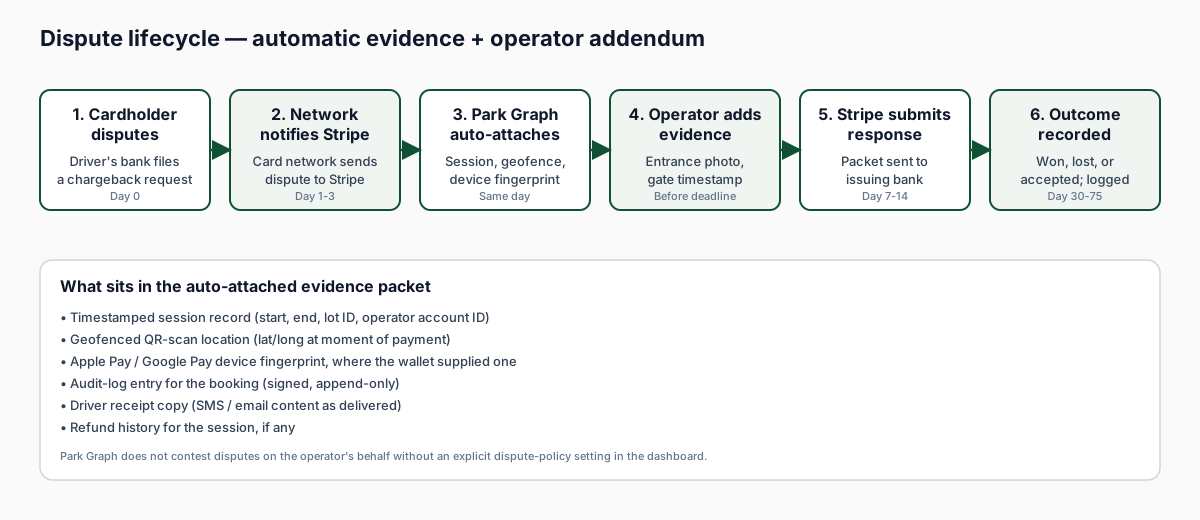
Disputes are issued by the cardholder's bank through the card network. Park Graph automatically attaches the standard dispute-evidence packet: timestamped session record, geofenced QR scan location, device fingerprint where Apple Pay or Google Pay was used, the audit-log entry for the booking, and the driver receipt. Operators can add additional evidence (entrance photo, gate timestamp) before the network's deadline. Stripe submits the response. Park Graph does not contest disputes on the operator's behalf without an explicit dispute-policy setting. The diagram below shows each stage of the lifecycle and the typical timing.
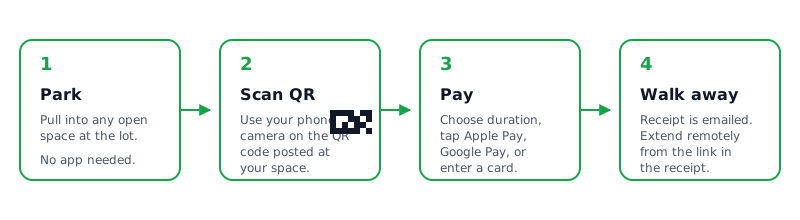
How the flow looks in practice
- 1
Driver scans QR sign
Camera opens parkgraph.com/p/PG-LOT-XXXX. Park Graph reads the lot ID, fetches lot pricing, and renders the payment sheet.
- 2
Apple Pay / Google Pay sheet appears
If the device has Apple Pay or Google Pay, that's offered first. Otherwise the Stripe Elements card iframe renders. Card fields live inside the iframe — Park Graph never sees keystrokes.
- 3
Stripe tokenizes
Stripe issues a PaymentMethod ID. Park Graph receives the token, brand, last four, expiry month/year. Nothing else.
- 4
Park Graph confirms the session
Backend writes a session ledger entry, fires the driver receipt, updates the operator dashboard.
- 5
Stripe Connect settles to the operator
Funds land in the operator's connected Stripe account on the operator's payout schedule. Park Graph platform fee is netted on Stripe before payout.
- 6
Refund or dispute (if needed)
Refunds initiated from the operator dashboard or the driver receipt link run through Stripe. Disputes auto-attach the session evidence packet for the operator's response.
Driver-side guarantees
A driver paying through a Park Graph QR sign should expect a few things, all of which are checkable on the page that loads: a parkgraph.com/p/ URL, the TLS padlock in the browser address bar, the operator name and lot name visible above the payment sheet, an Apple Pay or Google Pay sheet (or Stripe Elements card fields inside an iframe), and a final receipt sent from a parkgraph.com sender. If a "Park Graph" page asks for a password, an SSN, a full name, or a full card number outside an iframe, treat it as a fake. See QR code safety for the full driver checklist and the report inbox.
What Park Graph does not claim
We do not claim that Park Graph itself is "PCI compliant" in any unqualified sense. Stripe holds PCI-DSS Level 1 for the cardholder-data path; our scope is SAQ A. We do not claim a fixed payment uptime number — payment availability is a dependency on Stripe's uptime, which Stripe publishes themselves. The Park Graph status page surfaces our portion of the payment path (Park Graph backend + webhook delivery) plus the upstream Stripe status when degradation is observed.
We also do not represent ourselves as a money-services business. Park Graph is the technical platform; Stripe is the payment processor; the operator is the merchant of record on their own connected account.
Why Stripe Connect, not a payment aggregator
A common alternative to the Stripe Connect architecture used here is a payment aggregator: the platform takes the driver's payment into its own merchant account, then pays out the operator on a separate schedule. Aggregator architectures are simpler in some respects but they create a fundamentally different trust posture. The aggregator holds the driver's funds, controls when the operator gets paid, decides on chargeback losses, and carries the merchant relationship with the card networks. Park Graph chose Stripe Connect specifically to avoid that posture: the operator is the merchant of record on their own connected account, holds their own funds, and runs their own payout schedule from their own Stripe dashboard.
Architecturally the consequences are concrete. Park Graph cannot freeze an operator's funds. Park Graph cannot delay an operator's payout. Park Graph cannot decide whether to refund a session over the operator's objection (operators set the refund policy in the dashboard). The trade-off is that operators carry a small amount of additional onboarding work — a Stripe Connect account, a verified bank account, an identity verification — but the trade buys them custody of their money and a direct relationship with the payment processor. That is the trade we made and that is the trade the payment-security page documents.
Summary controls
PCI scope
SAQ A — Stripe handles cardholder PAN
Card data stored
Token, brand, last four, expiry month/year
Funds custody
Operator's connected Stripe account
Dispute evidence
Auto-attached session packet
Last updated: May 5, 2026. Email security@parkgraph.com for payment-security questions. See also /trust/security, /trust/qr-code-safety, /trust/operator-verification, and /legal/refunds.
Frequently asked questions
- Does Park Graph store credit card numbers?
- No. Park Graph never sees a raw card number. Cardholder data is captured inside the Stripe Elements iframe in the driver's browser and tokenized by Stripe before it leaves. Park Graph only receives a PaymentMethod token, the brand (Visa, Mastercard, etc.), the last four digits, and the expiry month and year. Those are stored to render the receipt and to defend a chargeback. Nothing else.
- What is the Park Graph PCI scope?
- Park Graph's PCI scope is SAQ A — the smallest scope available to a merchant integrating Stripe.js correctly. We do not handle, transmit, or store cardholder primary account numbers. Stripe handles the full card-data path under their PCI-DSS Level 1 attestation. We do not represent ourselves as PCI Level 1 or PCI compliant in any other sense.
- What payment methods does Park Graph accept?
- Apple Pay, Google Pay, all major credit and debit cards (Visa, Mastercard, American Express, Discover), and a small set of regional methods where the operator opts in. Apple Pay and Google Pay are presented first because they are faster for the driver and have the lowest dispute rates.
- Who holds the funds — Park Graph or the operator?
- The operator. Funds settle to the operator's connected Stripe account, not to a Park Graph balance. Park Graph cannot move funds out of an operator's connected account; the operator controls payout schedule, payout bank account, and refund policy from their own Stripe dashboard. Park Graph nets the platform fee on Stripe before payout — no separate invoice and no holding period.
- How do refunds work?
- Drivers can request a refund from the receipt link they receive at session end. Operators can issue full or partial refunds from the operator dashboard. The refund flows through Stripe back to the original payment method. Park Graph never moves money outside the Stripe rails — there is no bank-account ACH initiated by Park Graph for a refund.
- How are disputes (chargebacks) handled?
- Stripe issues the dispute through the standard card-network process. Park Graph automatically attaches the dispute evidence the operator needs: the timestamped session record, the geofenced location, the Apple Pay / Google Pay device fingerprint where available, the audit log of the booking, and the driver's receipt. The operator can add their own evidence (entrance photo, gate timestamp) before the deadline. Park Graph does not contest disputes on the operator's behalf without an explicit dispute-policy setting.
- What does Stripe see vs what does Park Graph see?
- Stripe sees the full card number, CVC, and expiry — they are PCI-DSS Level 1 specifically because they need to. Park Graph sees the resulting PaymentMethod token, the brand, the last four digits, the expiry month and year, the amount, the currency, the operator account, and the lot identifier. That is the complete list. There is no intermediate logging of the full card number.
- Are receipts sent securely?
- Yes. Receipts are sent by SMS to the phone number entered by the driver and by email if an email is provided. Both contain a signed, expiring link to the full receipt page hosted on parkgraph.com. The receipt page does not include any cardholder data beyond brand and last four. The signed link expires after 90 days; after that, the receipt is still available from the operator dashboard.
- Can an AI agent pay for a session on behalf of the driver?
- Yes, but only with explicit per-session driver consent and a hard amount cap that the driver sets in the agent UI. Each agent payment is logged with the agent identifier, the consent token, and the cap. See /trust/ai-agent-safety for the full permission model.
- How does Park Graph protect against payment fraud?
- Stripe Radar runs on every transaction. Park Graph adds session-level signals (lot proximity from the QR scan, device fingerprint, repeat-offender list maintained internally). Suspicious sessions are challenged with 3-D Secure where the issuer supports it. Persistent fraud signals trigger an account-level review and, if warranted, a temporary payouts pause — see /trust/operator-verification.
- What is the operator payout schedule?
- The default payout schedule for new operators is T+2 (funds available two business days after the session). Established operators can request daily, weekly, or per-transaction payouts via the Stripe dashboard. Park Graph does not hold operator funds beyond the standard Stripe rolling reserve, which Stripe sets per account based on dispute risk.