Tutorials
Step-by-step guides to help you get the most out of Park Graph.
Set up your first lot
Create your account, add a lot, generate a QR code, and collect your first payment.
Configure dynamic pricing
Set up peak hour multipliers, weekend rates, and occupancy-based surge pricing.
Connect your Stripe account
Link your Stripe Express account to receive direct payouts from parking sessions.
Upload a custom logo
Add your brand logo to QR codes for a professional, branded parking experience.
Manage multiple lots
Set up and manage a portfolio of lots with different pricing, features, and configurations.
Set up event surge pricing
Configure automatic price adjustments for events near your parking lots.
Generate API keys
Create API keys with specific scopes and rate limits for custom integrations.
Read your analytics dashboard
Understand every metric in your dashboard — revenue, occupancy, sessions, and sources.
Set up webhook notifications
Receive real-time notifications when sessions start, end, or payments are processed.
How to use these tutorials
Each tutorial is a focused, self-contained walkthrough of one Park Graph workflow. They are tagged by difficulty — Beginner, Intermediate, and Advanced — and by the time it takes to complete them, so you can pick the right one for where you are. If you are brand new, work through the Beginner tutorials in order: they build on each other and take you from an empty account to a live, revenue-generating lot. More experienced operators can jump straight to the Intermediate and Advanced guides to unlock pricing automation and developer integrations.
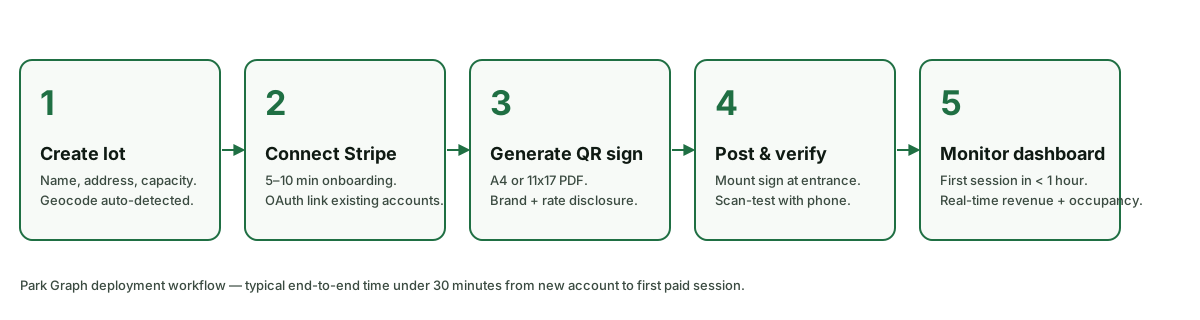
Foundations: get your lot live
The foundational tutorials cover the essentials every operator needs. Set up your first lot walks through creating an account, adding a lot, generating a QR code, and collecting your first payment. Connect your Stripe account shows how to link a Stripe Express account so payouts flow directly to your bank. Upload a custom logo adds your brand to QR codes and driver-facing pages, and Read your analytics dashboard explains every metric — revenue, occupancy, sessions, and sources — so the numbers actually mean something.
Pricing and scale
Once your lot is earning, the Intermediate tutorials help you grow. Configure dynamic pricing covers peak hour multipliers, weekend rates, and occupancy-based surge. Set up event surge pricing shows how rates can adjust automatically around events near your lots, and Manage multiple lots explains how to run a portfolio of lots — each with its own pricing, features, and configuration — from a single dashboard.
Developer and integration tutorials
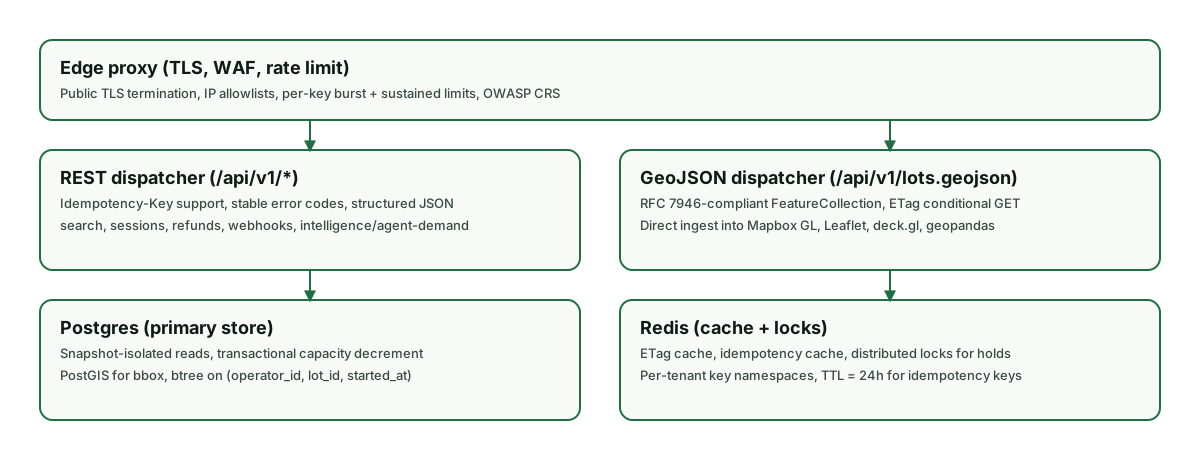
The Advanced tutorials are for operators and developers building on top of Park Graph. Generate API keys covers creating keys with specific scopes and rate limits for custom integrations, and Set up webhook notifications shows how to receive real-time events when sessions start, end, or payments are processed. These integrations are also what make your lots discoverable and bookable by AI agents through Park Graph's public API, MCP server, and ChatGPT Actions.
Tips for following along
The tutorials are designed to be done with your dashboard open in another tab. Because Park Graph is hardware-free, there is nothing to install — every step happens in software, so you can follow a walkthrough and apply it to a real lot in the same sitting. If you do not have a lot set up yet, start a free account first; the Beginner tutorials assume you can create one as you go. Each guide calls out which plan a feature requires, so you will always know whether something is available on Starter or needs Pro or Enterprise.
We keep the tutorials current as the product evolves, and we add new ones in response to what operators ask about most often. If there is a workflow you would like covered that is not here yet, let us know through the Contact page. And when you want the bigger picture behind a how-to — why dynamic pricing works the way it does, or how AI agents discover parking — the Blog and the Help Center are good companions to these step-by-step guides.
Ready to start?
Create your free account and follow along with these tutorials.