Support
Park Graph Customer Support
A person answers. Texting is the fastest way to reach us, for drivers at a lot and for owners setting one up.
Text or call
(970) 279-1744
- Texts
- Every day, 7 am to 9 pm Mountain Time
- Calls
- Monday to Friday, 8 am to 6 pm Mountain Time
Parking right now? Text your plate and the lot name. We can find your session, resend a receipt, or add time while you wait.
Top 10 answers
What drivers and lot owners ask us most, answered in full.
Drivers
I paid but never got a receipt. What do I do?
Receipts go to the email or phone number you typed at checkout, so check spam and your messages first. If it is not there, text (970) 279-1744 with your plate and the lot name and we will resend it. Your parking is paid either way; the lot sees your plate as paid.
How do I add more time?
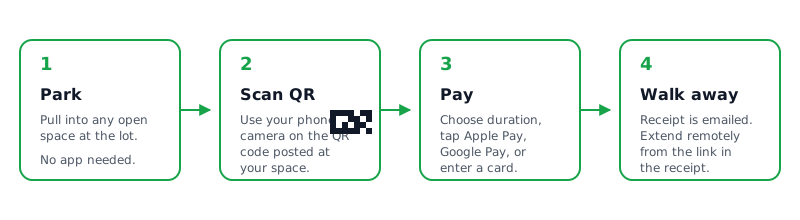
Open the link in your receipt, or scan the sign again, and choose Extend. If you gave a phone number for texts, we send a reminder 15 minutes before your time runs out with a one-tap link to extend.
I see two charges, or the amount looks wrong.
Your bank may briefly show a hold for the time you picked; it settles to the final amount. If a charge still looks wrong after a day, text (970) 279-1744 or email support@parkgraph.com with the last four digits of your card. Refunds go back to the same card and show up in 5 to 10 business days.
Do I need an app or an account?
No. Scan the QR sign, enter your plate, and pay with Apple Pay, Google Pay, or a card. Nothing to download and no password to remember.
Lot owners
How do I add a lot?
Your first lot takes about two minutes: type the address, set an hourly rate, and you get a QR sign. After that, use Add lot on the Lots page, or Add several lots to paste a list.
Add a lotWhen do I get paid?
Your first payout arrives 7–14 days after your first payment. That is Stripe's standard for new accounts. After that, payouts follow your plan's schedule. Verified lots are paid 2 business days after each payment.
How payouts workWhat does Park Graph cost?
Starter has no monthly fee. Park Graph keeps a small fee from each payment: Starter 10% (minimum $0.75), Pro 5% (minimum $0.25), or Enterprise 3.3% (minimum $0.10). Standard Stripe card processing applies on top, shown line by line in your dashboard.
Why does my sign say PREVIEW?
Signs carry a PREVIEW mark until the lot is live: payouts connected in Stripe and the lot active. Once both are done, download the signs again and the mark is gone. The QR code itself never changes.
Get your QR signsA sign is damaged or won't scan.
Print a new one from Signs in your dashboard. Each lot keeps the same QR code, so a replacement works the moment it goes up. Use the 18 × 24 in size for entrances drivers see from a car.
How do I refund a driver?
Open the lot, go to Sessions, find the payment by plate or time, and choose Refund. The driver gets the money back on their card in 5 to 10 business days, and Park Graph's fee on it is refunded too.
Setup guides
The four steps between signing up and your first paid session.
- 01Add a lotAddress, rate, sign. Your first lot takes about two minutes.
- 02Get your QR signsDownload, print, and post one at every entrance.
- 03How payouts workDrivers pay, Stripe pays you. Here is when and how.
- 04What drivers seeScan, plate, pay. No app, no account.
Help us help you faster
Drivers: include your plate, the lot name, and roughly when you paid. If it is about a charge, add the last four digits of the card. Lot owners: include the lot name or address and what you were trying to do. A screenshot helps when something looks wrong. We never ask for a full card number or your password, by text, phone, or email.
If payments seem down everywhere, check system status; we test the scan-to-pay flow every minute. Longer reads live in the Help Center, pricing details on Pricing, and developers can start with the API docs.