Free calculator
Parking lot revenue calculator: estimate daily, monthly, and annual revenue
Last updated: . Every calculation runs entirely in your browser; nothing is sent to our servers unless you opt in to email your result.
How parking lot revenue is actually calculated
Every parking lot revenue projection starts with the same four levers: how many spaces you have, how often each one is occupied, what you charge when it is occupied, and how many hours per day you operate. Multiply those four numbers and you have your gross hourly revenue ceiling. The difference between an honest projection and a fantasy projection lives entirely in how realistic your occupancy and rate assumptions are — not in any clever modeling.
The calculator above defaults to 50 spaces, $8 per hour, 65% occupancy, and 12 operating hours per day. Those numbers are reasonable for a downtown commuter lot in a second-tier US city. If you operate a stadium lot, you probably have 90%+ occupancy on event days and 5-10% on non-event days — model both scenarios separately rather than averaging them, because the revenue distribution is bimodal and a flat average will hide enforcement risk.
Once you have your baseline, you can layer in two of the most consequential modern revenue levers: dynamic pricing and AI-agent discoverability. Dynamic pricing means your rate floats with demand instead of staying flat at $8 all day. The data is unambiguous — flat-rate lots leave money on the table during peak hours and chase customers away during slow hours. AI-agent discoverability is newer but growing fast; when ChatGPT or Gemini suggests parking to a driver, lots that publish structured data get recommended while lots that don't are invisible to that channel entirely.
Reading the calculator output
The four cards at the top — Daily, Weekly, Monthly, Annual — are gross revenue projections at the inputs you provided. These are the numbers to put on a pro-forma. Annual revenue is calculated as 52 × weekly, not 365 × daily, so a lot that closes on Sundays correctly drops 1/7 of revenue rather than 0.
The middle row shows three uplift scenarios. With dynamic pricing assumes you switch from a flat rate to a demand-following rate that targets ~80% occupancy. With AI agent bookings assumes you publish your lot to Park Graph's AI-readable feed and become discoverable via ChatGPT, Gemini, Claude, and the other major assistants. Combined potential multiplies the two lifts because they target different demand pools — dynamic pricing optimizes the customers you already get, while AI bookings bring new customers who would otherwise have parked elsewhere.
The bottom row compares net revenue across the three Park Graph plans. Net revenue equals gross revenue minus the monthly subscription minus the per-session platform fee. The plan highlighted in green is whichever one yields the highest net at your input volume. For lots under ~$8K gross monthly, Starter usually wins. Above ~$15K, Pro pulls ahead because the lower per-session fee outweighs the subscription.
When to trust the projection — and when not to
Revenue calculators are useful for three things: sizing a business case, qualifying a lot for acquisition, and explaining the upside to a partner who isn't in the weeds on parking economics. They are not useful for precise budgeting — the inputs are too coarse and the month-to-month variance in real-world parking revenue is too high. A lot near a stadium can swing 4× between game weeks and bye weeks; an airport lot can swing 2× between summer travel season and February.
Use this calculator to ask "is this lot in the right ballpark?" If the projection says $25K monthly and your gut says $5K, one of you is badly wrong and worth investigating before you sign a lease or order signage. If the projection says $25K and your gut says $20-30K, the lot is well-modeled and you can move into operations planning with confidence.
For acquisitions and refinances, lenders typically want a trailing-twelve-month actuals statement, not a calculator output. The calculator is best used as a sanity checkagainst the actuals — if the seller's claimed revenue is well above what the inputs would predict at any reasonable occupancy assumption, ask why. The most common answer is that the seller is reporting gross-of-tax or including unrelated revenue (valet tips, EV charging) in the parking number.
Five revenue levers most operators underprice
Beyond the three inputs in the calculator, there are five operational levers that materially change a parking lot's revenue and that most operators leave on the table. We mention them here because they don't show up explicitly in the formula but they shape the inputs you'd enter.
Enforcement consistency. A lot where roughly three in ten cars park without paying loses the same share of receipts at every price point. Switching from honor-box collection to license-plate-recognition (LPR) enforcement typically recovers 15-25% of leakage in the first 60 days. That is effectively free revenue — it shows up as occupancy that was already happening, just unpaid.
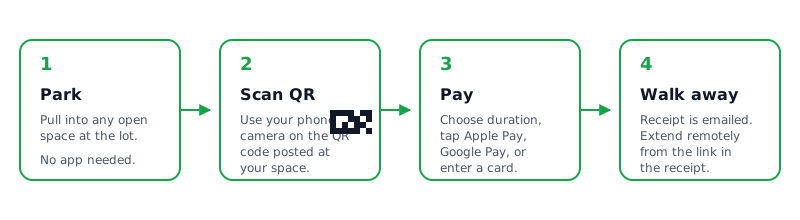
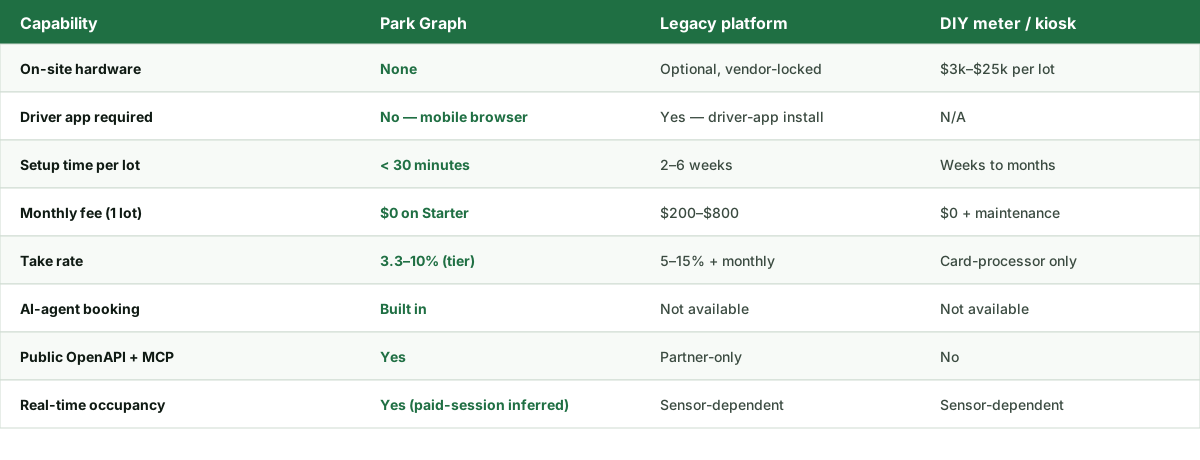
Payment friction. Drivers who can't figure out how to pay in 60 seconds give up. Lots that require an app download lose 20-40% of would-be paying customers; lots that accept tap-to-pay or QR-without-app lose less than 5%. The revenue calculator above assumes low friction (QR codes, no app required) — if your lot still requires an app, discount the projection by ~25%.
Time-of-day pricing. A flat $8 rate is wrong twice a day: too high at 4am (deters demand) and too low at 6pm (leaves money on the table). The dynamic pricing uplift in the calculator captures this.
Discoverability. A lot that doesn't appear in Google Maps, Apple Maps, or AI-assistant results is invisible to ~70% of demand. The AI-agent uplift in the calculator captures the AI-assistant share; the map share is captured by ensuring your lot has correct hours, rates, and a working website.
Maintenance and lighting. A poorly-lit or pothole-ridden lot collects 15-30% less revenue than a clean, well-lit equivalent at the same location. The effect shows up in the occupancy input — a lot with bad conditions has lower occupancy at any given price.
Related Park Graph calculators and tools
If you found the revenue calculator useful, three other tools in this suite tend to come up immediately afterward.
- ROI calculator — once you know revenue, the ROI calculator subtracts current costs (legacy software, hardware, processing fees) and shows your payback period for switching.
- Dynamic pricing calculator — explore exactly which time-of-day rates produce the +25% uplift this calculator assumes, including elasticity tuning for your driver mix.
- Optimal price calculator — the inverse problem: given a current rate and occupancy, what single rate change would maximize net revenue tomorrow?
For deeper background on the underlying mechanics, the parking revenue optimization guide walks through the academic basis for the 25% dynamic- pricing figure and the 15% AI-booking figure, including citations to the SFpark study and Park Graph's own operator cohort data.
Ready to turn this estimate into real revenue?
Print a QR sign, post it at your lot, and start accepting payments today. The Starter plan is free forever.
FAQ — Parking Lot Revenue Calculator
- How accurate is this parking lot revenue calculator?
- It is directional. The calculator multiplies your spaces, hourly rate, occupancy, and operating hours into a baseline projection, then applies industry-typical uplifts for dynamic pricing (~25%) and AI-agent bookings (~15%). Real-world revenue depends on seasonality, weather, local events, payment friction, and enforcement quality. We publish the formulas so you can audit them — but every operator should validate against 30 days of live scan-and-pay data before committing capex.
- What occupancy should I assume for a parking lot?
- Use measured numbers when you have them, otherwise default to typical bands by lot type: 30-45% for off-airport long-stay, 55-70% for downtown commuter lots, 65-85% for mixed-use urban, and 80-95% for event/stadium near peak. Anything above 90% sustained is a price-too-low signal; the calculator caps the dynamic-pricing recommendation at 95% to reflect that.
- Why does dynamic pricing add roughly 25% to revenue?
- When prices float with demand, off-peak hours fill more spaces (filling otherwise-empty inventory) and peak hours capture more dollars per space-hour from drivers willing to pay for guaranteed access. SFpark, the largest published municipal study, observed average revenue per space-hour rising ~13-30% across pilot blocks. Park Graph operators see 22-30% blended uplifts after a 60-day learning period.
- How does AI-agent booking add to parking revenue?
- When your lot is published as structured data — ParkingFacility schema, an agent-readable availability feed, and a JSON-LD WebApplication endpoint — AI assistants such as ChatGPT, Gemini, Claude, and Perplexity can recommend it directly to drivers planning a trip. Operators on Park Graph report 12-18% incremental bookings from this channel within 90 days, on top of organic search traffic.
- Should I include taxes in the calculator?
- No. The revenue figures here are gross collected revenue before sales tax, parking tax, and any pass-through fees. Park Graph's billing engine itemizes these separately on the operator dashboard. If your jurisdiction adds 8-15% in tax, subtract that from the projection to estimate take-home revenue.
- What is a realistic break-even timeline for a new lot?
- A QR-only lot with rented striping and printed signage typically breaks even on its build cost within 60-120 days at the modeled occupancy band. Lots with capex-heavy hardware (gates, pay stations) take 18-36 months. The fastest break-evens we see are conversions of existing lots from honor-box or coin-meter to QR + dynamic pricing, where the only new spend is signage.
- Why does the recommended plan change as I adjust inputs?
- Each plan has a different mix of fixed monthly subscription versus per-transaction fee. Starter has no subscription and a higher per-session fee; Pro and Enterprise charge a subscription but a lower per-session rate. The crossover happens around 800-1,200 sessions per month. The calculator highlights the plan with the highest net revenue at your specific volume.
- Does this calculator work for monthly parker subscriptions?
- It models hourly transient parking. If most of your revenue is monthly contracts, treat each contract as ~120 hours of paid time per month at the contract's effective hourly rate (e.g., a $250 monthly pass on a 12-hour weekday lot is ~$2.08/hr). The output is still directional but you'll capture the revenue floor correctly.
- What if my lot has tiered pricing (first hour free, daily max)?
- Use the blended effective rate — total revenue divided by total paid hours — for the "Average hourly rate" input. The calculator's recommendation engine assumes a single rate; lots with complex tariff structures should validate the projection against 30 days of live billing data before relying on it for capex decisions.