Free tool
QR code parking sign generator: print-ready, weatherproof, WCAG-compliant
Last updated: . Every calculation runs entirely in your browser; nothing is sent to our servers unless you opt in to email your result.
What makes a parking QR sign actually work
A QR sign is a deceptively complex artifact. It needs to survive a parking lot environment for years, scan reliably from a parked car's seated position in any light, and tell the driver enough to commit to the payment without scanning. Most failed QR-payment rollouts trace back to violating one of these constraints — the QR is too small, the contrast is too low, the sign is mounted at a bad angle, or the sign lacks the rate and lot name.
The generator above bakes the constraints in by default. Error correction is set to H (~30% recovery) so the QR still scans when scratched or partially obscured by snow. The contrast checker enforces ≥4.5:1, the WCAG AA threshold for normal text — a reasonable proxy for scanner reliability. Sign size presets correspond to the 10× rule of thumb (scan distance ≈ 10× QR side length).
Choosing the right sign size for your lot layout
Sign size depends on where the driver will be when they scan. There are three common scan positions and each has a different size recommendation.
Curbside / drive-through scan (~6-10 ft). The driver pulls up, scans without leaving the car, and proceeds to a space. Use the medium (12×18) or large (18×24) preset. The QR needs to be 8-12 inches on a side. This pattern is common at airport long-stay, event lots, and parking decks with curbside attendants.
In-bay / per-space scan (~3-5 ft). The driver parks, gets out, and scans a sign on the wall, post, or wheel stop. Use the small (8.5×11) preset. The QR needs to be 4-6 inches. This is the most common pattern for surface lots and most reliable because the driver is already committed to the space.
Wayfinding scan (~12-20 ft). The driver scans from a distance to confirm rate before deciding to enter. Use the large preset and place at eye level near the lot entrance. The QR needs to be 12-18 inches. Pair with a printed rate so drivers who don't scan can still see the price.
Why color contrast matters more than aesthetics
Brand colors lose to scanner reliability every time. A lot owner once spent $4,000 printing 200 signs in their brand color (a soft sky blue on cream) and found that scan failure rates at dusk hit ~40%. The QR was fine on a phone in daylight; in a parking lot at 6pm in winter, the camera couldn't differentiate the modules. The contrast ratio was 3.1:1 — well below the 4.5:1 WCAG AA threshold the generator above enforces.
The fix is straightforward: choose a foreground that renders nearly black after monitor-to-print color drift, and a background that stays bright. Pure black (#000) on pure white (#fff) gives 21:1 and scans in near-total darkness. Park-green (#0f7e3f) on white gives ~5.6:1 and looks branded while passing the threshold. Avoid red foregrounds (most scanners interpret red as low-luminance) and avoid yellow backgrounds (light yellow on white scores under 1.5:1).
Print, mount, and maintain checklist
Print specifications. 300 DPI minimum; CMYK color space; UV-resistant ink for outdoor use; 1/8" bleed if sending to a commercial print shop. The PDF we email after lead capture is pre-configured with these specs.
Substrate selection. Aluminum (.040" or .063") for permanent installs; Coroplast (4mm) for temporary use under 18 months; vinyl-on-cardstock with laminate for indoor garages. Avoid bare paper outdoors.
Mounting. Chest height (~48") for in-bay signs; eye height (~60") for wayfinding; perpendicular to the typical driver approach angle to minimize sun glare. Use stainless or galvanized hardware that won't streak the sign with rust.
Maintenance. Wash quarterly with mild soap and water; replace at the 5-year mark before fade affects scan reliability; spot-replace any sign with visible damage immediately. Most operators keep 5-10% of total sign count as inventory for fast replacement.
Related tools and resources
- Parking lot audit checklist — verify your signage setup along with 25+ other operational dimensions.
- QR code parking payment overview — deeper background on the QR-first payment architecture this sign feeds into.
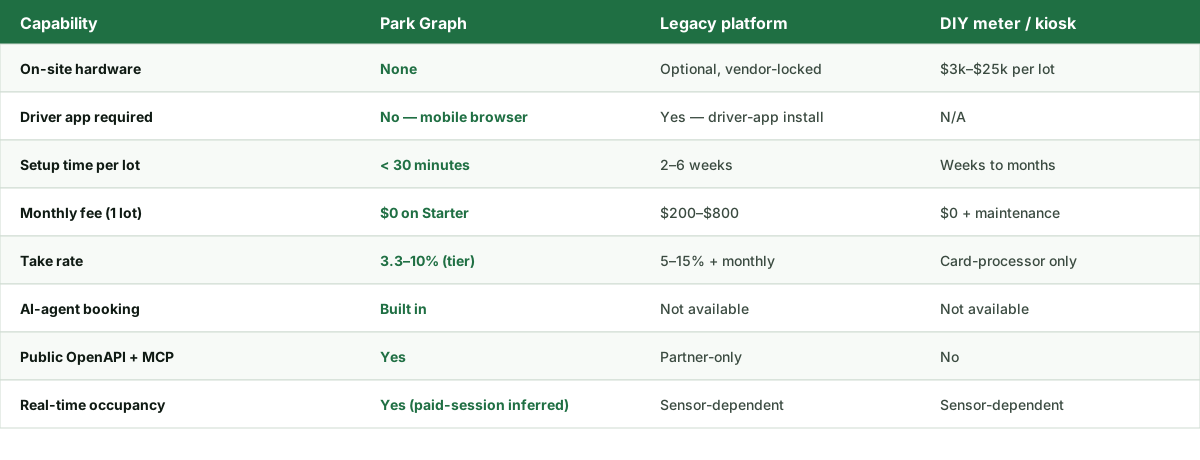
- Parking payment system guide — comparison of QR-based vs. legacy hardware-based payment systems.
Ready to turn this estimate into real revenue?
Print a QR sign, post it at your lot, and start accepting payments today. The Starter plan is free forever.
FAQ — QR Code Parking Sign Generator
- How big should a QR code on a parking sign be?
- Rule of thumb: scan distance ≈ 10× QR side length. A 5-inch QR scans reliably from ~4 feet, an 8-inch QR from ~6.5 feet, and a 12-inch QR from ~10 feet. The generator above shows the recommended scan distance for each preset size. For curbside signs where drivers stay in the car, choose the medium or large preset; for in-bay signs where drivers approach on foot, the small preset works.
- What error correction level should a parking QR use?
- High (H, ~30% recovery). Parking signs see weather, sun fade, scratches from snow plows, and bird droppings. The H error correction level allows the QR to remain scannable even when ~30% of the modules are obscured. The generator above uses H by default. Lower error correction levels create slightly smaller QRs but fail more often in real-world conditions.
- Why does the generator check color contrast?
- Color contrast determines whether a phone camera can reliably scan the QR in suboptimal light. The WCAG AA threshold of 4.5:1 is a reasonable proxy for 'works in dim parking lot at dusk'. Pure black on pure white scores 21:1 (ideal). Dark navy on cream scores ~14:1 (excellent). Park green (#0f7e3f) on white scores ~5.6:1 (passes). Anything under 4.5:1 risks failed scans in low light.
- Can I customize the URL behind the QR code?
- The free generator encodes a same-origin demo URL so a casual scan lands on a working /p/demo page on this site. Paid Park Graph operators get a per-lot URL (e.g., parkgraph.com/p/main-st-lot-123) that opens the live payment screen with the correct rate and lot ID pre-filled. Sign up for a free account to claim a per-lot URL.
- What sign material works best outdoors?
- For permanent installations, use 0.040" aluminum with vinyl overlay and UV-resistant laminate — typical lifespan is 5-7 years before fade affects scannability. For temporary or event use, weatherproof corrugated plastic (Coroplast) lasts 6-18 months at $5-15 per sign. Avoid uncoated paper or printer-grade vinyl outdoors; both fade and curl within weeks.
- How do I mount QR signs in a parking lot?
- Three common patterns. (1) Bollard-mounted at the entry — driver scans before pulling in. (2) Per-bay or per-cluster signs at chest height on the wall, post, or wheel stop — the most reliable for after-park scanning. (3) Wayfinding signs at decision points (lot corners, lane ends). Combine all three for redundancy. Make sure mounting hardware is non-glare and non-reflective so the QR remains scannable.
- Will scanners pick up my QR through dirty or wet glass?
- Modern phone cameras (post-2018) handle moderate dirt, water beads, and even cracked screens well — error correction H is designed exactly for this. The two failure modes that still defeat scanners are direct sun glare (mirror finish on the sign reflects into the camera lens) and very low light without a flash. Mount signs perpendicular to typical driver approach angle and well-lit by overhead fixtures.
- Can I print this myself or do I need a print shop?
- Both work. For under 50 signs, an office laser printer on heavy cardstock with a UV laminate sleeve is sufficient and ships same-day. For 50+ signs or any installation expected to last more than 12 months, send to a local sign shop that prints on aluminum or Coroplast — typical cost is $15-30 per sign for a printed-and-laminated 12×18 inch panel. Email the lead form and we'll send a print-ready vector PDF.
- What happens if a QR sign is damaged or stolen?
- Print a replacement and reinstall. Because the QR is just a URL, the underlying lot configuration is unchanged — drivers scan the new sign and land on the same payment surface. Park Graph operators can also rotate the URL through the dashboard if they suspect the old QR is being abused (e.g., printed on a competitor's sign). Most operators keep a small inventory of pre-printed replacements for fast turnaround.