Replace a coin meter
Pull the meter, post a QR sign, route the funds to the same bank account through Stripe.
Faster + cheaper
Money page · Parking payment system
Replace coin meters, card kiosks, and driver apps with one printed QR code. Drivers pay in their phone's browser using Apple Pay, Google Pay, or any major card. Funds settle directly to your Stripe account every two business days.
Most parking payment systems on the market today fall into one of two camps. The first is the legacy meter-and-kiosk world: physical hardware bolted to a pole or a wall, accepting coins or cards, requiring an annual service contract and a vendor truck-roll for any rate change. The second is the driver-app camp: a smartphone application the driver has to install and account-create before they can pay, with a 20-35% abandonment rate the operator absorbs as lost revenue.
Park Graph is neither. It is a parking payment system that lives entirely in the driver's browser and the operator's dashboard. The only physical artifact at the lot is a printed QR code on a sign. The only software the driver needs is the phone they already own. The only software the operator needs is the Park Graph dashboard and a Stripe account.
The five rows below summarise the operator pains that drove this design. Read them and decide for yourself whether your current parking payment system is solving for them.
Operator-reported pains, weighted by frequency in our discovery interviews.
| Pain today | What it costs you | How Park Graph fixes it |
|---|---|---|
| Coin and bill meters jam, get robbed, or freeze in winter | $400-$2,500/repair, hours of lost revenue | QR signs are passive — no electronics, no batteries, no maintenance window. |
| Card-reader meters require expensive merchant accounts and PCI audits | $3k-$5k/yr in compliance overhead | Park Graph rolls payment-processing PCI into the platform. Operator-side compliance is one Stripe form (SAQ-A). |
| Driver-app payment systems lose 20-35% of payments to abandonment | Direct revenue loss + complaint volume | No app required. Browser checkout converts at much higher rates because the install step is gone. |
| Reconciling payouts to the bank is a manual spreadsheet task | 5-10 hours/month per lot in bookkeeping | Auto-reconciliation against Stripe payout. CSV export and API for accounting integrations. |
| Dynamic and event pricing requires a service visit on legacy meters | $150+/visit, slow response to demand | Update rates from the dashboard. Schedule event-only or surge windows in advance. |
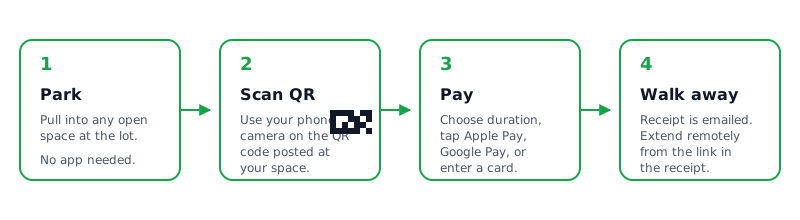
A driver pulls into a Park Graph lot. Their eye lands on a yard sign with a large QR code, the lot name, the hourly rate, and the daily maximum printed clearly underneath. They open their phone camera, point it at the code, and tap the link banner that appears. The Park Graph payment page loads in under two seconds.
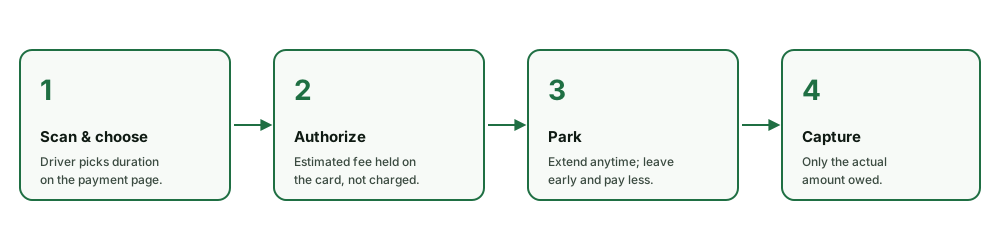
The page shows the lot name in a large header, the current hourly rate, and a duration slider. As the driver moves the slider, the total updates in real time. They tap Apple Pay, the system 3D-Secure-authenticates if needed, and the session is active. The payment confirmation page becomes a digital pass with a countdown, a session code, and an extend button. No tickets to print, no receipts to keep, no app to install, no account to create.
On the operator side, Park Graph routes the payment through Stripe Connect to the operator's connected Stripe account. The operator's dashboard updates in real time — revenue ticks up, occupancy increments, the lot map shows the new active session. On Stripe's standard payout schedule, the funds land in the operator's bank account. Park Graph never holds operator money.
For accounting and reconciliation, every session emits a webhook with the full transaction record (lot, driver-fingerprint, amount, fee, payout id) so the operator's warehouse, ERP, or QuickBooks instance always matches the bank statement. Refunds, dispute evidence, and partial captures are handled in the same flow.
The phone mockup to the right is the Park Graph payment page as it appears in a real driver's browser. Notice the absence of an account creation step, the prominent Apple Pay button, and the duration slider that updates the price in real time.
The page is responsive down to the smallest commonly-shipped phone (iPhone SE first generation) and up to a tablet. We test it weekly against the most popular Android browsers as well as Safari. There is no “please install our app” interstitial — Park Graph does not have a consumer app and does not plan to ship one.
The same checkout works for hourly transient parking, daily flat-rate parking, event surges, and prepaid book-ahead reservations. The driver experience is intentionally identical so drivers learn it once and trust it forever.
Park Graph
Scan QR Code
Point camera at parking sign
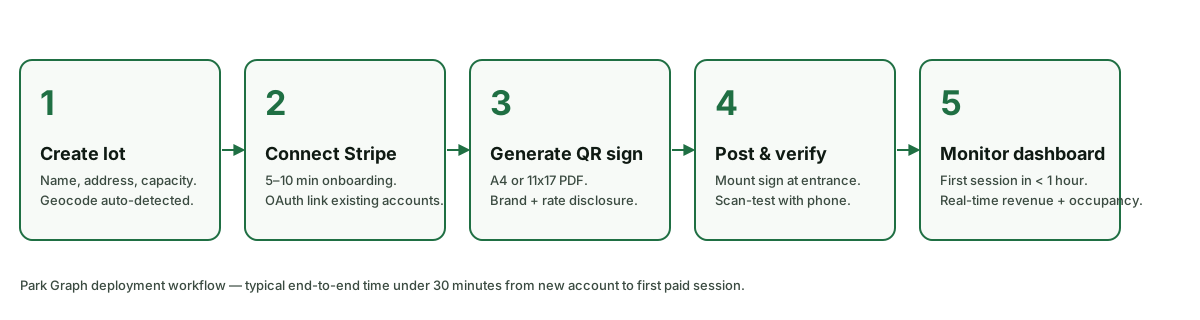
Enter address and rates in the dashboard.
Link existing or onboard a new Stripe account.
Download the print-ready PDF and post the sign at the lot.
Scan the sign yourself and complete a $1 test transaction.
Hook the webhook into QuickBooks or your warehouse.
Watch the dashboard or API for revenue, refunds, and disputes.
Generate a QR code for your lot. No account required.
QR preview
The generator above produces a real, scannable Park Graph QR code that points at a demo lot. You can use it to test the driver flow in your phone's browser before creating a Park Graph account. When you sign up, your real lot QR codes are generated the same way, branded for your operator account.
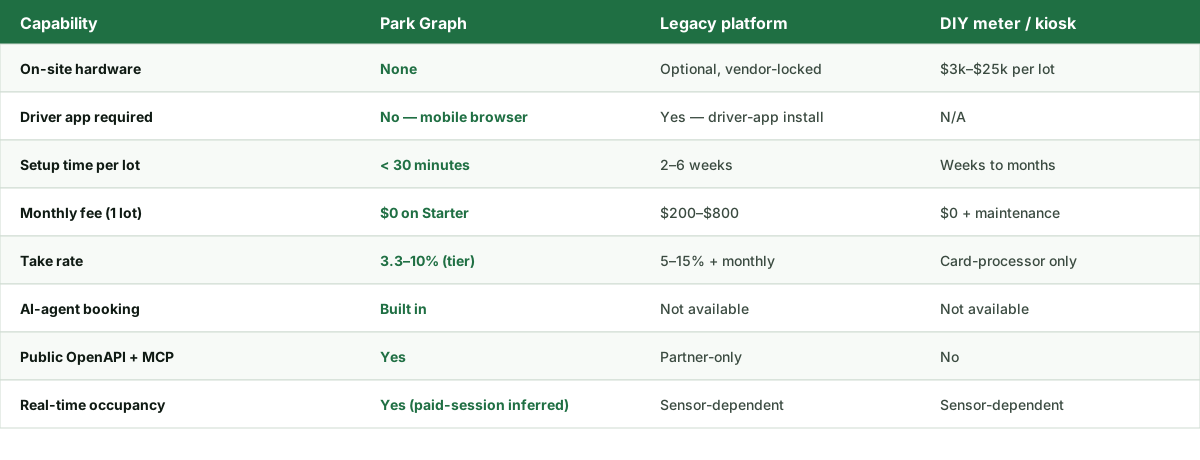
| Capability | Park Graph | Legacy parking platform | DIY / hardware-based |
|---|---|---|---|
| Driver app required | No | Yes | N/A |
| On-site hardware | None | Often required | Required |
| Median payment time | <60 seconds | 60-180 seconds | 120-300 seconds |
| Payment processor | Stripe Connect to operator account | Vendor sweep then payout | Operator sets up themselves |
| Take rate | 3.3-10% | 5-15% + monthly | 2.9% + 30¢ Stripe only |
| Refund tooling | 1-click from dashboard | Submit ticket / phone call | Manual via Stripe dashboard |
| Chargeback evidence auto-attached | Yes | Sometimes | Operator builds themselves |
| PCI scope | SAQ-A only | Vendor-dependent | Full operator burden |
Pull the meter, post a QR sign, route the funds to the same bank account through Stripe.
Faster + cheaper
Eliminate the kiosk's $3k-$25k upfront cost and the per-transaction rental fee.
Capex elimination
Some operators run Park Graph alongside ParkMobile so any driver can pay regardless of preference.
No-app fallback
Run base rates 360 days a year and event-only surges 5 days a year — same lot, same QR sign.
Surge pricing
Bill monthly permit holders through Stripe subscriptions on the same Park Graph account that takes hourly transactions.
Permit + transient
Issue printable or texted validation codes for restaurants, hotels, and meeting venues. Codes expire automatically and are tracked in the dashboard.
Validations
Parking payment system at a glance
Includes Stripe processing
Scan to authorized
No meter, no kiosk
Combined fees include Stripe card processing.
On Pro, the operator keeps 95¢ of every dollar collected, before Stripe's card processing. After Stripe, the operator typically nets 91-92¢ on the dollar — better than the 80-85¢ commonly netted from legacy meter or kiosk systems once vendor take rates and monthly hardware fees are included.
Throughput economics are equally favourable: a Park Graph lot can run at 100% capacity during a sold-out event because the payment system does not bottleneck on a single kiosk line. Every driver pays in parallel, on their own phone, with no queue.
0%
Operator take at Pro
0s
Median scan-to-paid (target)
$0
Hardware required
0
Payment methods supported
Projected targets reflect 2026+ planning and internal pilot modeling — not live customer outcomes.
PCI DSS Level 1 (via Stripe)
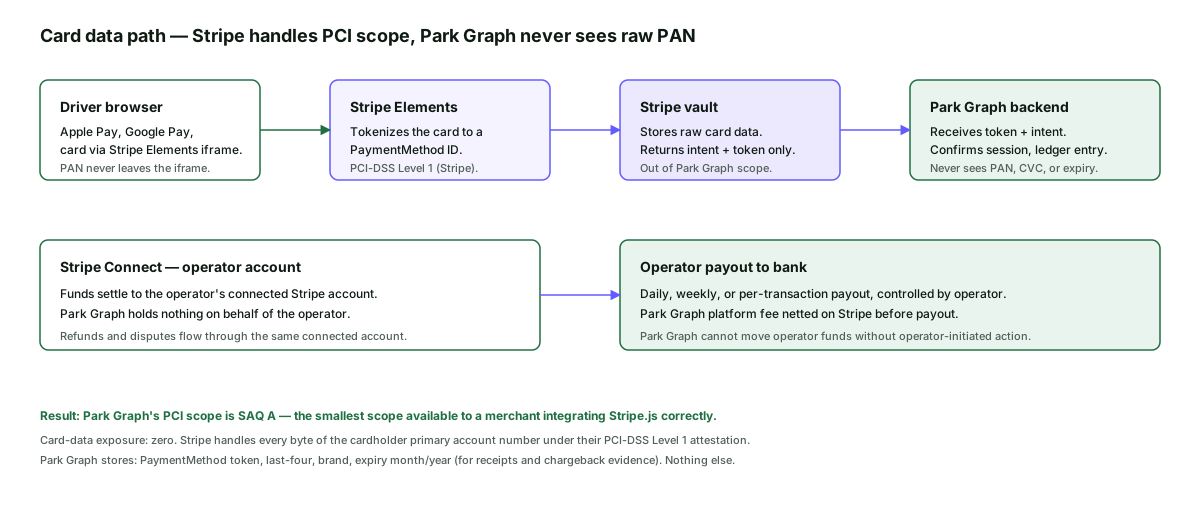
Card data tokenized in the driver's browser; never touches Park Graph.
Strong Customer Authentication
3D Secure 2 enforced on cards from regions that require it.
Encrypted at rest + in transit
AES-256 at rest, TLS 1.3 in transit.
Operator data isolation
Per-operator row-level security on the underlying Postgres cluster.
The full security posture, sub-processor list, and incident response runbook are published under /trust.
The calculator below estimates monthly take-home revenue across Starter, Pro, and Enterprise plans for any lot size, hourly rate, occupancy, and operating-hour configuration you choose. Numbers update live as you adjust the inputs.
See how much you could earn with Park Graph.
Projected monthly revenue
$86,400
Starter
Platform cost
$8,640/mo
Your net revenue
$77,760/mo
Pro
Best valuePlatform cost
$4,819/mo
Your net revenue
$81,581/mo
Enterprise
Platform cost
$5,350/mo
Your net revenue
$81,050/mo
Print a code. Post it. Get paid. Free forever on Starter.