Surface lot revenue optimisation
Trigger surge pricing at 80% occupancy for game-day or event windows automatically.
Dynamic pricing
Money page · Parking occupancy software
Stop guessing how full your lot is. Park Graph turns paid sessions into a live occupancy signal, layers in sensor and camera feeds where they exist, and publishes the result to your dashboard, your drivers, your AI-agent integrations, and your revenue model.
Anyone who runs more than thirty parking spaces and cares about revenue benefits from real-time occupancy data. Below thirty spaces a glance out the window is usually enough. Above thirty spaces — and certainly at hundreds or thousands — the difference between “the lot feels busy” and “the lot is 87% full and forecast to peak in 22 minutes” is the difference between competent operations and revenue left on the table.
The classic buyers of parking occupancy software have been airports, hospitals, and municipal operators. They paid for sensor meshes and dashboards because no other option existed. The buyers we see today include surface-lot owners who never could have justified a $50,000 sensor install, mixed-use developers who want a fullness signal across an entire campus, and event venues that need a live count once a week. Park Graph is built for all of these because it does not require capex.
| Pain today | What it costs you | How Park Graph fixes it |
|---|---|---|
| Per-space sensors cost $200-$500 each and require maintenance | $20k-$50k upfront for a 100-space lot, plus 5-15% annual maintenance | Park Graph computes occupancy from paid sessions for free. Add sensors only where you need them. |
| Operators don't know how full the lot is until end-of-day reconciliation | Missed dynamic-pricing windows, missed staffing decisions | Real-time dashboard updates within seconds of every payment event. |
| Drivers circle the lot looking for a space | Unhappy drivers, scrappage, lost loyalty | Publish live occupancy to maps and AI agents. Drivers see fullness before they arrive. |
| Forecasting demand is a manual spreadsheet exercise | Slow response to demand shifts, conservative pricing | Per-lot 7-day forecast retrained nightly, exposed in the dashboard and API. |
| Permit holders skew occupancy reporting | Inaccurate utilization metrics, bad capacity decisions | Permit reconciliation via QR scan license-plate fingerprinting keeps the count honest. |
Every Park Graph paid session has a known start time, end time, and lot. The platform computes occupancy at any timestamp T as the count of sessions whose start ≤ T and end > T, divided by the lot capacity. This is exactly the same arithmetic a sensor system performs on entry/exit events. The only difference is that the source signal is the payment, not the sensor.
For lots where 100% of drivers pay (most paid surface lots), payment-derived occupancy and sensor-derived occupancy converge to within a few percent. The remaining gap comes from monthly permit holders, validations, and grace-period entries. Park Graph reconciles these by recording a license-plate or QR-scan fingerprint at the entry event so the count remains accurate even when no payment changed hands.
Where you need exact non-payment occupancy — for example a free lot, or a lot with a high mix of permit holders — Park Graph integrates with sensor and LPR feeds through the API. The dashboard merges payment and sensor signals automatically and surfaces discrepancies (a sensor entry without a payment is flagged for review).
Total Revenue
$12,847
Sessions
342
Occupancy
73%
Avg Rate
$8.40
Revenue by source
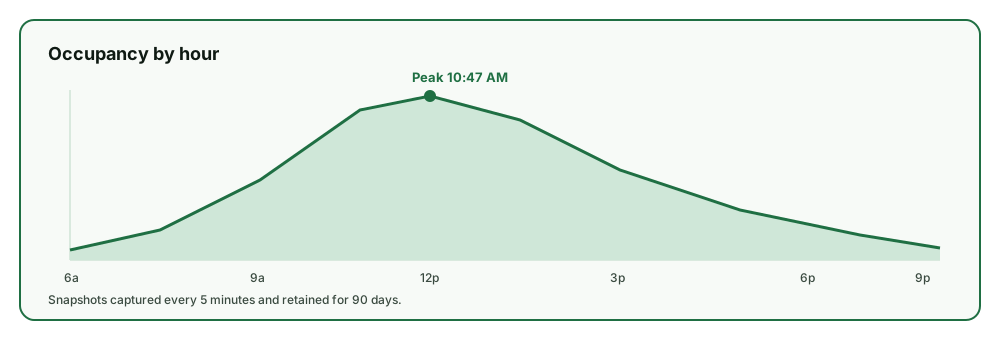
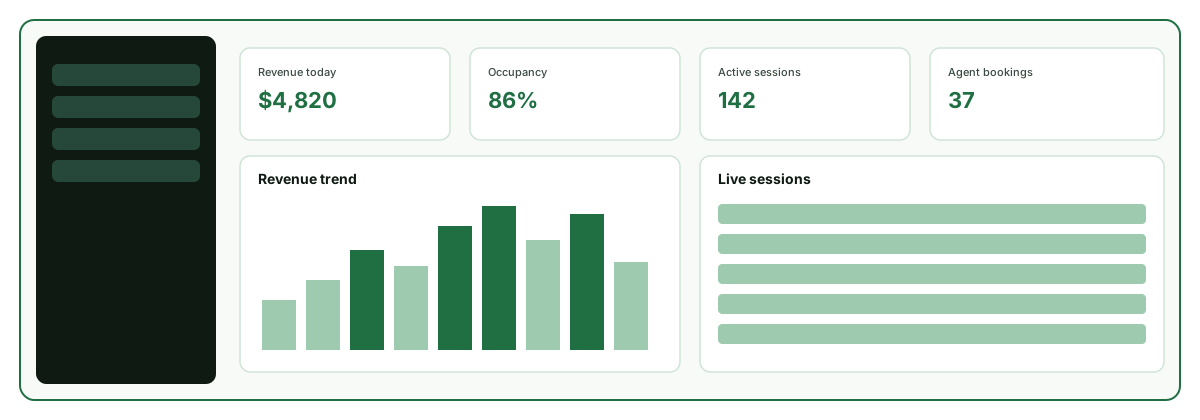
The occupancy tile in the dashboard preview above shows current fullness, a 24-hour spark line, and the forecast for the next 6 hours. Operators with multiple lots see a consolidated heatmap; operators with a single lot see a per-zone breakdown. The same data is available through the public API and through the Park Graph MCP server for AI agents.
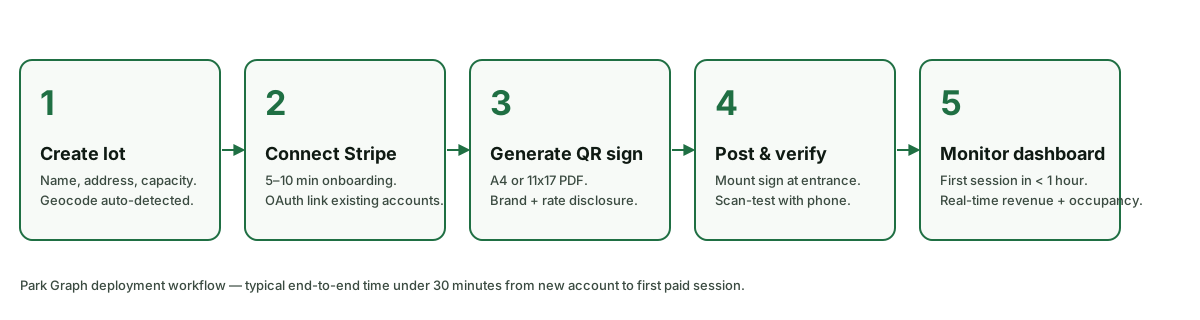
Add the lot in the dashboard with its capacity (the denominator for occupancy).
Print and post a QR code. Every paid session feeds the occupancy counter.
Confirm the occupancy tile updates as test sessions are created.
Add a sensor or LPR feed via the integrations menu if you need exact non-payment occupancy.
Toggle public availability so Google, Apple, Waze, and AI agents see live occupancy.
Configure rate steps at, e.g., 70% and 90% fullness.
From QR-based payments to AI agent integrations — Park Graph is the complete infrastructure layer.
Drivers scan, pay, and park in under 30 seconds. No app download, no account required.
Revenue tracking, occupancy heatmaps, source breakdown, and weekly performance reports.
Connect to ChatGPT, Claude, Gemini, and every AI assistant through a single API.
Automatic surge pricing based on events, occupancy, time of day, and demand signals.
Aligned with SOC 2 controls — row-level security, scoped API keys, and comprehensive audit logs.
REST API, MCP, OpenAI Actions, Gemini Functions — every platform, one integration.
| Capability | Park Graph | Legacy parking platform | DIY / hardware-based |
|---|---|---|---|
| Sensor mesh required | No (optional) | Yes | Yes |
| Hardware cost (100 spaces) | $0 | $20k-$50k | $15k-$30k |
| Latency from payment to dashboard | <5 seconds | Seconds-to-hours | Custom |
| Public availability feed | Built in | Add-on | Build it yourself |
| AI-agent discovery (ChatGPT etc.) | Built in | Not available | Build it yourself |
| Forecast horizon | 7-day, retrained nightly | Limited or none | Custom |
| Occupancy-based dynamic pricing | Built in | Add-on / unavailable | Custom |
| Multi-lot consolidated view | Yes | Vendor-dependent | Custom |
Trigger surge pricing at 80% occupancy for game-day or event windows automatically.
Dynamic pricing
Show live fullness on the entrance LED display via the API; close gates automatically at 100%.
Operations
Forecast Wednesday occupancy for shift-change planning and adjust permit issuance.
Healthcare
Block reservations once paid + reserved sessions exceed garage capacity minus a buffer.
Hospitality
Hand officers a live occupancy map on a phone — no sensor truck-roll required for a one-day event.
Events
Push live block-by-block availability to Apple Maps so drivers don't cruise.
Public sector
Capex avoided
Per 100-space lot
From payment to tile update
Retrained nightly per lot
Sensor capex range based on quotes from three major in-ground sensor vendors as of Q1 2026.
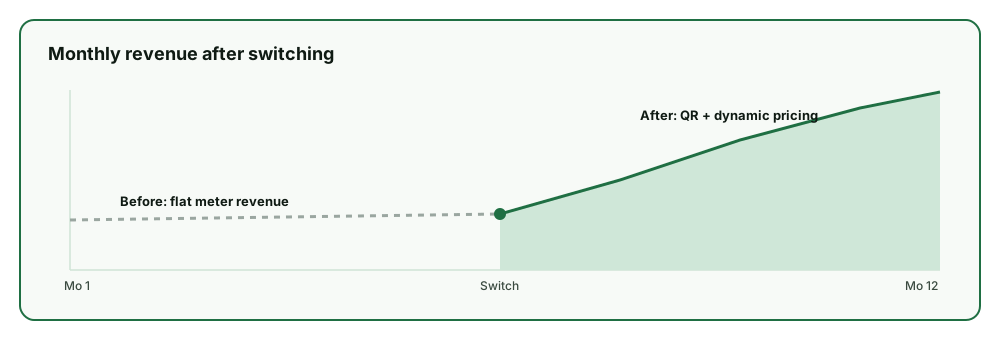
A 100-space surface lot quoted for an in-ground sensor mesh routinely sees $25,000 in hardware plus $4,000-$8,000 per year in maintenance and connectivity. Park Graph computes the same occupancy signal from the existing QR-payment flow at no incremental cost.
Where exact non-payment occupancy matters — a permit-heavy garage, for example — the usual choice is to deploy sensors only on the entry/exit lanes and let Park Graph derive per-zone fullness from the combined signal. That cuts the sensor footprint by an order of magnitude.
0s
Dashboard latency (target)
0 day
Forecast horizon
$0
Sensors required
0
AI agent platforms supported
Projected targets reflect 2026+ planning and internal pilot modeling — not live customer outcomes.
Sensor-vendor agnostic
Bring SKIDATA, Designa, Amano, ParkPlus, or generic NB-IoT sensors.
Privacy-first plate handling
License plates are hashed at rest; raw plate kept only for the active session window.
Public feed is opt-in
Operators decide whether to publish occupancy externally.
Audit log on every override
Every manual occupancy correction is recorded with operator id and reason.
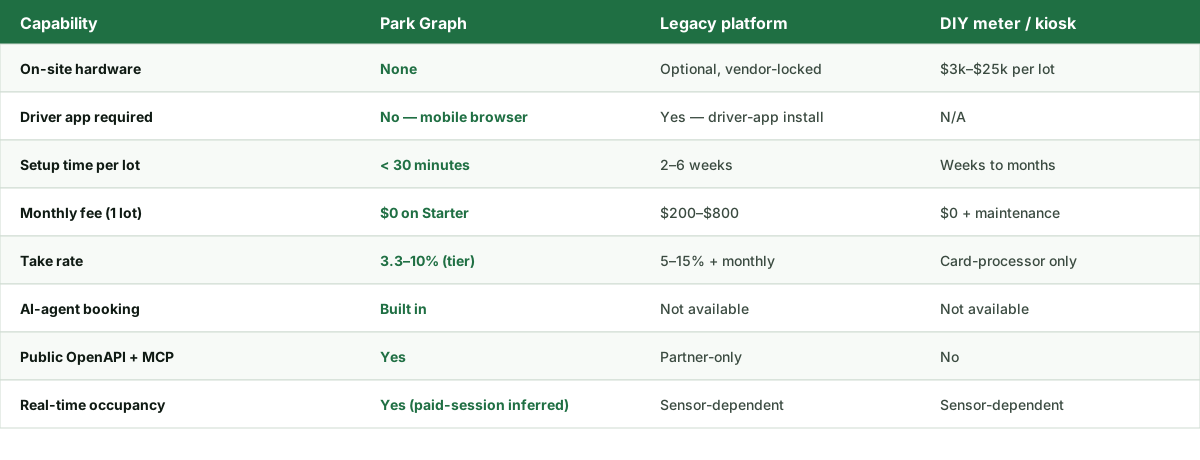
The calculator below estimates monthly take-home revenue across Starter, Pro, and Enterprise plans for any lot size, hourly rate, occupancy, and operating-hour configuration you choose. Numbers update live as you adjust the inputs.
See how much you could earn with Park Graph.
Projected monthly revenue
$86,400
Starter
Platform cost
$8,640/mo
Your net revenue
$77,760/mo
Pro
Best valuePlatform cost
$4,819/mo
Your net revenue
$81,581/mo
Enterprise
Platform cost
$5,350/mo
Your net revenue
$81,050/mo
Sign up free, post a QR sign, and the dashboard fills in by itself.