How do I pay for parking?
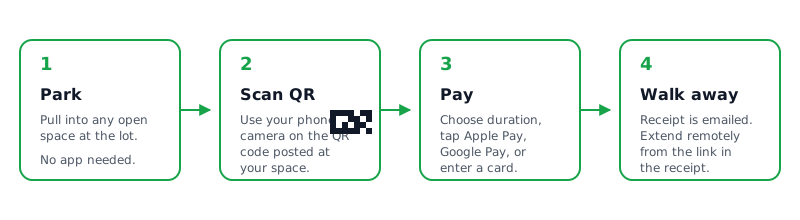
Scan the QR code on the lot sign with your phone camera. Pick how long you're staying, enter your plate, and pay with Apple Pay, Google Pay or a card.
FAQ
Straight answers about paying at a Park Graph lot and running one. Can't find yours? Text us and a person will answer.
Paying, receipts, refunds and adding time. No app or account needed.
Scan the QR code on the lot sign with your phone camera. Pick how long you're staying, enter your plate, and pay with Apple Pay, Google Pay or a card.
No. Scan the QR sign, enter your plate, and pay. Nothing to download and no password to remember.
Yes. Text the code on the lot sign and a time to (877) 422-PARK, like ABC234 2 hours. We text back the price and a link to pay. At many lots your space is held for 10 minutes while you pay.
If the lot offers one, its pay page has a Monthly tab. You're billed every month and we email you a link to manage the pass. Lost the link? Request it again at parkgraph.com/pass.
When you reserve by text and the lot is full, we tell you right away and you aren't charged. Text another lot's sign code and a time to try there.
A sign code and a time to park (ABC234 2 hours), RECEIPT for your latest receipt, HELP for help, STOP to stop texts and START to turn them back on. Anything else goes to our assistant or a person.
Text or call (877) 422-PARK, or email support@parkgraph.com. Texts are read every day, 7 am to 9 pm Mountain Time. Calls are answered Monday to Friday, 8 am to 6 pm Mountain Time.
Open the link in your receipt, or scan the sign again, and choose Extend. If you gave a phone number for texts, we send a reminder 15 minutes before your time runs out with a link to extend.
Tap End Session on your parking page. For stays up to 7 days you pay for the time you parked, never more than you approved. Time you add with Extend is charged when you add it.
Receipts go to the email or phone number you typed at checkout, so check spam and your messages first. Text RECEIPT to (877) 422-PARK to get the latest one for your number. Your parking is paid either way; the lot sees your plate as paid.
Your bank may briefly show a hold for the time you picked; it settles to the final amount. If a charge still looks wrong after a day, text (877) 422-PARK or email support@parkgraph.com with the last four digits of your card.
Overcharges, duplicate charges, sessions that never started and lots you couldn't get into are refunded. Email legal@parkgraph.com with your session code and we refund within 5 business days after checking. Leaving early or the wrong duration aren't refunded by default, though the lot owner can choose to.
The lot owner leaves it when a car is parked without a paid session. Scan its QR code to see what's owed and why, then pay the posted rate and late fee on that page.
No. Park Graph never tows or issues tickets; enforcement is up to the lot owner. If your car was towed, call the towing company named on the lot's signs. Text (877) 422-PARK with the lot name if you need help reaching the owner.
We use your number only for your receipt, reminders and replies. It goes to our texting provider and carriers, nobody else; lot owners never see it. Your contact details are cleared from parking records after 30 days.
Reply STOP to any text from (877) 422-PARK and we stop right away. Reply START to turn texts back on, or HELP for help.
Signing up, signs, prices, payouts and your dashboard.
Park Graph turns your lot into a pay-by-phone lot. You post a QR sign, drivers scan it and pay with Apple Pay, Google Pay or a card, and the money goes to your bank through Stripe. No meters, kiosks or app.
Go to parkgraph.com/signup and enter your email. We send a one-time code, so there is no password. Then add your first lot: address, spaces and an hourly rate.
The same way you signed up: enter your email and type the code we send, or choose Continue with Google. Enterprise accounts can use their company's single sign-on. If a code expires, ask for a new one.
Yes. Text a photo of your lot to (877) 422-PARK. We estimate how many spaces it has and text back a link to finish signup with that lot already started. The link works for 7 days.
Your first lot takes about two minutes: type the address, pick it from the list, enter the spaces and an hourly rate, and you get a QR sign. After that, use Add lot on the Lots page, or Add several lots to paste a list. Starter includes up to 3 lots; Pro and Enterprise have no limit.
Sign up from the link we gave you (or the same browser you used on the homepage). The lot you started is added to your account when you sign in, so you only finish the details.
A lot is live when your Stripe payouts are connected and the lot itself is active. A lot under review goes live once the review clears. ID verification does not hold it back.
Open Signs in your dashboard, pick the lot and a size (8.5 × 11, 12 × 18 or 18 × 24 in), and download the PDF. Print it yourself or send it to any sign shop; the larger sizes include bleed.
Signs carry a PREVIEW mark until the lot is live: payouts connected in Stripe and the lot active. Once both are done, download the signs again and the mark is gone. The QR code itself never changes.
Print a new one from Signs in your dashboard. Each lot keeps the same QR code, so a replacement works the moment it goes up.
Yes. You accept the Terms of Service when you sign up. When the Terms change, the dashboard asks you to accept the new version before you change anything.
Stripe checks your ID once, before your first payout. It never stops your lot going live: drivers can pay as soon as the lot is live. Start it from Verify in your dashboard; it takes a few minutes with your phone.
An optional check that you run the lot: photos taken at the lot, a deed, lease, tax or utility bill, or a code on your Google Business Profile. Verified lots get a badge and faster payouts on Pro and Enterprise.
Not yet. Each Park Graph account has one owner sign-in today. Enterprise accounts can sign in through their company's single sign-on.
Choose Connect payouts in the setup checklist. Stripe asks for your legal name, date of birth, the last four of your SSN or your business tax ID, and a bank account. It usually approves in minutes. If the chip says Action needed, Stripe wants one more detail; choose Finish in Stripe.
Your first payout arrives 7–14 days after your first payment. That is Stripe's standard for new accounts. After that, payouts follow your plan's schedule. Verified lots are paid 2 business days after each payment.
Open the lot, go to Sessions, find the payment by plate or time, and choose Refund. The driver gets the money back on their card in 5 to 10 business days, and Park Graph's fee on it is refunded too.
Starter has no monthly fee. Park Graph keeps a small fee from each payment: Starter 10% (minimum $0.75), Pro 5% (minimum $0.25), or Enterprise 3.3% (minimum $0.10). Standard Stripe card processing applies on top, shown line by line in your dashboard.
Starter is free for up to 3 lots with 250 text reservations a month. Pro is $499 a month with unlimited lots, 10,000 text reservations, surge pricing, API keys and webhooks. Enterprise is $2,499 a month and adds white-label signs, single sign-on and an SLA.
Pro starts with a 14-day free trial. We email you before it ends, and you can cancel from Billing before then. Starter is free with no trial needed.
Cancel any paid plan from Billing in your dashboard. It ends at the close of the current billing period, and the unused part of the period isn't pro-rated. Starter accounts can be closed at any time.
Each lot has an hourly rate and an optional daily maximum, set on the lot's Pricing page. Pro and Enterprise can add peak-hour, weekend, busy-lot and event pricing. Drivers are always charged the price they were shown. Starter lots never surge.
Yes. A driver texts your lot's sign code and a time, like ABC234 2 hours, to (877) 422-PARK. On Pro and Enterprise we quote the price and hold a space for 10 minutes while they pay. On Starter they get your pay page link. Starter includes 250 text reservations a month; Pro includes 10,000.
Yes. A lot with a monthly pass price shows drivers a Monthly tab on its pay page, Stripe bills them every month, and you see every pass under the lot's Monthly passes page. Set the price per month on the lot's Pricing page; a new price applies to new passes only.
Open Check plate and type the plate. It answers PAID until a time, EXPIRED, or NO RECORD, and shows if that plate was logged unpaid before on any of your lots. On EXPIRED or NO RECORD you can log the vehicle right there.
A notice you leave on a car that parked without paying. Its QR code opens a page where the driver pays your posted rate and late fee. The payment goes to you like any other, minus Park Graph's fee.
Yes. In Settings, turn on Texts from Park Graph and agree to the texting terms. Alerts and summaries then come from (877) 422-PARK. You choose which alerts come by text in Notifications.
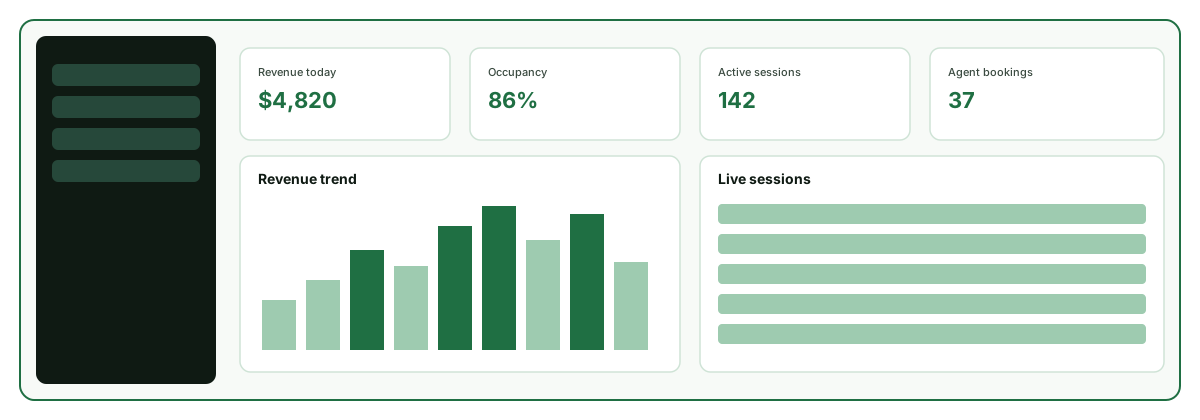
Analytics in your dashboard shows revenue, sessions and occupancy. Starter covers the last 30 days. Pro and Enterprise show all history and can export it.
Pro and Enterprise include API keys and webhooks, under API keys and Webhooks in your dashboard. AI assistants can find live lots through Park Graph's booking connection and book Pro and Enterprise lots. Developer docs are at parkgraph.com/developers.
Text or call (877) 422-PARK, or email support@parkgraph.com. Calls are answered Monday to Friday, 8 am to 6 pm Mountain Time. Texts are read every day, 7 am to 9 pm Mountain Time.
Text or call (877) 422-PARK. Texts: every day, 7 am to 9 pm Mountain Time. Calls: Monday to Friday, 8 am to 6 pm Mountain Time.