Truck parking comparison
Park Graph vs. Stackkly: Paid in 2 Business Days, Not 3–7
| Term | Park Graph | Stackkly |
|---|---|---|
| Owner fees | Park Graph Starter: 10% of each payment (minimum $0.75) and $0 a month. Pro: 5% plus $499/mo. Stripe's card fee on top. No fee to list. | Stackkly A service fee taken from each payout; amount not published (Stackkly's FAQ, as of Nov 2026) |
| Driver fees | Park Graph Park Graph wins None from Park Graph. Drivers pay the price you set. | Stackkly A renter service fee on weekly and monthly payments (Stackkly's FAQ, as of Nov 2026) |
| Payout timing | Park Graph Park Graph wins 2 business days after each payment, to your own Stripe account. Your first payout is released 7 days after your first payment, once your ID check is done. | Stackkly Generally 3–7 business days after the reservation starts or renews (Stackkly's FAQ, as of Nov 2026) |
| Do drivers need an app? | Park Graph Park Graph wins No app or account. Drivers scan your QR sign and pay in the browser. | Stackkly Drivers need a renter account and wait for the host to approve (Stackkly's FAQ, as of Nov 2026) |
| Booking by AI assistant (Claude, ChatGPT, Copilot) | Park Graph Park Graph wins Yes, on Pro and Enterprise: Claude, ChatGPT and Copilot can book a space through Park Graph's MCP server. Lots on every plan can be found. | Stackkly None found: no MCP server, ChatGPT app or Copilot agent (our search, Nov 2026) |
| Who sets prices | Park Graph You do, for each vehicle type, by the day, week and month. | Stackkly The host (Stackkly's FAQ, as of Nov 2026) |
“Park Graph wins” marks the rows where Park Graph comes out ahead on Stackkly's published terms. Park Graph's side comes from its live plans and product. Each Stackkly fact names its source and the month it was current; the links are in Sources at the end of this page.
Starter is $0 a month with no fee to list. Competitor terms checked November 5, 2026.
Why truck parking owners choose Park Graph over Stackkly
Paid in 2 business days, not 3–7
Stackkly says payouts are generally deposited 3–7 business days after the reservation start or renewal date (Stackkly's FAQ, as of Nov 2026). Your first payout is released 7 days after your first payment, once your ID check is done. After that, payouts arrive 2 business days after each payment. Payouts go to your own connected Stripe account; until that first release, a new account's payments wait on Park Graph's Stripe balance.
No fee added to your driver's bill
Stackkly adds a renter service fee to weekly and monthly payments (Stackkly's FAQ, as of Nov 2026). Park Graph adds nothing: the driver pays the price on your sign.
Your fee in writing
Stackkly takes a service fee from host payouts but doesn't publish the amount (Stackkly's FAQ, as of Nov 2026). Starter is $0 a month with no contract and no fee to list. You pay 10% of each payment (minimum $0.75) plus Stripe's card fee, only when a driver pays.
No request to approve
On Stackkly, renters need an account and the host approves each request (Stackkly's FAQ, as of Nov 2026). A driver points a phone camera at your sign, picks the vehicle type, enters plate, trailer and DOT or MC numbers, and pays with Apple Pay, Google Pay or a card. No download, no account, no password. That's the driver who pulls in at 11 PM after the truck stop filled up.
AI assistants can book your lot
On Pro and Enterprise, assistants such as Claude, ChatGPT and Copilot can find your lot and book a space for a driver through Park Graph's MCP server. Lots on every plan, Starter included, can be found. We found no Stackkly MCP server, ChatGPT app or Copilot agent (our search, Nov 2026).
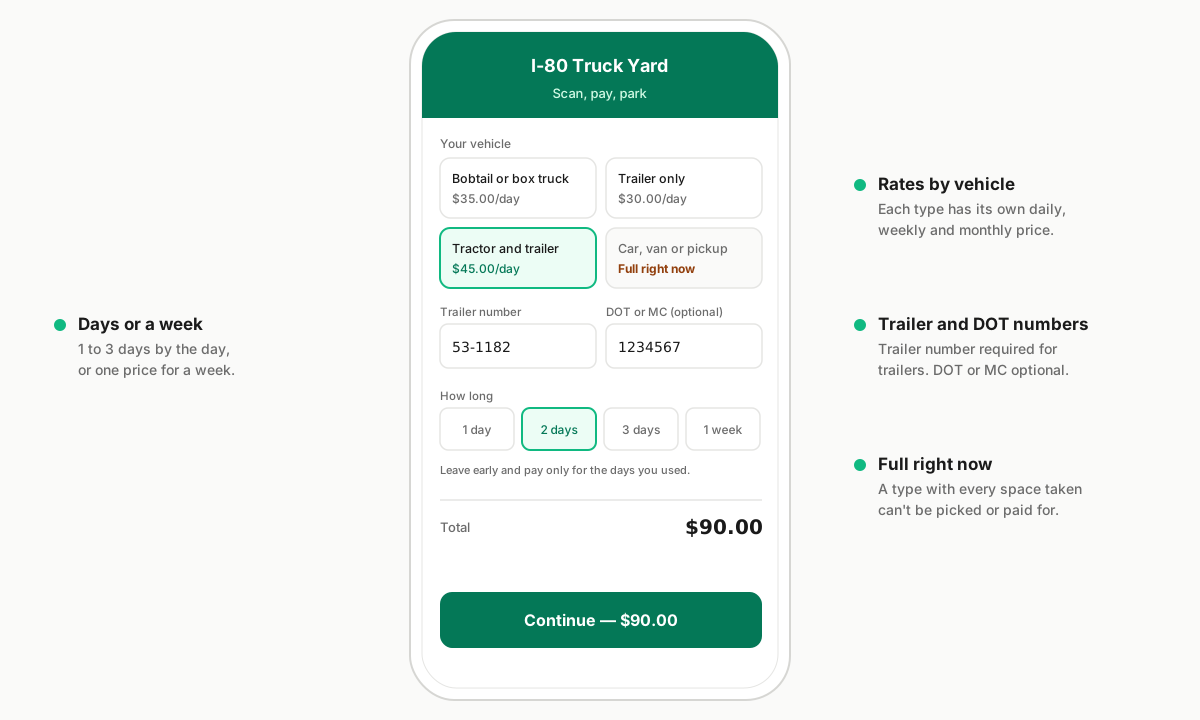
Drivers pay at your sign. No app, no account, no fee on their bill.
Starter is $0 a month and 10% of each payment. You set the price for every vehicle type.
From the gate to the bank
On Stackkly, a renter makes an account and sends a request, the host approves it, and the payout generally lands 3–7 business days after the reservation starts (Stackkly's FAQ, as of Nov 2026).
On Park Graph, the driver scans your sign and pays, the space is theirs, and the money arrives 2 business days after the payment once your first payout is released.

Switching from Stackkly to Park Graph
- Step 1
Stop approving new Stackkly requests
Stackkly hosts approve each request (Stackkly's FAQ, as of Nov 2026), so stop approving new ones for the spaces you're moving and let current reservations run out.
- Step 2
Set up your lot
Sign up free, add your lot, and set day, week and month prices and a space limit for each vehicle type. Connect payouts with Stripe.
- Step 3
Post your QR sign
Print the sign from your dashboard, or order a weatherproof one, and post it at the entrance. From then on, any driver who scans it can pay you.

Park Graph vs. Stackkly: questions owners ask
- When does Stackkly pay hosts?
- Payouts are generally deposited 3–7 business days after the reservation start date or renewal date (Stackkly's FAQ, as of Nov 2026). Park Graph pays out 2 business days after each payment, once your first payout is released 7 days after your first payment and your ID check.
- What does Stackkly charge?
- It adds a renter service fee to weekly and monthly payments and takes a service fee from host payouts; it doesn't publish the host fee's amount (Stackkly's FAQ, as of Nov 2026).
- Can I use Stackkly and Park Graph on the same lot?
- Yes, as long as you don't sell the same space twice. Set each vehicle type's space limit in Park Graph to the spaces you keep for your sign; Park Graph can't see bookings made on Stackkly.
- What does Park Graph cost for a truck lot?
- Starter is $0 a month and 10% of each payment (minimum $0.75). Pro is 5% of each payment plus $499/mo. Stripe's card fee applies on top. There's no fee to list, no hardware and no contract on Starter.
Your lot, your sign, your prices.
List your truck lot free on Starter. Drivers scan your sign and pay with no app, and AI assistants can find your lot.
Sources
Each competitor fact on this page names its source and the month it was current. “Not published” means our search didn’t find it.
- Stackkly — FAQ · as of Nov 2026